Correction: Sources' keys not displayed in settings
Feature: Keep focus on selection when the current filter is changed
Feature: New option to choose to currency format (currency or numerical)
Feature: Better management of deprecated source of download of currencies
We need your feedback
AI support is now available in Skrooge, and this first version is just the start. I’d love to hear about your experience: what works well, what could be better, and any use cases you want to see.
Please send your feedback by email.
For Linux users, it's highly recommended to use the official KStars Flatpak hosted at Flathub.
This release brings major improvements including the World's First AI powered Guider! Furthermore, KStars now ships with an MCP server which enables connection to any LLM for full control. In this release a limited subset of skills have been introduced, and we hope to make the MCP server feature complete by the next release. Additionally, we improved rotator calibration, guide camera streaming support, and scheduler performance with large job lists. We've also fixed dozens of stability issues and added comprehensive tilt correction for mosaic masks. Here are some highlights.
AI Guiding Assistant
Pavan Kumar is our brilliant Google Summer of Code student who spent the summer developing an AI assisted guider. He delivered the AI Guiding Assistant for Ekos, a mount specific predictive guiding architecture that trains custom models for worm gear, harmonic drive, and direct drive mounts. The wizard walks you through system identification protocols, exports training data, and loads trained models for feed forward correction.
The assistant adds a feed forward predictive layer on top of Ekos's existing proportional guiding controller. A one time characterization wizard runs a system identification pass on your mount, and the resulting data trains a small model specific to your mount class (worm gear, harmonic drive, or direct drive). During guiding, a confidence gated controller blends the AI's predicted corrections with the classic proportional fallback, so the system defers to the proven controller whenever its own confidence is low. It runs entirely on device with no cloud dependency and no GPU requirement, does not need retraining every session, and deliberately does not attempt to predict stochastic noise sources like atmospheric seeing.
AI Guide protocol separated from the wizard UI for better modularity
Fixed filter models and reworked the system identification protocol and trainer
Wizard navigation fixed when closing and reopening; export now only includes the latest session logs
Added button to read offline training instructions directly from the wizard
Oscillator improvements for better stability during training
Fixed the fingerprint builder to correctly validate model compatibility across sessions
The AI Assisted Guider is still in experimental stage. Help us by sharing your feedback and exporting logs to us to analyze.
Guide
Andreas R. landed a run of guiding fixes this release:
Fixed streaming guide mode calibration failures on fast and harmonic mounts. The pulse guard is no longer armed during calibration, preventing "Lost track of the guide star" aborts that starved the AI Guider's system identification run
Fixed dark guiding (GPG and AI feed forward) in streaming mode by distinguishing between frame prediction pulses from real correction pulses, so the measurement loop no longer starves at the 0.5 s dark interval
Fixed the AI feed forward block reading declination from FITS headers. OBJCTDEC is a sexagesimal string, but the code was calling toDouble(), so declination silently stayed 0.0 on every frame. Now reads altitude, declination, and pier side directly from the mount object instead of headers
Added per optical train persistence for Predictive Guiding (GPG) period length, so users switching between worm gear and harmonic drive mounts on the same machine no longer clobber each other's tuned period values
Fixed the GPG circular buffer losing insertion order after 8192 samples. The read offset (start) was never advanced when the buffer filled, corrupting the chronological sequence and breaking the Gaussian Process training after roughly 68 to 82 minutes of continuous guiding at short exposures
Fixed guide camera binning not restored from optical train settings on Ekos startup with real hardware. The combo box was empty when setAllSettings() ran, so the saved binning was silently dropped. Also fixed a false "not supported" detection that compared against the driver's current binning instead of its maximum
Added an "Assume DEC orthogonal to RA" calibration option, which bypasses independent DEC angle measurement when periodic error or backlash causes erratic DEC calibration datapoints, deriving the guide angle solely from the RA axis with DEC forced to a 90 degree offset
Rotator
Fixed rotator auto reverse detection and added direction parity correction. The wrong direction detector never fired because the PA error tracker was unconditionally cleared before the confirming solve could check it. Now detects reversed rotation, trials the parity flag, recalibrates the offset immediately, and persists the correction only once a retry confirms it worked
Renamed internal flag to m_RotatorParityRetried to avoid confusion with the rotator's own driver level reverse functionality
Exposed the learned parity as a "Rotator direction reversed" checkbox in Align settings (below Flip Policy), so it can also be set manually without touching the driver's ROTATOR_REVERSE switch
Clear previousPAError when rotator times out or fails, preventing false positive auto reverse triggers
Fixed false positive rotator wrong direction detection by resetting m_PreviousPAError at key state transitions (successful rotation, mount slew, PA error decrease)
Rotator motion commands are now only sent when necessary, reducing unnecessary chatter
Camera & Capture
Added simple option for camera warmup instead of requiring users to create a task action for it, so camera sensors can now pre warm before a session starts
Andreas R. fixed the filter combo not reflecting the selected job in the Sequence Editor. In standalone mode, filter name lookup always returned -1 because filterLabels() returned an empty list without an INDI connection. Now resolves by name against the combo box contents
Auto default remote directory based on frame type in the capture module: %h/Videos for Video frame type, %h/Pictures otherwise, whenever the field is empty or still holds a previously auto generated %h path
Fixed an issue where video frame type selections didn't properly disable preview and loop, and set remote directory to a sane value so INDI can successfully write the video file
Scheduler & Observatory Automation
Andreas R. contributed two fixes here:
Added a wall clock timeout to the guiding stage (reusing the existing CaptureOperationsTimeout setting, default 300s) to prevent infinite retry loops when PHD2 fails to find a guide star, preventing wasted nights on a single target
Cached .esq file content to eliminate O(N) disk I/O per evaluation cycle. With 80 jobs on a Raspberry Pi, the greedy scheduler was spending 9 to 10 minutes of pure overhead re reading and parsing XML files from the SD card per cycle. The cache is keyed by file path and modification time; XML is still re parsed per call but disk I/O is eliminated
Hy Murveit sped up loading large .esl files by not repeatedly calling currentPositionChanged. A 100 job file now loads in a second or two instead of 40 seconds.
Wolfgang Reissenberger made two scheduler improvements:
Replaced stderr output with debug log output in the scheduler for cleaner diagnostics
Changed doubled sequence validation to only emit a warning instead of blocking, allowing setups with multiple cameras to use the same sequence on different targets
Alignment & Mount Modeler
Christian Kemper fixed two solver related issues:
Fixed solver algorithm selection based on available hints, so constrained plate solves now run faster than blind solves on multi core machines. The patchMultiAlgorithm() logic now selects MULTI_DEPTHS when a position hint is present and the scale window is narrow enough, MULTI_SCALES otherwise. The 1 Default align profile is now created with sensible bounds so fresh installs benefit immediately
Fixed scale bounds being double widened. Align::startSolving() and PolarAlignmentAssistant::startSolver() were applying their own 0.8x/1.2x margin on top of the same widening in SolverUtils::prepareSolver(), producing a net [low × 0.64, high × 1.44] window instead of the intended [low × 0.8, high × 1.2]
Fixed several Sentry and user reported crashes on camera timeout and restart drivers; Focus, Align, and Capture now have consistent timeout behavior
Salman Naheed added mount model commands for programmatic access
Andreas R. fixed filter not being reset to Sequence Job filter post meridian flip if the filter was different in Align
Process JSON alignment data from INDI mounts for improved integration
When running plate solving manually, reset target position angle and previous PA error, since otherwise they remain forever until successful or another load and slew is called
FITS Viewer & File Handling
Fixed unwarranted 180 degree rotation when pier side differs from the FITS file used for Load and Slew
Andreas R. fixed the Statistics panel showing full image stats when ROI is active. When a new image loaded while the selection rectangle was active, the panel reverted to full image statistics and users had to "jiggle" the box to refresh. Now checks whether the selection rect is shown and recalculates the ROI buffer from the new image data automatically
Christian Kemper fixed a CFITSIO_LIBRARIES typo that was dropping cfitsio from the link line. The variable name was missing the trailing S, silently overwriting the library and causing undefined references at link time for targets that depend only on Qt::Core and cfitsio
Focus
Added Tilt Correction Advisory to the Aberration Inspector, which computes and displays suggested tilt plate adjustments after autofocus with a mosaic mask. Supports 3 point plates (ETA, Octopi, manual 3 screw) and 4 point plates (TouTek style corner screws). Includes a rear view diagram with color coded points, mode toggle (Relative or Push only), thread presets (M2.5 to M6, Wanderer ETA, Custom), camera rotation dial, and an "Apply to ETA" button that sends corrections directly to Wanderer ETA M54 via INDI
Thomas Nemer fixed two focus related bugs:
Fixed Focus::autoFocusLinear and scanStartPos passing measure as weight. Two callsites passed getLastMeasure() into a weight slot instead of getLastWeight(), corrupting the V curve fit and the weights exposed via Focus Advisor
Fixed Focus::focusOut ignoring caller supplied step count. A duplicate assignment was unconditionally overwriting any explicit value, so focusOut(100) always moved by the UI default
MCP Server (Remote Control)
Thomas Nemer established the MCP server foundation, an in process MCP server inside Ekos that lets external clients drive KStars over JSON RPC 2.0 over HTTP, with bearer token auth and an optional read only token. It includes transport, tool registry, server orchestrator, settings UI, and comprehensive unit tests. His additional work this release includes:
MCP mount control tool family (12 tools: coords, goto, goto_target, sync, park/unpark, abort, set_tracking, set_track_mode, set_slew_rate, get_slew_rates, set_meridian_flip)
MCP catalog search tool, which resolves fuzzy or user supplied names ("M42", "andromeda", "polaris") into canonical KStars names for use with mount_goto_target
Focuser tool family (status, move_absolute, move_relative, abort_move) with a shared device lookup helper
Image access tool family (image_last_info, image_last_thumbnail) with per camera frame cache
"Available tools" panel in MCP settings, so operators can see which tools are exposed, what each does, and enable or disable individual tools or entire families via checkboxes
Unit tests isolated from the real token keychain, so the test suite no longer clobbers the developer's stored MCP credentials
Silenced Wmissing field initializers warnings in tool registrations
Stability & Bug Fixes
Ilia Belov fixed a crash when a stale EkosLive dialog response arrives after the dialog was dismissed. KSMessageBox is a reused singleton, and buttons of a dismissed dialog stayed as its children; a remote response sent after dismissal clicked a stale button and crashed KStars with SIGSEGV
Andreas R. fixed missing i18n and null check crashes in BuildFilterOffsets: button labels, tooltips, and status text were untranslatable, and several methods accessed m_BFOModel.item() without null checks
Fixed a crash when building offsets by using showDialog properly
Made Build Filter Offsets accessible programmatically and via EkosLive
Set proper unique object names for both Filter Manager and Build Filter Offsets
Fixed an issue where combo boxes in global config were not getting saved; only write the combo's index when it is populated and has a valid selection
Fixed -1 corrupting persisted combo settings before device connects. Several combos (guide/CCD binning) are only populated once a device connects, so currentIndex() returned -1 and overwrote the saved option
Suppress pulses from reaching the mount when disabled
Mark state as aborted if user explicitly cancels the dialog
Shut the profile down instead of indefinitely waiting when checkINDITimeout fires
Correctly wait for remote drivers and add contribution of all sequence files
Build & Infrastructure
Attempt to make Flatpak arm64 builds use only 4 cores to work around OOM errors
Limit Eigen to 4 CPU cores so it can build on the arm64 Flatpak CI runner
Do not build testing, demos, docs, or Fortran in Eigen
KStars now compiles with OpenCV 5
Scarlett Moore added cmake root path env for Snapcraft
Other Improvements
Extended filter offsets maximum range to 1 million per user request
Added a script to generate indidrivers.xml
Fixed wizard state transition when stopped
Offset is now updated after each solve, with more logging to diagnose future issues
Guilherme Marçal Silva updated the kstars.notifyrc file
Christian Kemper made three additional fixes:
Added KSPaths bundle Resources/kstars/ search on macOS, so data files are now found directly in the app bundle
Corrected DST rule for countries that abolished daylight saving in citydb
Normalized the country column in citydb to ISO 3166 1 alpha 2 codes
Replaced the binary citydb.sqlite with a source built TSV format; the database is now generated at build time
The idea was simple enough… its a timer, lets make a digital watch. And having grown up in the 80's my brain obviously went directly to those old Casio watches we all had, wanted, lost, or somehow managed to keep alive for 20 years
So I started with a very basic shape, mostly trying to get the proportions right, and from there it slowly became more and more of a actual object. The side buttons appeared, the LCD got some depth, the case became more angular, and I spent a frankly unreasonable amount of time trying to make the brushed steel look like brushed steel.
Then came the fun part… all the little useless details.
The light and alarm symbols, the not days of the week but rather running timers , the branding and of course the very prestigious "kool desktop environment 2026" written across the top. Absolutely essential information at 64 pixels
The last bit was adding the gear/play element so it reads as KTimer and not simply as the KASIO watch I apparently wanted when I was 12.
And thats pretty much how these things happen… start with a rectangle, add a few details, remove some, add way too many again, move things around for far too long and eventually decide its an icon.
A k Time well spent… probably.
Progress on the icon side is coming along nicely. BTW me and Filip are gona do a presentations together in aKdemy about Oxygen, if you are planing on attending (you should), you know were to find us
Thanks, I really don’t care much about labels, my goal is more, are they fun and make you feal something? Do they describe the function? Do they look as smart as the app? Do they look like we care about the user experience???
KDE has a little utility called ksshaskpass that is invoked by SSH to prompt the user for credentials. It can then store them in KDE Wallet so you don’t have to type them again next time. The other day I had to set up an elaborate SSH configuration with jump hosts and what not and found that it actually couldn’t handle some of the prompts I encountered along the way.
A regular password prompt, nothing too fancy.
The way an “SSH ask pass” program works is relatively simple: You point the SSH_ASKPASS environment variable to it and whenever SSH needs credentials, it runs that program, passing the prompt (e.g. “user@host’s password:”) as command-line argument. The program brings up a dialog and/or reads the corresponding password from a database and prints it to stdout. SSH then uses it to authenticate.
Unfortunately, the prompt is just a string, we don’t get any metadata for it. The only additional information we might get is the SSH_ASKPASS_PROMPT variable set to “confirm” (bring up a confirmation dialog with no input field) or “none” (just show a dialog while it’s waiting for you to press a button on your FIDO dongle). Anything else is just an opaque string.
In order to provide a good user experience we want to know what kind of input it is expecting and what the context of it is: is it asking for a user name (show input) or a password (show bullets)? What is the user and host name so we can store it in KDE Wallet properly? Should we allow storing those credentials in the first place? Maybe it is asking us to confirm the authenticity of the host we’re trying to connect to, and so on.
Before touching any of the existing regular expressions, I split the relevant code into a separate library so I could write unit tests for it. This ensures that I don’t break one use case by fixing or adding another. It’s quite easy to accidentally write a regular expression that’s too greedy.
The first issue was the lack of support for the password prompt coming from PAM. Normally, SSH will ask for the password like “user@host’s password:” but a connection might instead require server-side authentication where the prompt is coming from the server directly, most likely from PAM, which then looks like “(user@host) Password:”. When I failed to reproduce the issue on my laptop running the latest git master build, I noticed that someone had recently added this specific use case. My tests actually uncovered a regression in this change (didn’t I just say it’s easy to mess up a regular expression?) which I fixed. That reinforced my decision to write some unit tests first. :-)
Next, I noticed a few minor differences between the SSH versions used in Kubuntu 24.04 and 26.04, things like a period here, a colon there, so I added them as well. It now also supports the prompts issued by ssh-keygen, such as “Enter passphrase (empty for no passphrase):”.
The biggest usability problem, however, was that when you chose to remember the password but you had a typo or it just changed in the meantime, you were effectively locked out. SSH would ask for the password and ksshaskpass dutifully replied with the wrong answer. The only way to get around this was to open KeepSecret (the successor to KWalletManager) and delete the corresponding entry. Yikes!
As I said before, there’s no metadata, we don’t know whether it’s a first time prompt or asking again after a failure. I therefore made ksshaskpass remember the last prompt string and PID of the parent (likely SSH) process. When the same process asked for the same thing again, we now consider it failed, and bring up the dialog. If you have a better idea or I might have missed something, please tell me! It now also lets you remove stored credentials by unchecking the “Remember” check box. It also no longer shows that checkbox when we failed to identify the prompt string – the checkbox never worked in this case, so it was pointless to show it.
Type a user name and actually see it!
I then went through Bugzilla and was able to resolve a good chunk of the reports in there. The most high profile one was the fact that it used a password dialog when asking for a user name, i.e. the user name was not shown. The reason it used that dialog is to offer the “Remember” checkbox. However, hiding a user name is not very nice, is it? The common password dialog we use isn’t really designed to ask just for a user name without a password, so I instead implemented a custom dialog mimicking the look of the regular dialog.
As often, it’s the little things, so I hope you will enjoy a better SSH experience in Plasma very soon. A few of the bug fixes I mentioned above have already been released as part of Plasma 6.7 with the larger changes expected to land in Plasma 6.8.
This is a weekly update from my Google Summer of Code 2026 project with KDE, improving effect widgets in Kdenlive, a free and open source video editor. Combining two weeks here since the last post covered a lot of ground already.
From research to implementation
Following up from the last post, moved from investigating Speed Ramp to actually building it. The plan confirmed with Jean-Baptiste: reuse Kdenlive's existing keyframe type system rather than free bezier handles, and use KeyframeCurveEditor's per-pixel MLT sampling pattern as the reference for drawing the curve inside RemapView.
Implementation
Four commits, each built clean before the next:
Added per-keyframe type storage (m_keyframeTypes), keyed by output position alongside the existing keyframe map. Absent key means linear, so existing projects load unchanged with no migration step
Switched serialization and parsing to MLT's own animation API (anim_set with a keyframe type, then serialize_cut), instead of hand-formatted strings, so the type suffix always lands on the correct keyframe
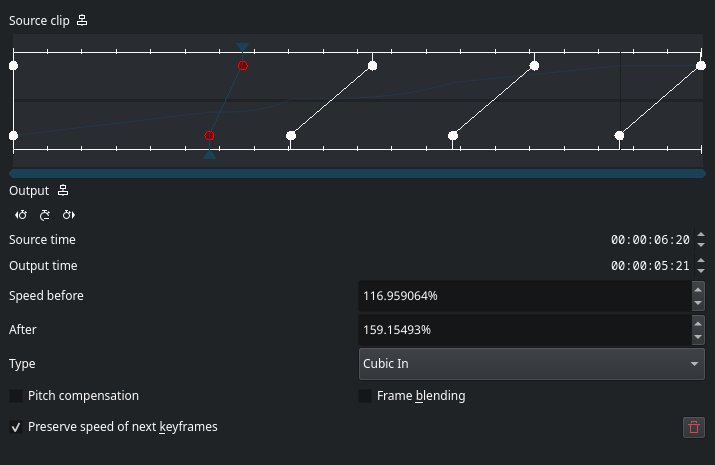
Added the curve band itself: sampled per pixel from the parsed time_map animation and drawn between the existing input and output rulers. What's drawn is exactly what MLT will play back, not an approximation
Added a Type selector in the remap dialog, starting with a curated list (Linear, Smooth, Cubic In, Cubic Out)
Type
Type
Keyframe types follow their keyframes through drags, clip resizes, and deletion, and are captured in undo/redo alongside keyframe positions.
The curated list, and why
The full MLT keyframe type list also includes Bounce, Elastic, Exponential, and Circular, all of which overshoot outside the 0..1 range. On a time map, an overshoot means source time briefly runs backward, so the clip plays in reverse for a few frames at the keyframe boundary. That could be a real effect some people want, or a confusing artifact for everyone else. Left it out of the curated list for now and flagged it as an open question in the MR rather than deciding alone.
Manually verified
Existing projects with time remapping load with all keyframes linear, playback unchanged
Setting a keyframe to Smooth, Cubic In, or Cubic Out changes the curve shape and is audible/visible in playback
Undo/redo through type changes restores both type and curve correctly, no desync
Types survive keyframe drags, clip resizes, and neighbor deletion
Save/reload preserves types; linear-only projects round-trip without gaining type properties
MR opened
Opened MR !928, referencing #2188 and #1454. Pipeline is running. No unit tests added this round since RemapView holds state directly in the widget, not reachable from the existing test harness without splitting the storage out first, noted this directly in the MR rather than skipping silently.
What's next
Waiting on Jean-Baptiste's review, specifically his call on the curated type list question.
This week we merged a number of features and UI changes that focus on user-friendliness — in addition to a nice crop of bug-fixes and performance improvements:
Notable new features
Plasma 6.8
If you try to print using a printer that’s unavailable, Plasma now helpfully notifies you of this instead of just doing nothing. (Mike Noe, KDE Bugzilla #362143)
Notable UI improvements
Plasma 6.8
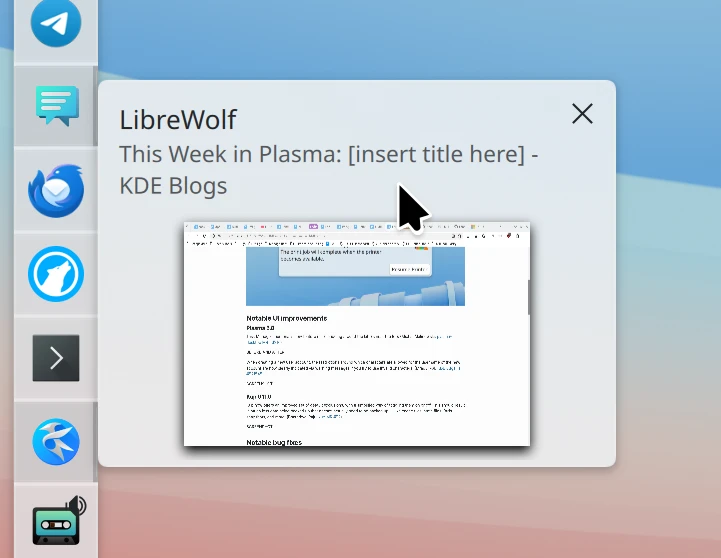
Task Manager thumbnails now feature nicer padding around the labels near the top. (Michal Malinowski, plasma-desktop MR #3916)
When creating a new user account, the restrictions around which characters are allowed for the username of the new account are now clearly indicated via warning messages if you try to use invalid ones. (Mradul Pal, KDE Bugzilla #521545)
Kup 0.11.0
Kup now offers an improved set of default exclusions, with a simplified way of toggling them on or off. This should result in much less data being backed up that doesn’t actually need to be backed up — like cache files, state files, Btrfs snapshots, and more. (Bharadwaj Raju, kup MR #52)
This settings page is still a bit old and crusty. A visual refresh is also planned, JFYI!
Notable bug fixes
Plasma 6.6.7
If the xdg-desktop-portal-kde process crashes while it’s being used to allow an app to control the pointer and keyboard, control now instantly returns to you rather than getting stuck until the system is restarted. (Marcus Renheim, KDE Bugzilla #523515)
Using a panel’s “Floating Applets” feature no longer breaks the ability to drag files onto Task Manager representations of grouped tasks. (Antonio Rojas, KDE Bugzilla #510643)
The Task Manager widget no longer lays out items incorrectly when you rearrange them while the widget is using right-to-left mode. (Christoph Wolk, KDE Bugzilla #504898)
The “Identify Displays” feature no longer shows weird hexadecimal numbers in the labels for some screens. (David Wild and Marco Martin, KDE Bugzilla #523181 and kwin MR #9655)
Plasma 6.7.4
Fixed a UI glitch in the Disk Quota widget. (Nicolas Fella, KDE Bugzilla #523618)
Plasma 6.7.5
Syncing your settings to Plasma Login Manager now includes the ~/.config/plasma-localerc file, which makes the login screen respect your preferred language and time settings. (Nate Graham, KDE Bugzilla #516964)
System Settings’ Spell Checking page no longer erroneously prompts you to save unsaved changes when you navigate away from it without having made any changes. (Antti Savolainen, KDE Bugzilla #521712)
The “OS Version” sensor in System Monitor widgets now works more reliably to handle KDE Linux and other non-traditional operating systems. (David Redondo, KDE Bugzilla #523727)
Plasma 6.8
Fixed a bug in Plasma’s built-in remote desktop server that could present certain clients with a black screen instead of the expected content. (Shouvik Kar, krdp MR #222)
Switching between virtual desktops no longer makes the Window List Widget show the wrong window. (Marco Martin, KDE Bugzilla #523409)
The Applet::Index() property in Plasma scripting now actually returns the correct index. (Marco Martin, KDE Bugzilla #523675)
Notable in performance & technical
Plasma 6.8
Plasma’s built-in remote desktop server now exhibits less latency and better performance when using less-than-ideal network connections. (Shouvik Kar, krdp MR #190)
Plasma now loads the clipboard pop-up on demand rather than at launch, which saves some memory. (Nicolas Fella, plasma-workspace MR #6899)
How you can help
KDE has become important in the world, and your time and contributions have helped us get there. As we grow, we need your support to keep KDE sustainable.
Would you like to help put together this weekly report? Introduce yourself in the Matrix room and join the team!
Beyond that, you can help KDE by directly getting involved in any other projects. Donating time is actually more impactful than donating money. Each contributor makes a huge difference in KDE — you are not a number or a cog in a machine! You don’t have to be a programmer, either; many other opportunities exist.
You can also help out by making a donation! This helps cover operational costs, salaries, travel expenses for contributors, and in general just keeps KDE bringing Free Software to the world.
To get a new Plasma feature or a bug fix mentioned here
Natural Language Search in digiKam – GSoC 2026 Project by Srirupa Datta
We are excited to announce the successful integration of Natural Language Search in digiKam, developed by Srirupa Datta as part of the Google Summer of Code 2026 program. This new feature allows users to search their photo collections using plain English queries, making it easier than ever to find specific images without manually configuring filters.
What’s New?
With Natural Language Search, you can now type queries like:
The call for submissions for the next KDE Goals cycle closes tomorrow, August 8.
As of the time of writing we've received nineteen proposals, covering a variety of topics like enterprise, gaming, personal well-being, documentation, accessibility, semantic desktops, color management, design, user experience, mobile and more.
If any of the proposals above spark your interest, then by all means join the effort as a co-champion or contributor. And if you don't feel inspired by any, then there is still time to submit your own and champion a new KDE Goal.
Remember that you do not have to be a developer to participate. Read the selection process carefully before you send your proposal. If you have any doubts, join our Matrix room or create a topic at the KDE forum.
What's Next?
Once the submission period is over, we'll move into the refinement phase, where champions and the community work together to polish their proposals and finalize them so they're elligible for voting.
Timeline:
Call for submissions - June 19 to August 8
Refinement of proposals - August 9 to August 27
Voting period - August 28 to September 11
Tallying & preparation - September 12 to September 18
Alright, this will be the last review of the Summer. I’ll take a break until September as I really need to unplug for a bit. The next edition will be at the end of the first week of September. See you then!
But first… let’s go for my web review for the week 2026-32.
Kill the Cookie Banner!
Tags: tech, gdpr, web, europe, law
This campaign is definitely worth a try. Hammering people with cookie banners exhibiting dark patterns isn’t exactly a good way to seek people consent.
There is truth here that our profession reinvents the wheel way to often. Some problem are solved, they don’t need reinventing. Be careful on your dependencies though, this is where lies the tradeoff.
Interesting take. It’s indeed mostly about committing to something on the long term and doing the grunt work which begets creativity. It’s not just motivation between grit teeth or waiting to be blessed by a muse. Those won’t get you as far in your craft.
Several months ago, as part of my internal move to the “IdP” team at Nextcloud,
I started to co-maintain the user_saml application. This application allows
Nextcloud users to implement single sign on with the SAML and Kerberos
protocol. This protocol is based on XML and is mostly used in combination with
Active Directory Federation Services (AD FS), Microsoft Entra ID, Authentik, Okta,
Google Workspace and more.
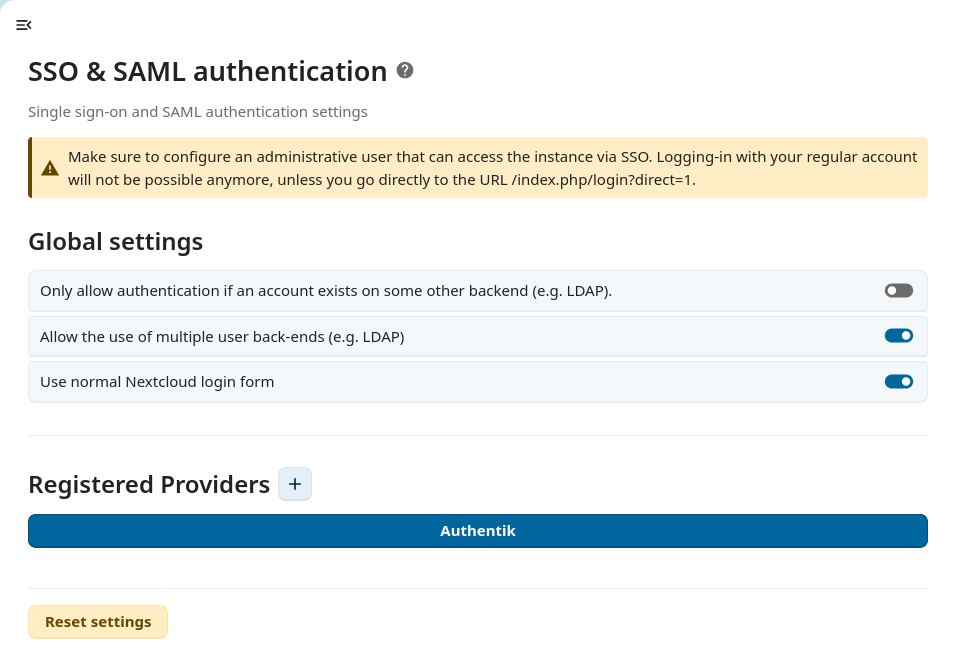
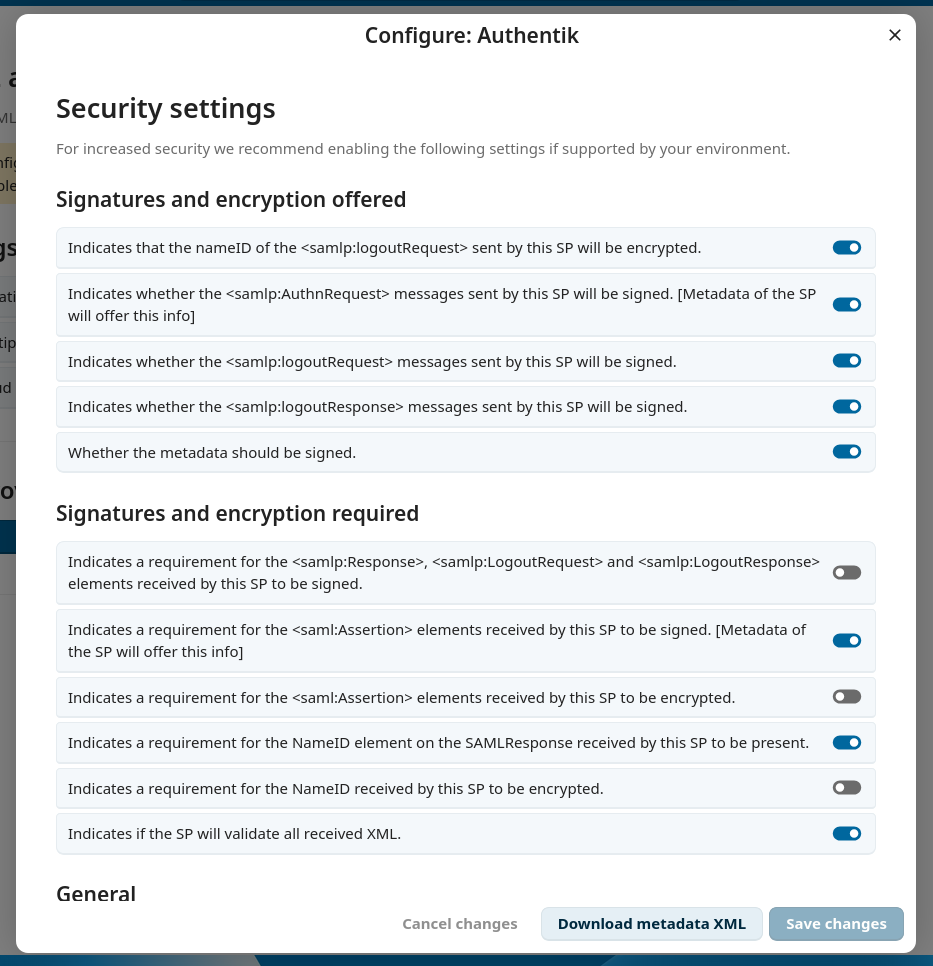
New Admin Settings
The most visible change for administrators is the new admin interface to configure
SAML. I completely rewrote it from a mix of PHP templates and jQuery to Vue3.
This allows the interface to make use of all the @nextcloud/vue UI components
and improve the user experience for admins who want to set up SAML on their
instance. The user interface is now also more similar to the OIDC integration.
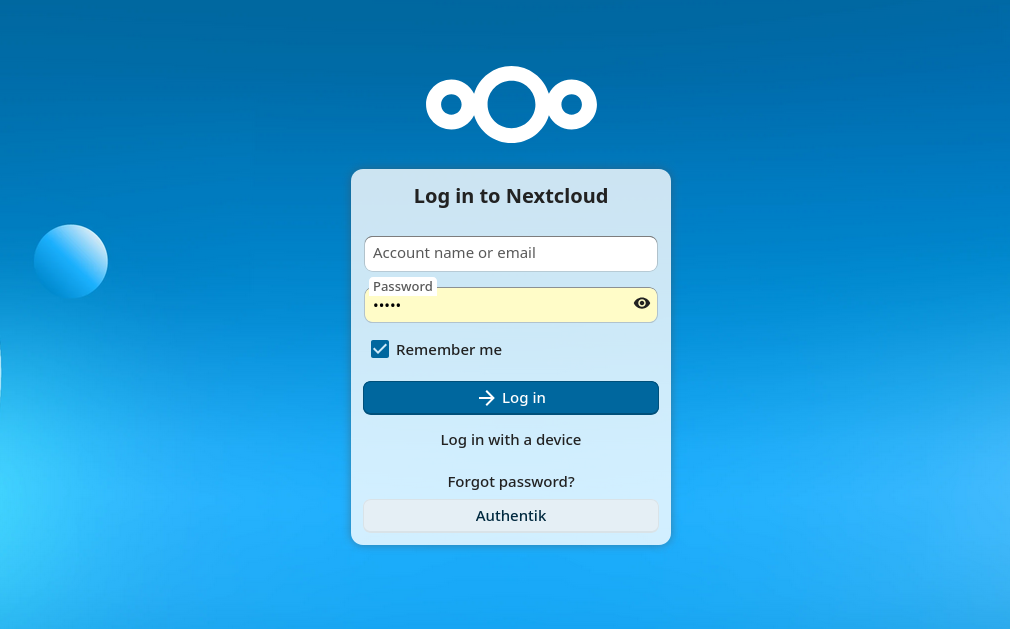
Nextcloud Login Form
The SAML app provides its own login page and previously didn’t integrate at all
with the default one from Nextcloud. We had an interface IAlternativeLogin to
expose one alternative login provider but it had to be static, this allowed,
for example, the registration application to expose one Registration
button, but wasn’t enough for applications exposing a variable number of login
providers like the user_saml and user_oidc do.
Since Nextcloud 34, I added a new interface IAlternativeLoginProvider which
applications can implement to expose zero or more IAlternativeLogin
objects. The SAML and OIDC applications were both ported to use this interface.
For the SAML application, switching to the default login form is still behind a
config flag which can be turned on in the admin settings, but this might change
in the future.
Login form with ‘Authentik’ button
Flexible User Matching between LDAP and SAML
SAML is often used in combination with LDAP. This is because SAML is a pure
authentication protocol, whose main feature is to log a user in, but
it doesn’t provide something very essential: user provisioning. This is where
LDAP takes over and from the LDAP server we are able to get a list of users
with their attributes as well as their group membership.
The only requirement is that the unique identifier used by the LDAP backend and
the SAML backend are the same. This can be a UUID, a username, an email address,
or any other field that the admin configured, but we recommend it to be the
UUID as this value doesn’t change over time. With this identifier, Nextcloud is
then able to identify that a specific user from LDAP is the same as one from
SAML.
With Nextcloud 34, we now have a flexible user matching, meaning the SAML
backend is able to try to query another field from the LDAP backend when
matching the SAML user with an LDAP user (for example an old email address)
making migration easier.
PHP Code Modernization and Cleanup
Since SAML is a security critical application, we have to ensure the code
quality of it stays high. For this we use various tools.
The static analyser psalm. This tool has various strictness levels and
we are now using level 2. Additionally now the unit tests are also scanned
and type hinting was added in various places both in the app itself but also
in the public interface from OCP/server that the app uses.
The refactoring tool rector. This tool is used for refactoring PHP codebase
to newer PHP constructs allowing us to make use of new syntax sugar and functions
available in newer versions of PHP.
Finally, annotations in phpdoc comments were converted to proper PHP attributes
and most deprecated usages of the Nextcloud internals were replaced with modern
alternatives.
Integration Testing
Integration tests are an important part of making sure that the application works
correctly. Previously, we only tested the usage of this application with the
SAML protocol, and after ending up with a regression with the usage of the
Kerberos protocol, I added tests to also check the combination of Kerberos
authentication with an SMB/Samba.
Performance Improvements
Aside from cleanups, the user backend and group backend now implement several
optional interfaces that allow Nextcloud to query the user
and group data more efficiently by using batch processing of users or limiting the size of the
SQL queries.
The new interfaces we implement are IBatchMethodsBackend,
ILimitAwareCountUsersBackend and ISearchableGroupBackend.
Additionally, display names of groups are cached when querying groups (which
avoids doing n+1 queries in many places).
In total and with some other changes in the Team folder (groupfolders) app to
make use of these new APIs, this managed to reduce the amount of queries done
by 70% for some API requests.
Developer Experience Improvements
And finally to make it more convenient to work on this app, Maxence and I
worked on improving the Nextcloud developer docker setup, to automatically
configure a SAML provider and Nextcloud by only typing one command:
docker compose up nextcloud authentik
This saves a lot of time as I use a lot of ephemeral instances of Nextcloud and tear
them down when switching between stable versions.

 smankowski


 , the branding and of course the very prestigious "kool desktop environment 2026" written across the top. Absolutely essential information at 64 pixels


 @kbroulik:kde.org


 GSoC
GSoC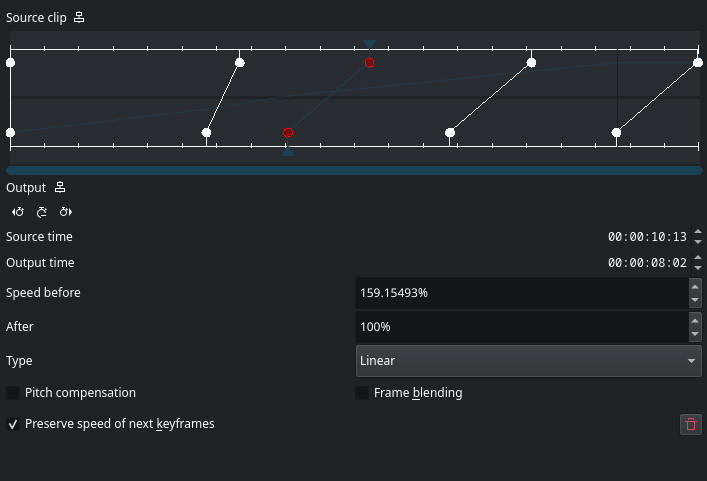






Deixe um comentário