My initial post on Ni! OS gained
more interest than I expected. Any time I jokingly do something, people
react to it more than when I do something serious. :)
As a reminder, KDE Ni! OS is not a distribution, but a configuration
for NixOS that aims at providing a ready-made
immutable system for KDE users and developers with similar features to
those of proper immutable KDE distributions.
If the Google search AI tells you it is a distribution, do not trust
it:
Google thinks Ni! OS is a distribution
Further, if the Google search AI tells you Ni! OS is a code name for
KDE Linux, do not trust it:
Google thinks Ni! OS is a code name for KDE
Linux
Repository
The project got a repository at invent.kde.org which is currently in a
very rough/bare state. Could be useful to existing NixOS users, but has
a long way to go to become a proper resource on how to install and use
Ni! OS.
Logo
NixOS has its own (quite cool, if you ask me) logo which doesn’t
suite the comical image Ni! OS is trying to achieve.
For this reason, Ni! OS now has a proper custom logo – representing a
– a shrubbery! – one that looks nice, and not too
expensive.
Ni! OS Logo
It is also meant to represent the way NixOS achieves immutability.
Many packages are present on the system, but hidden from the plain
sight as they belong to the previous system versions or are just
hidden-from-the-user dependencies of other packages.
What followed was a deep dive into the TeXbook to learn about math font parameters, OpenType Math specification, and related documentation & resources. Fortunately, FontForge has really good support for editing Math tables; and the base font used (KpMath-Sans by Daniel Flippo) already had all the critical parameters set (which needed slight adjustments). I started the development of Arsenal Math by integrating the glyphs for Latin letters, Arabic numerals, some symbols etc. and with proper scaling & stem thickness corrections, for regular, bold, italic and bolditalic variants, plus math calligraphic letters. In addition, a lot of Math kerning (known as ‘cut-ins’ in OpenType parlance) was added to improve the spacing.
Fig. 1: Arsenal Math specimen, contributed by CVR.
Being an OpenType font — XeTeX, LuaTeX or some Unicode math typesetting engine (e.g. MS Word) is required to use Arsenal Math. Boris did testing and provided many feedback, and Vaishnavy Murthy graciously reviewed the glyph changes I made. The CTAN admins were quite helpful to get the font accepted into the repository. There is a style file and fontspec file supplied with the fonts to make the usage easy. The sources are available at RIT fonts repository.
Boris also donated funding for the project, but he had already paid me many folds by mailing The TeXbook autographed by Donald Knuth for me, so I requested the LaTeX devfund team to use funding for another project. Karl Berry suggested to write an article about the development process, which is published in the issue 46:3 of the TUGboat journal, and has a lot more technical details.
Fig. 2: The TeXbook autographed by Don Knuth for me.
The learning experience of Math typesetting internals, and contributing to the TeX ecosystem has been a fulfilling spare-time work for me in 2025. Many thanks to all those involved!
My focus these days tends to be on Plasma, so that’s mostly what I’ll be mentioning on the technical side. And as such, everything here is just what I personally noticed, got involved with, or got excited about. Much more was always happening! Additional KDE news is available at https://planet.kde.org.
The Wayland transition nears completion
Real picture-in-picture support!
For several years, Plasma has been transitioning to the newer Wayland display server protocol, and away from the older X11 one. 2025 is when it got real: we announced a formal end to Plasma’s X11 session in early 2027.
To make this transition as seamless as possible for as many people as possible, the people involved with the Plasma shell and especially KWin did a herculean amount of work on improving Wayland support on topics as varied as the following:
Accessibility
Drawing tablets
HDR
Color management
P010 video color
Overlay planes
XRandr emulation
Screen mirroring
Custom screen modes
Implemented support for a large number of protocols, including xdg-toplevel-tag, xdg_toplevel_icon, ext_idle_notifier, color_representation, fifo, xx_pip, pointer_warp, and single_pixel_buffer
Pre-authorization for portal-based permissions
Clipboard and USB portals
Thanks to this and earlier work, most FOSS operating systems (also known as “distributions” or “distros”) that ship Plasma are defaulting to the its Wayland session these days — including big ones like Arch Linux, Debian, and Fedora KDE. Kubuntu is planning to for the next LTS as well. As a result, our (opt-in) telemetry numbers show that 79% of Plasma 6 users are already on Wayland. I expect this number to increase once SteamOS and the next Kubuntu LTS version default to Wayland. So you see, it really is driven by distros!
Now, Plasma’s Wayland support isn’t perfect yet (any more than its X11 support was perfect). In particular, the two remaining major sources of complaints are window position restoring and headless RDP. We’re aware and working on solutions! I can’t make any promises about outcomes, but I can promise effort on these topics.
This admittedly somewhat messy and plodding transition has taken years, and consumed a lot of resources in the process. I’m looking forward to having it in the rearview mirror, and 2026 promises to be the year that enables this to happen! Expect a lot of Wayland work in 2026 to make us ready for the end of the Plasma X11 session in 2027.
Plasma continues to mature and improve
In addition to what I mentioned in the Wayland section, Plasma gained a whole ton of user-facing features and improvements! Among them are:
Rounded bottom window corners
Day/night global theme and wallpaper switching
Saved clipboard items
Speed graph in file transfer notifications
Panel cloning
Per-virtual-desktop custom tiling layouts
“You missed X notifications while in Do Not Disturb mode” feature, and auto DND mode enabling while in a fullscreen app or video
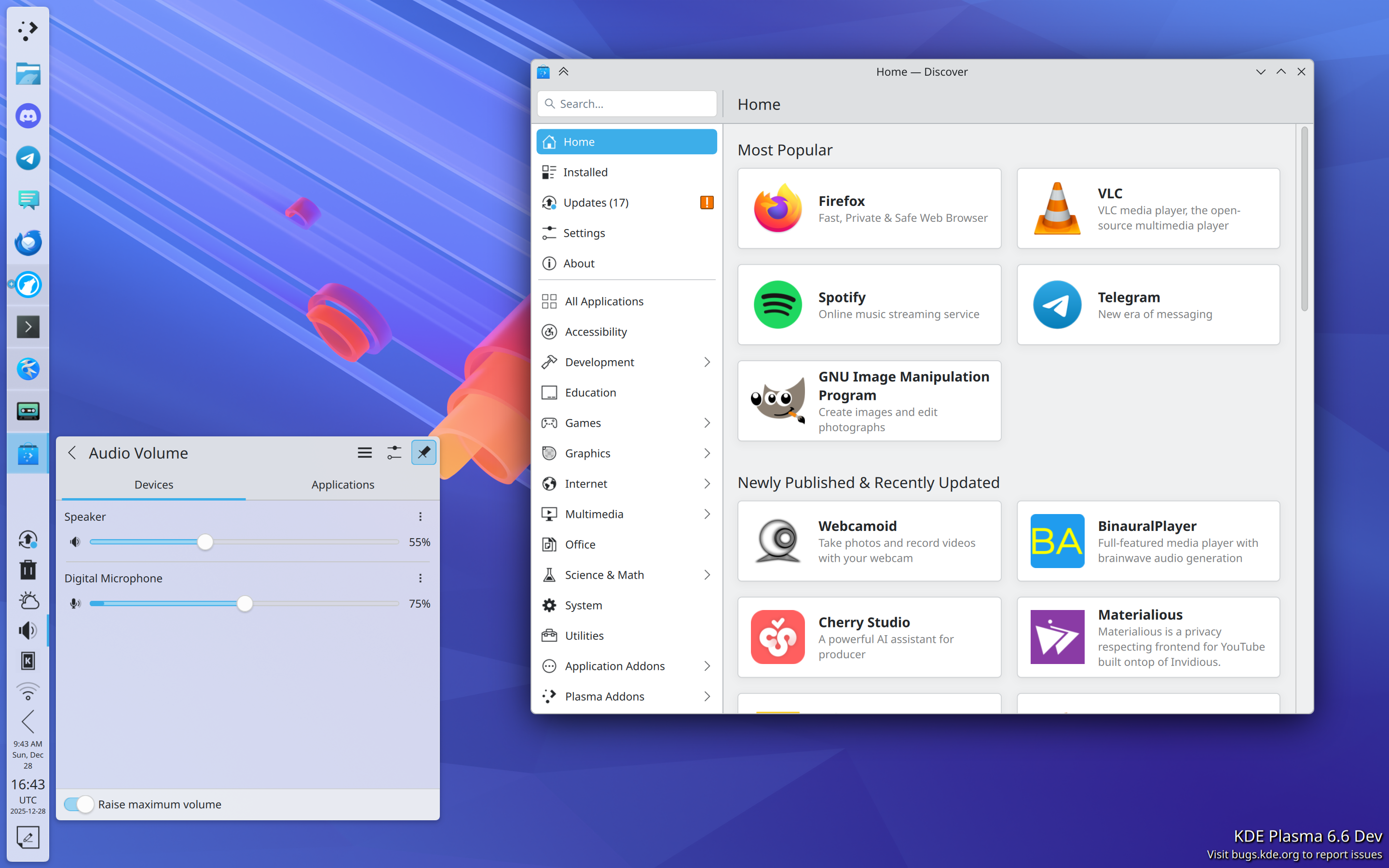
Install hardware drivers in Discover (on supported distros)
New app highlighting in Kickoff
UI overhaul for KMenuEdit and Info Center’s energy page
Playback rate selector in the Media Player widget
Three-finger pinch to zoom
UX and video quality and file size improvements in Spectacle
GPU usage monitoring in System Monitor
Use existing user accounts for RDP/remote desktop
Printer ink level monitoring
Inline print queue viewing in the Printers widget
Only show the screen locker and logout screen UI on one screen, not all of them
OCR in Spectacle (coming in Plasma 6.6)
Monochrome colorblindness filter (coming in Plasma 6.6)
Option for automatic screen brightness on supported hardware (coming in Plasma 6.6)
Option for virtual desktops to only be on the primary screen (coming in Plasma 6.6)
Phew, that’s a lot! And Plasma is getting rave reviews, too. Here are a few:
A decade ago or so, it used to be that Plasma wasn’t seen much as the default option for distros, but that’s changing.
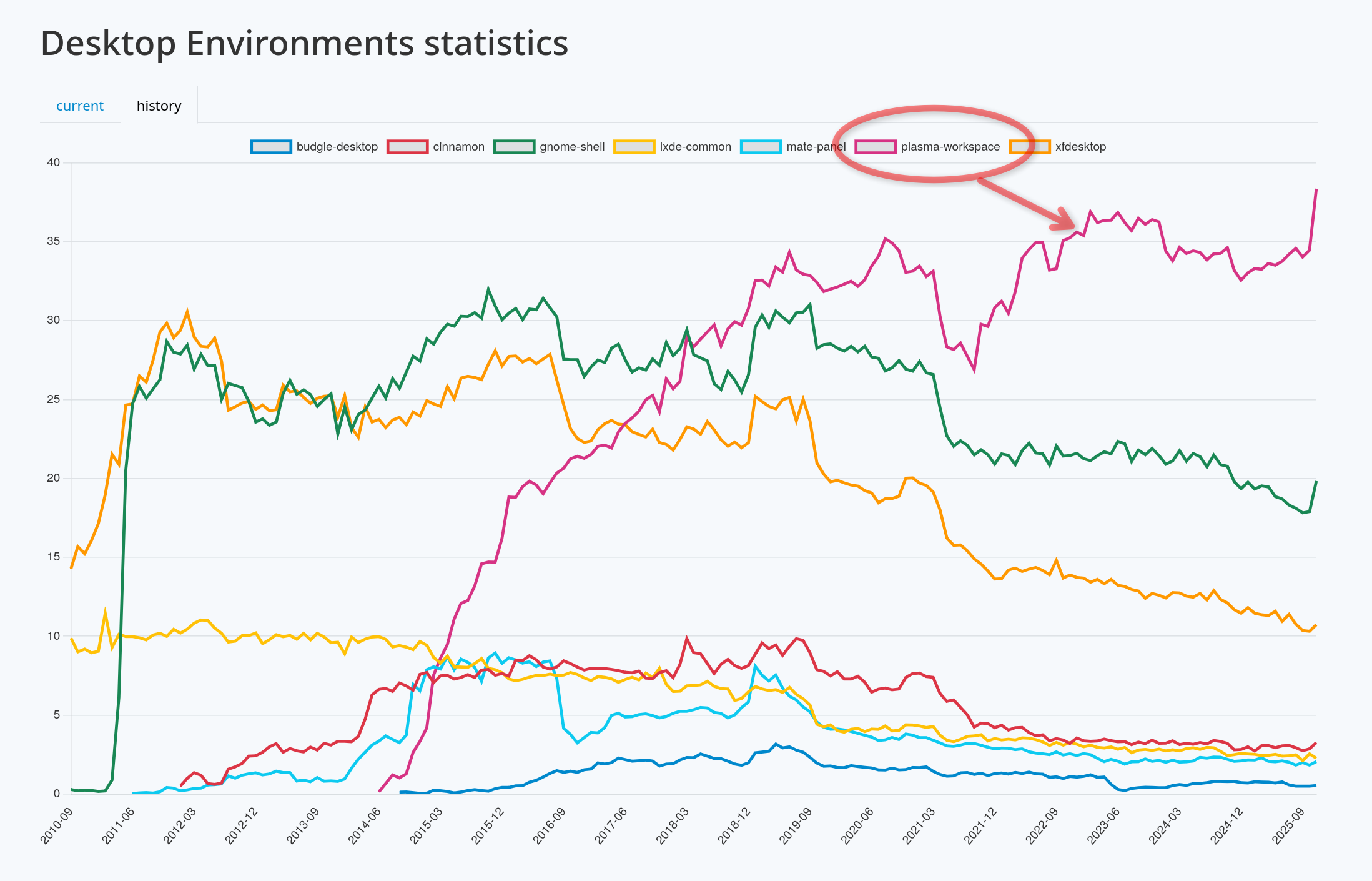
Today Plasma is the default desktop environment in a bunch of the hottest new gaming-focused distros, including Bazzite, CachyOS, Garuda, Nobara, and of course SteamOS on Valve’s gaming devices. Fedora’s Plasma edition was also promoted to co-equal status with the GNOME edition, and Asahi Linux — the single practical option for Linux on newer Macs — only supports KDE Plasma. Parrot Linux recently switched to Plasma by default, too. And Plasma remains the default on old standbys like EndeavourOS, Manjaro, NixOS, OpenMandriva, Slackware and TuxedoOS — which ships on all devices sold by Tuxedo Computers! And looking at the DIY distro space, Plasma is by far Arch users’ preferred desktop environment:
It’s a quiet revolution in how Linux users interact with their computers, and my sense is that it’s gone largely unnoticed. But it happened, so let’s feel good about it!
In fact, if we exclude the distros that showcase their developers’ custom DEs (e.g. COSMIC, ElementaryOS, and Linux Mint), at this point the only significant distros missing here are the enterprise-oriented ones: Debian, RHEL, SLE, Ubuntu, and the like. It’s something for us to work on in 2026, but clearly the current state is already great for a lot of people, including gamers, artists, developers, and general users.
KDE Linux grows
On the subject of operating systems, at Akademy 2024, Harald Sitter revealed the KDE Linux operating system project to the world. But in 2025, it spread its wings and began to soar.
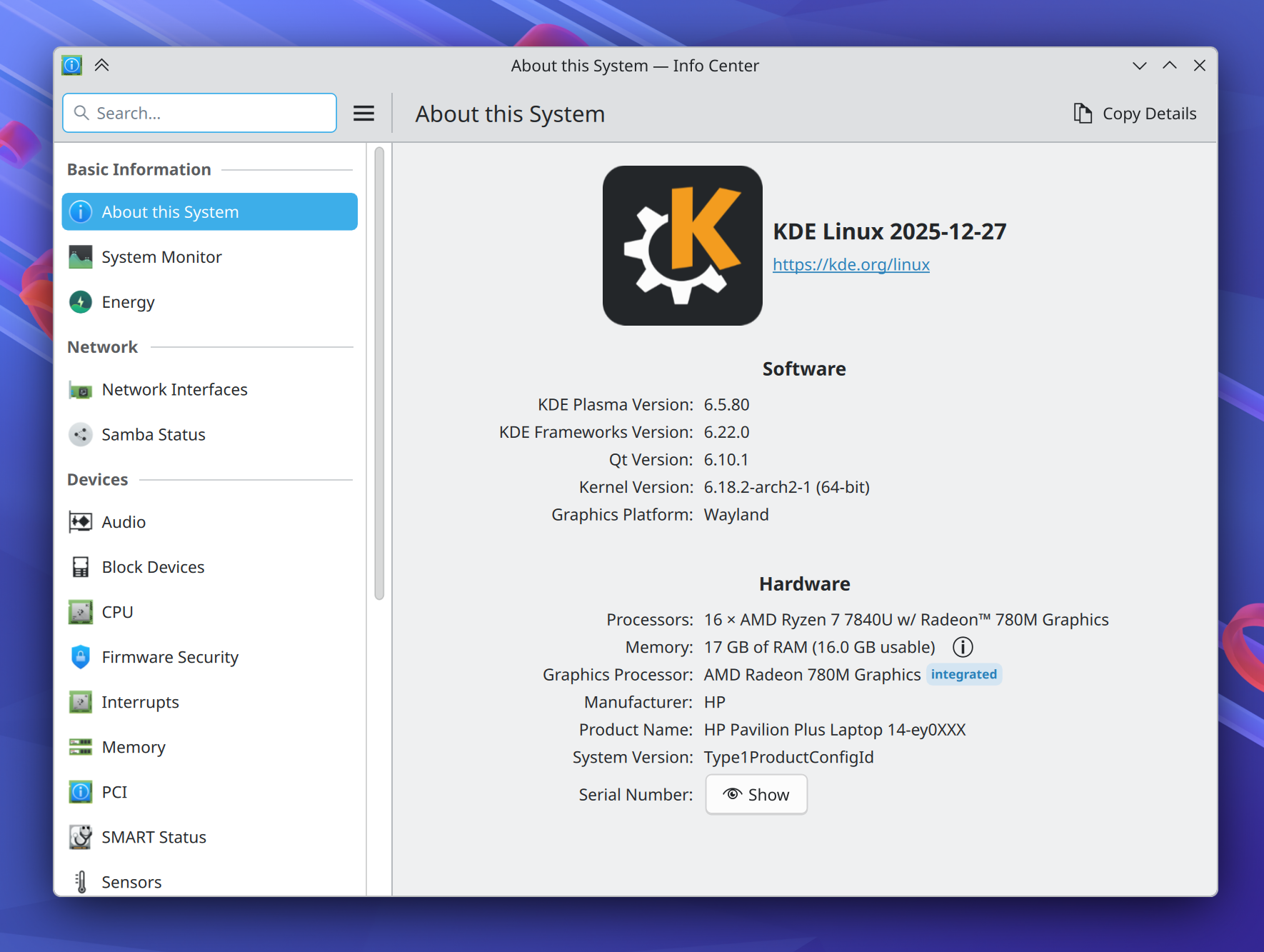
Despite technically still being an Alpha release, I’m using this in-house KDE OS in production on multiple computers (including my daily driver laptop), and a growing number of KDE developers and users are as well. Thanks to its QA and bulletproof rollback functionality, you can update fearlessly and it doesn’t feel like an alpha-quality product. You don’t have to take my word for it; ask Hackaday and DistroWatch!
This project has been very special to me because I believe that KDE needs to take the reins of OS distribution in order to offer a cohesive product. The earlier KDE neon project already broke the ground necessary to make this kind of thing socially possible; now KDE Linux is poised to continue that legacy with a more stable and modern foundation.
To be very clear, none of this is an attempt to kill off other distros. Far from it! In fact, an explicit goal is to showcase what a well-integrated KDE-based OS looks like, so others can take notes and improve their offerings. And there’s still lots and lots of room for specialized distros with different foci, and DIY distros that let people build their own preferred experiences.
I’m really excited to see where this project goes in 2026. You can learn more on the project’s documentation wiki: https://community.kde.org/KDE_Linux
Fundraising performance is completely bonkers
This is the second year that Plasma users have seen a donation request pop-up in December. And it marks the second year where this not only didn’t kill KDE, but resulted in an outpouring of positivity and a massive number of donations! Last year I wondered if it was repeatable. It’s repeatable.
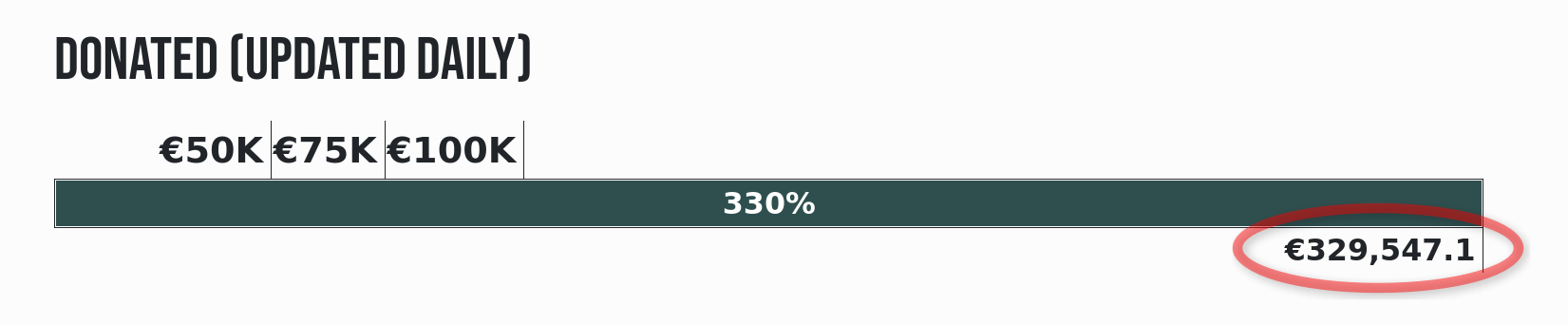
That plus an even more ambitious and well-organized end-of-year fundraiser propelled KDE to its best ever Q4 fundraising sum: nearly €330,000 as of the time of writing! KDE e.V. (the non-profit organization behind KDE) is going to end up with a 2025 income that’s a significant fraction of a million Euros, and mostly crowdsourced, too.
I say this a lot, but sums like this truly help keep KDE independent over the long haul. But how, specifically?
First, by being mostly funded by small donors, KDE retains its independence from any powerful and opinionated companies or individuals that happen to be patrons or donors.
Second, with such a large income in absolute terms, KDE e.V. now has resources to rival the private companies in KDE’s orbit that contribute commercially-funded development to KDE (like mine), and that’s a good thing! It means a healthy diversity of funding sources and career opportunities for KDE developers. It’s systemic resilience.
And finally, with money like this, KDE e.V. is able to fund projects of strategic interest to KDE itself, and fund them well. Historically KDE’s software has been developed by volunteers working on what’s fun, companies funding what supports their income, and some public institutions funding their specific use cases. And that’s great! But it leaves out anything that’s not fun, doesn’t make money, and isn’t directly relevant for governments. These are the kinds of large projects or maintenance efforts that KDE e.V. is now able to fund if necessary.
It’s a big deal, folks! This kind of fundraising performance puts KDE on the map, permanently. And it’s mostly thanks to people like you, dear readers! The average donation is something like €26. KDE is truly powered by the people.
If you can make a donation please do so, because it matters, and goes far!
KDE’s overall trajectory
It’s positive. Really positive.
But when I joined KDE in 2017, the community was a bit dejected. After giving my very first public conference talk at Akademy 2018, multiple people came up to me and said some variant of “thank you for this optimistic vision; I didn’t think I could feel positive about KDE again.”
These reactions were really surprising to me; without the benefit of history, I had no idea what the mood was or how things had been in the recent past. But somestatistics about contributor and commit numbers bear out the idea that 2013-2017 was a bit of a low period in KDE’s history, for various reasons.
But since then, KDE has come roaring back, and you see it in positive trends like adoption by hardware vendors and distros, great fundraising performance, good reviews, positive user feedback, and new contributors.
Everything isn’t perfect, of course; there are challenges ahead. Bugs to fix and stability problems to overcome. The Wayland transition and a new theming system to complete. Features to add that unlock Plasma for more users. More effort to put into getting Plasma-powered operating systems and devices into the mainstream.
But the KDE community is up for it. KDE is a mature institution that’s resisting enshittification, and making the world a better place in ways both big and small. My work on KDE represents by far the most meaningful part of my career, and I hope everyone else involved can feel the same way. What we do matters, so let’s go out there and do it even better in 2026!
Like every year I took a couple of days off at the end of the year to wind down and spent some quality time with the family. Time just flies and it feels like the year had only just begun. I have also taken the time to revisit some of my work-in-progress merge requests and tried to push them over the finish line.
Please talk now or forever hold your peace.
More than five years ago, at the peak of the pandemic, I wrote a patch to add a “Push to talk” feature to Plasma’s volume keys handler. For meetings, I even bought a cheap 8€ USB foot pedal to operate it like a bus driver! It’s basically a single button USB keyboard. Unfortunately, back then KGlobalAccel, our global shortcuts handler, couldn’t report key press vs. key release. Therefore, it was a bit of a hack abusing key auto-repeat: pressing the key, a timer was started and the microphone unmuted. Every key repeat reset the timer and only when it expired the microphone was muted again. Fortunately, nowadays we can query a global shortcut’s state and detect when it is pressed and released again. I decided to revisit the patch and made it much simpler. I hope to finally include it in Plasma 6.7 coming out next summer.
Speaking of shortcuts, Meta+P (p as in projector) lets you quickly switch between a couple of common display arrangements. For when the one you want isn’t included, there’s now a handy button in the corner to bring you to the full display settings. It has actually become my primary means of accessing them.
To be consistent with the others, this button curiously does not use a regular tooltip
Another neat little addition is a “Compare files” button (using Kompare) in the confirmation dialog when copying a plain text like file (e.g. source code, too) would overwrite an existing one. It already looked at the files to decide whether they‘re different or not but it didn’t let you check in detail yourself.
Last year, I showed a shell script running in Konsole reporting its progress using ConEmu-specific OSCs (Operating System Command). The merge request sat dormant after I lost some work on it while moving to my new laptop. Always push your work-in-progress changes to a git branch sometime, right? I have cleaned up the patch, added API comments, as well as an option for whether to show progress in taskbar or not. It also opts into FLATPAK_TTY_PROGRESS. To my surprise, when I implemented Unity Launcher API in Plasma, I added an option to disable badges on individual applications but not progress reporting. It’s still in review but I am confident to ship it as part of KDE Gear 26.04.
It’s always fascinating to observe other users interacting with KDE Plasma. For instance, us power users take middle click paste for granted. On Plasma, middle clicking the desktop typically results in a sticky note of text being created. However, when you did that by accident, it wasn’t really clear how to get rid of it. If you click the sticky note, the format toolbar includes a delete button, sure, but a user might not even think of doing that. Originally, I thought about adding an “Undo” notification. The simplest solutions are often the best, though, and so it just focuses the newly created sticky note to ensure the delete button is visible right away.
Jump right into a match of Grandfather’s Clock! Or Klondike. Or Freecell. Or…
Finally, for those who like to procrastinate, KPat (KPatience) now offers direct access to all of its game modes via the context menu in the application launcher and in KRunner. Just type “Freecell” or my favorite “Grandfather’s Clock” (because you can’t really lose) into KRunner, and off you go!
There’s still a couple of days left for our Year End Fundraiser. If you want to show your love for KDE and support the work we’re doing, please consider donating! I am looking forward to seeing you all around next year.
Happy holidays to all in the KDE universe who celebrate them! As 2025 draws to a close, I thought it would be a good time to take stock.
“This Week in Plasma” began 8 years ago as a development report for KDE’s Usability & Productivity goal, which had just been democratically selected by the community in the very first round of the new KDE Goals process.
Back then it wasn’t called “This Week in Plasma” (or “TWiP” for short), but eventually it would gain and change names, and move off my personal blog and onto KDE’s infrastructure.
During these past 8 years, I’ve done my best to keep the wider KDE community informed about what’s going on almost every week! And I’m constantly amazed and humbled by the positive feedback it’s generated.
The march of time and accumulation of responsibilities
My own role in KDE has changed substantially during these 8 years. I started out in 2017 as a volunteer and fell in love with KDE, squeezing my KDE time into a long daily train commute to and from work. And by 2019 I had a full-time job at Blue Systems, doing what I loved. In 2022 I was elected to the KDE e.V. board of directors, until October of this year. Each of these transitions heralded the accumulation of more responsibilities beyond TWiP.
And at the beginning of this year, everything changed again when I became the co-owner and CEO of Techpaladin Software, the successor of Blue Systems’ consultancy business, and an employer of over a dozen rockstar KDE developers.
This has been the largest career shift in my life, and caused my time to become more limited than ever before. It’s possible some readers may have noticed the quality of TWiP content slipping over the past year; it’s not a coincidence, and I apologize for not being able to do a better job.
I need help
I truly want to keep publishing this blog, but there comes a point where I have to face facts: my time and energy budgets are not as unlimited as I wish they were. In addition, my children are getting older; they’re 9 and 13, and they need their dad to do more than just work and work and work and work and work some more.
So it’s time to begin the painful but necessary process of ensuring that those budgets remain big enough to cover my work and family responsibilities.
In 2026, I’m actively looking for a person or team interested in taking over TWiP. Until then, I plan to reduce the frequency of posts, based on how busy my schedule is. Expect one every two weeks, or even every three or four weeks.
How You Can Help
If anyone reading would like to see TWiP remain a weekly fixture as much as I do, the best way to make it happen is to get involved and help out with it! I would be thrilled to hand off TWiP to the next generation.
Nothing about TWiP is particularly difficult, but it does take time. Time to notice or seek out relevant changes, time to collect them in a big list, time to sort them for relevance to the readership, time to write a little blurb for each of them, time to take screenshots showcasing the changes, and time to edit and polish the post.
I’m happy to teach, coach, or mentor anyone who wants to get involved. So if you’ve been wondering how you can get involved in something that matters without technical skills beyond basic markdown and git, this is a perfect way to do it. And if you are technical, I’m sure there are low-hanging-fruit opportunities for automation that I never pursued (I did try AI a few times, but the results were always horrible).
You can reach out to me about it at nate@kde.org, or the relevant Matrix room, or any other relevant means of getting in touch that you might already know about. Please do!
And finally
I’d like to take the opportunity to thank the readers and community members. This blog post series is something I never really expected to become popular, and it was my pleasure to publish it (almost) every week!
Today Plasma and KDE in general are strong and prosperous, with growing bases of users, hardware partners, distros pre-installing our software, and small-donor financing. In some ways KDE is outgrowing TWiP; it’s no longer really necessary to provide weekly evidence that we’re still keeping the lights on. The evidence is all around us!
But it’s still a nice thing to have, I think. I personally would feel sad if I had to abandon TWiP without anyone to hand it off to. So if you’re interested in getting involved, please reach out!
If helping to take over TWiP isn’t your cup of tea, consider donating to KDE’s 2025 end-of-year fundraiser. It’s already demolished past records by raising over €325,000, but every little bit helps! This level of funding can support significant projects and keep KDE independent for years to come. And that’s what we all want.
So here’s to a great 2025 for KDE, and may 2026 be even better!
At the TUG2025 conference, I presented a talk about the development of a new colour font, which does automatic syntax highlighting for TeX documents/snippets. The idea was floated by CVR, and was inspired by a prior-art of HTML/CSS syntax highlighting font by Heikki Lotvonen.
Syntax highlighting is achieved by specialized grammar files or packages on desktop applications, code editors, the Web, and typesetting systems like TeX. Some of these tools are heavy (e.g. prism.js or pygmentize package). A light-weight alternative would be a font that uses recent OpenType technologies to do syntax highlighting of code snippets. I developed such a font, for highlighting TeX code snippets.
Fig. 1: OpenType colour font doing syntax highlighting of TeX document.
There are some novelties in the developed font:
It supports both COLRv0 and COLRv1 colour format specifications (separate fonts, but generated from the same source).
Supports plain TeX, LaTeX2 and LaTeX3 macro names.
A novel set of OpenType shaping rules for TeX syntax colouring.
The base font used is M+ Code Latin by Coji Morishita. The details of the development, use cases, and limitations can be found in the 46:2 issue of the TUGboat journal publication. The binary font and sources are available at RIT fonts repository.
This article focuses on the community analysis of the Automotive Grade Linux Business Intelligence study. It explains which data was analyzed, why individuals were excluded, and how understanding teams and organizations helps correctly interpret metrics from complex software production systems.
Lately, this question came up a few times on different channels and I felt to provide some background why things are the way they are.
The question arose most likely, because the latest KMyMoney development snapshot downloaded had a problem and users using that snapshots wanted to return to an earlier version which did not have this problem. At that point they just found out, that those older versions are not available anymore. Therefore, this post will provide some information how the KMyMoney project handles development and which services create binary versions and why older ones disappear.
For that purpose, I created the diagram shown below. It shows the participants in the game enclosed in the areas identified by dashed lines. Those are:
KMyMoney developers provide the source code that makes up the application
KDE project and their sys-admins running the CI/CD infrastructure which is used by the KMyMoney team to verify that the software compiles and builds in various environments (Linux, FreeBSD, Windows) and provides executable test versions (snapshots).
The distribution maintainers who use released source code versions, add distribution specific changes and provide the installable package in the format for the distribution in question (e.g. RPM, DEB, AUR, TGZ, …).
The diagram also shows the means that the various players interact with, namely the GIT repository and the released source tar-balls. And last but not least, it marks the different steps in the processes of snapshots and releases (red circle with white number) which are explained below.
Step 1 is where a source code change happens. This may be a new feature or a bug fix. The developer commits this change to the GIT repository either into a specific branch (e.g. stable or master). I leave out feature branches which also exist but don’t play a role here. Once step 1 is finished, automatically
Step 2 kicks in and the KDE CI/CD system starts a pipeline to build the software and run the automated tests in various environments. In case any of those builds or tests fails, the committing developer gets a notification via e-mail and has the chance to fix the problem by adding another commit in step 1 and thus restarting the process. If all builds and tests finish successfully, the last part of step 2 creates installable versions for different environments as snapshot version and continues with step3.
Step 3.stores the last successful build for download by developers, testers and interested users. Per KDE project policy only the last successful build is kept, which answers the title’s question. Those snapshot versions will show a version x.y.z followed by an 8 digit hash in the Help/About KMyMoney dialog. This 8 digit hash identifies the commit (step 1) that this version is based on. Example: 5.2.1-05390aa93
Steps 1 through 3 can happen multiple times a day.
Step 4 happens, when the KMyMoney developers (or better release manager) create a release. A release does not only contain the source code in a compressed container format and an electronic signature as outlined above, but is also accompanied by the releases notes, change log and the public announcement on blogs, mailing lists, forums, etc. So a bit of work is involved. Step 4 also includes the change of the version number of KMyMoney (which is another step 1 commit) and creating a tag in the GIT repository on the commit that is used to create the tarball. Binaries created based on those tarballs therefore do not show a commit hash in the Help/About KMyMoney dialog.
Step 5 is performed by the release manager with the help of KDE sysadmin. KDE sysadmins take the files and add them to the KDE content delivery network which comprises of mirrors around the world.
Step 6 happens, when distribution maintainers take those source code files and compile and build them into installable packages for their distributions.
Steps 4 through 6 usually happen at a low frequency.
I hope that this explains how the project works and why things are the way they are.
Not shown in the above diagram is the work performed by one developer. He maintains a specific build for MS-Windows versions based on MinGW. Using cross-compiled versions allow to create KMyMoney for Windows including support for AqBanking (online banking features) which is not possible using the MSVC compiler suite. Since he basically uses the above mentioned steps 4, 5 and 6, the resulting binaries unfortunately do not contain the 8 digit hash in the Help/About KMyMoney dialog.

 @ivan:kde.org



 rajeesh