Hey wassup guys! Welcome to yet another blog made by me!
I've been busy for a while due to exam stress and my passport situation. But I am glad to share that I finally got the passport yesterday! This brings me one step closer to making it to Akademy 2026 in Graz, Austria.
Now I just need to get my flight and hotel bookings done, get some required documents signed from my university, get a VISA or a forex card and then finally apply for the Austrian Schengen VISA.
Anyways, this blog is supposed to be about sharing learnings / progress made in week 2 and 3 of my GSoC journey so let's go!
If I recall correctly, I did the following in the past 2 weeks:
Work on some CI issues in the android image and the windows MinGW image.
I had to build harfbuzz from scratch for the android image because it simply didn't have it by default.
For the windows image, I actually found a bug in harfbuzz which made the windows build fail. I filed an issue and they fixed it very quickly by using AI https://github.com/harfbuzz/harfbuzz/issues/6026. I don't really like it myself that harfbuzz is heavily using AI in its development but I think I can't really do much about it. Perhaps this is a topic worth covering in another blog?
Destroying resources after we have no use for them.
I was leaking some memory by using harfbuzz to generate subset fonts but was never really calling the destroy functions required to free that memory.
Fix a dangling pointer bug that caused invalid fonts on subsetting.
I unknowingly made a serious dangling pointer or use after free bug when I was working on destroying harfbuzz resources after I had used them. The gist here was that I used a class called MemStream but didn't realize that it actually had a read-only view on my subset font data, let's say const char* fontData. I called harfbuzz destroy function after constructing this stream and it freed the fontData and then when the time came for writing to the file, the fontData pointer inside the stream was dangling and corrupted data got written.
Making font subsetting an optional feature
I reported the harfbuzz issue and the patch MR got merged so does that mean the windows CI would also get fixed immediately? Not quite, the harfbuzz people would first need to release a release and then it needs to be updated in the package repository to finally get the patch working. We aren't sure about just how much time this is going to take so I worked on making the font subsetting functionality optional by using CMake options magic.
What I learned
I am now less likely to make dangling pointer mistakes but it could still happen.
Quite a lot of CMake and how to do optional features with it.
Dealing with CI.
And a couple more things I forgot about but I did actually learn from them.
Conclusion
I think I did like below-okayish amount of work done but I am glad I actually learnt a lot of useful and important things.
I would like to thank my mentor Albert Astals Cid, and the Poppler community for helping me.
I would also like to thank KDE board members for approving my reimbursement requests.
And finally, thank you for reading my blog so far :)
So, last road map discussion it was decided I would start working on HDR. This is partially because I have the hardware for it, as well as Krita now supporting the wayland color management protocol, so my hardware is actually being used appropriately.
Furthermore, before I worked on text my specialization within Krita is its color management code, so I feel a little like a fish in water right now.
HDR tends to mean three separate things:
There’s the hardware side, where a screen can show such bright colors that it needs to be interacted with in a special way to make good use of those colors. This particular manner also informs how we store HDR values inside file formats.
There’s the scene referred workflow, where we assume there’s a scene white, usually the brightness of a diffuse white, like paper, and highlights are above that are the high dynamic range.
Finally, there’s the tone mapped result of a scene referred image. That means that we take the scene referred image, and scale everything so that the result fits into a regular SDR range. This is typically the version that people learn of first when they scroll photography websites.
For Krita’s purpose, we’re largely interested in the first two. The hardware and file format side in particular needs a lot of work to get all the metadata right. For the scene referred section, the filters need adaptation. But the last entry is necessary to create a nice result image for social media, so I’ll cover that in the future too.
For now, I focused on getting some UI fixes in.
Canvas Decorations
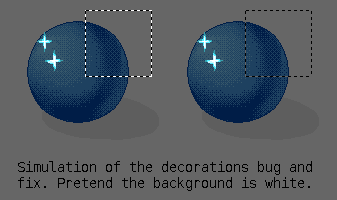
So, the first thing that needed tackling was the user interface. In particular, when using previous versions of Krita, the canvas decorations were blown out.
Basically, this happened because we draw our decorations onto the OpenGL canvas with a QPainter. Because QPainter nor QColor has any concept of what space it is drawing in, it doesn’t know to convert from sRGB to the rec2100pq format we’re using for the HDR canvas. We also have the issue that sometimes, colors aren’t in sRGB, but rather should represent a color from the image. Previously, we could assume that if the display was wide gamut, we didn’t need to adapt the decorations, or treat them differently from image colors, so we just treated them as the same thing, and drew the colors straight onto the display color space.
Now, the only place that knows how to handle image colors properly, applying all the OCIO config, etc, as well as having information to convert sRGB to the canvas space is the display color converter inside the canvas. This one has an extra simplified interface, called the color display renderer. Most of the work to fix this was to add functions to this renderer interface to convert colors (and images) and finally funnel the renderer through all canvas decorations. This was about 130 changes in the end.
Most of them were just plain conversions from sRGB to canvas space, but the color picker had to use the actual image color, as did the preview for the transform tool. Nor everything had to be converted on the fly. In some cases, like the vector tools, we have a set of colors we reuse, so those were added to the display renderer to be converted as a single struct of colors. Then, there’s the on canvas toolbars, like for the selection tools. These just use QPalette colors, which was solved in a similar manner, with the display renderer keeping a version of the current palette, but converted to the canvas space. At some point, we might need to do the same with KColorScheme, except that this class doesn’t have a way to change colors inside of it. Not sure what the best solution here is, as Krita needs to control the conversion function (in case of wide-gamut, etc).
Then, there were the reference images. Reference images are drawn on the side of the canvas in Krita. While fixing them was easy enough, I went a little further: Enabling HDR and wide gamut on the reference images. This was a little bit ambitious, as it required converting between QColorSpace and our similar class, KoColorProfile (a KoColorSpace, if you’re curious, is a KoColorProfile and a bit depth, as KoColorSpace has a whole bunch of per-model+bit-depth functions to wrangle pixels).
This conversion isn’t too hard, because QColorSpace can read and return iccprofiles, and KoColorProfile can do the same. However, for rec2100pq in particular, we will want to return a profile of our own. Same with sRGB. So what happens before we try to load the icc profile is that we test the transfer and the like, and funnel the values into our profile searching system. This system was created to handle ITU CICP values (basically a standardized set of enums for transfers and colorants), and was already extended with the known quantities outside of that (Adobe RGB, ProPhoto), so it can handle all the predefined transfers and colorants QColorSpace supports and find the relevant profile before trying to create it.
Now, when we load a reference image, and the image is RGB, Krita will convert it to a QImage, but set the colorspace to use that RGB space. The exception is when the image is floating point, in which case it’ll be converted to rec2100pq, because our reference images are eventually stored as PNG, and PNG cannot handle floating point. Then, when we start drawing the reference images, we first ensure the QImage QPaintDevice has its QColorSpace set to use the canvas colorspace. When drawing, we test the color space of the device, and the colorspace of the reference image, and then do the conversion to the canvas space before drawing.
And it works. I’m pretty pleased with this, because we have a bunch of other places we still draw with QPainter that might be useful to color manage, with the most notable one being the vector shapes. I hope we’ll be able to tackle that in the near future.
Improving the color management page
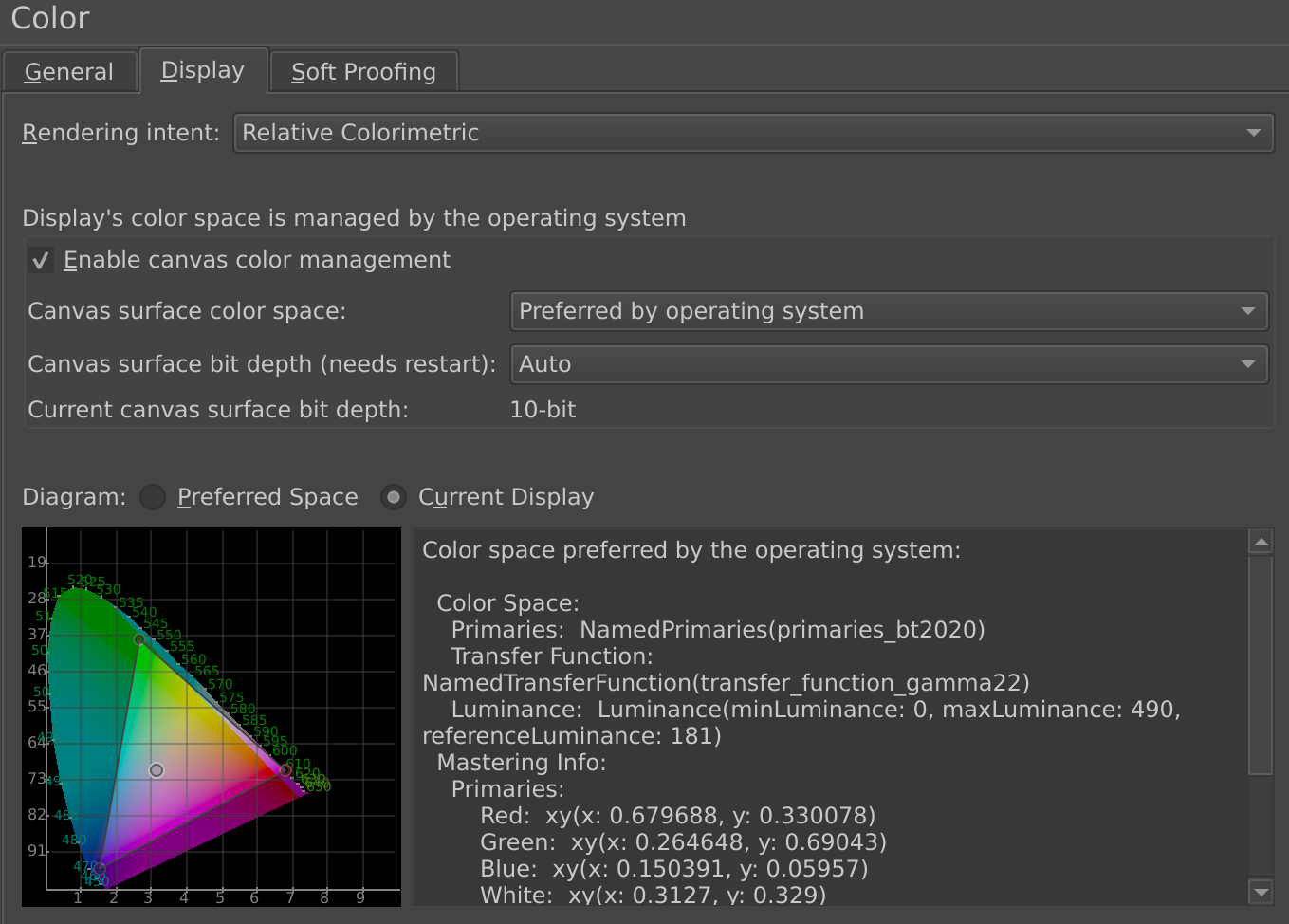
This was basically setting a little widget to show the color space data we get from wayland. Wayland sends us two types of information: The preferred color space, and the mastering display data. The former is the space wayland suggests that we send data in for the least amount of color conversions. The second is a little bit more weird. The mastering display color volume in HDR terms is a bit of metadata to indicate the gamut of the display that the image was finalized on. The idea being that this info can help guide the gamut mapping process by indicating in what range the important contrasts are.
In practice, what wayland is sending here is the color volume of the display the current window is on. I think this is so that we can send that data right back when we’re sending HDR data for the image that is being authored on that display.
The CIE tongue widget now can switch between the preferred space and show the display of the current color space. In this case, it’s showing that my screen is a p3-like, as many HDR screens are.
So, I made the XY CIE Tongue widget display these spaces with a toggle to switch between the preferred and current display gamut, and an auto update when the preferences switches screens. It might seem small, but one of the reasons I ported the CIE tongue widget over from Digikam all those years ago is because I do feel it is much more friendly to be able to see the actual gamut instead of having to interpret magic numbers and names.
Making the Histogram handle floating point
Our histogram docker was limited to [0 1], which isn’t very useful when working in linear floating point, so I wanted to fix that. So, a histogram in Krita is made by taking a vector of integers, initializing that with 256 values, and then going over each color and incrementing the value that is associated with the value of the pixel. You then do this per-component, to get a view of where the pixel values are per-channel.
What needed to be added here was that we now first test all the pixels for the maximum possible component value. Then, afterwards we divide the range of 0 to maximum by 256, and use that to sort the pixel values into. This means that as the image gets a bigger range, the precision of the histogram decreases, but as far as I know its output should still be statistically relevant.
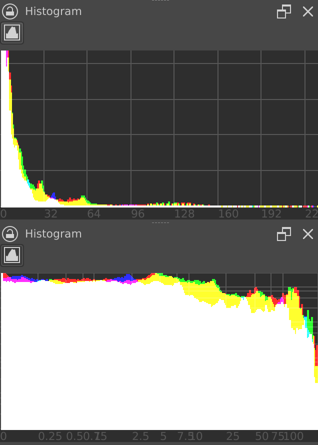
Two screenshots of the histogram docker for the openExr sample image “desk.exr”. The top is without logarithmic scaling. The numbers at the bottom indicate that the image goes well beyond 200.0 in value (where 1.0 is diffuse white). At the bottom, the logarithmic scale works both in the x and y axis, showing the spread of values more clearly.
Of course, in really wide range images, the range becomes a little meaningless. Therefore, it was decided to add a toggle to switch into logarithmic mode as well. For this, to keep the precision sensible, it needs to sample a separate logarithmic vector during pixel sampling. This has the added benefit that switching between linear and logarithmic is instantaneous.
Then I spend some time tweaking the graph and adding numbers at the bottom.
One thing I’m a little worried about though: The log grid is using log10. But with HDR there’s a concept of stops, which is log2. And I’m wondering if I should switch the logarithmic mode to log2 instead of log10, but at the same time, I’ve never seen log2 graph paper.
Vector Cursors
This has nothing to do with HDR, but I also converted all the cursors to SVG. This was something I did when there was a lull in the text work last year, because my screen is also a high dpi screen, and the cursors in X11 were tiny. So, I spend some time redrawing all the cursors, and then load them with QIcon(file.svg).toPixmap(width, height) to get a display scaled pixmap to use with QCursor. Of course, this then got delayed because there were issues with hot-spot offset and Android, and then I had to return to the text work. I managed to get back to this recently and finalize it.
I’m kinda happy, because between the vector cursors, the color managed canvas decorations and the fact canvas decorations get scaled (something I did… two, three years ago), everything we can draw on the canvas now looks good on modern displays.
Next up is going to be digging into the weeds of HDR metadata.
We've also created a new USB-card, with the newest stable version of Krita for all OSes. Includes Comics with Krita, Muses, Secrets of Krita and Animate with Krita tutorial packs. It's a 32 GB USB card with USB A and USB C connectors and the latest Kiki splash by Tyson Tan! If you just want the empty card because Kiki is cute, you can get that for a reduced price!
This week, the import/export feature for KeepSecret was completed and merged in !33.
The implementation went through several changes before reaching its final form. My initial approach was to use a KWalletManager-compatible XML format so that data could be exchanged directly between the two applications. To match KWalletManager's structure exactly, I referenced kwalleteditor.cpp from the KWalletManager repository and implemented support for elements.
The final format now preserves all item information:
-Secrets are Base64-encoded and decoded from raw bytes, avoiding UTF-8 conversions.
-ContentType is preserved per the Secret Service specification.
-Attributes are exported exactly as stored.
-Files use the .keepsecret extension instead of .xml.
My first version queried libsecret directly during export. After review, I changed it to use the data already stored in m_items when a wallet is opened, making the code simpler, cleaner, and consistent with the rest of the model.
There was also a small but important UI change. Initially, the Import and Export actions were placed in the application's global drawer. During review, Marco Martin noted that these operations belong to a specific wallet rather than the application as a whole. Following that feedback, the actions were moved to the wallet page itself and integrated into the ActionCollection system, alongside actions such as Lock and Delete Wallet.
The next step is a follow-up merge request that adds support for importing the legacy KWalletManager XML format. This will make migration from KWallet to KeepSecret much smoother for existing users.
The merge request!34 is open and under review.
It's been quite a while since I last wrote an entry in this blog. It's also been some time in which my invent gitlab graph has been feeling a bit emptier and I've also been more absent from the KDE work and community in general.
Several causes have been lining up to cause this lack of time and energy (or, in modern terms, bandwidth) I've had lately to dedicate to this amazing community and projects. But one could also summarize this to a lack of motivation.
In order to improve the situation, I've had to resort to a last desperate meassure: LEARNING VI!.
I know most people reading this might want to discourage me from such a painful path, more even at my 40+ age. But I've found myself again piked by the spark of curiosity, and wanting to learn and try new thigs. Even writing this paragraphs feel a bit easier as I'm punching characters in INSERT MODE.
Of course, I've not jumped into a vim/neovim terminal editor, but the very same Kate editor I'm used and love to work with. Just activated the integrated VI-mode and started getting comfortable with it.
On this process I've also discoverd several small issues that were not fully working, not implemented, or differ from the regular VIM experience. And as a KDE developer/enthusiast what's more enticing than pull up my sleeves and try to fix those. As we usually advice newcomers: better stratch one's own itch.
And what's best, I'm enjoying the experience of simultaneously learning some new VI magic, seeing how it is implemented in Kate, and using it to potentially fix bugs or implement new functionallity. I'm aware that the VI-mode is not supposed to be a full replacement or mimick of the traditional terminal VIM experience, and it shouldn't be. But I think there is still enough room for improvement within that limit.
But since I've discovered VI registers, I'm having the most fun fixing some usecases, adding new tests and implementing some of the missing ones. And I have also some new exciting (but more involved) ideas in mind.
Still not sure if many users and members of the community will benefit from these. Are you a happy VIM (or VI adjacent) user? Did you know Kate had this mode completely integrated with its UI at a keystroke's distance? (try Ctrl-Alt-V)? Moreover, since the VI-mode code is implemented in the KTextEditor framework, any application that uses it, such as KWrite or KDevelop (or even your own app) can use this mode too!
Hello everyone, i am uploading this blog nearly after a month.
I got the wifi security QML working and one of my MR got merged in production.
Here is my detailed work done during that phase
Refactored the Security 8021x. I have detailed explanation in my MR description.
MR - https://invent.kde.org/plasma/plasma-nm/-/merge_requests/566
Similarly, I refactored the cpp code for the wifisecurity part (WPA2, WPA3 Personal networks),
MR - https://invent.kde.org/plasma/plasma-nm/-/merge_requests/582
New QML designs and QML classes (which are still in review) for Wifi Security Tab and its combo box.
MR - https://invent.kde.org/plasma/plasma-nm/-/merge_requests/583
I have refactored almost 50% of the main KCM editor (the left side pane is completed)
MR - https://invent.kde.org/plasma/plasma-nm/-/merge_requests/584
What's Next?
I'm currently working on the remaining Network Connection tabs, such as General, Status, and others. There's still a lot of work ahead, but the progress so far has been encouraging.
I'll continue sharing updates as development progresses.
This is a weekly update from my Google Summer of Code 2026 project with
KDE, improving effect widgets in Kdenlive, a free and open source video
editor.
This week JB reviewed the per-channel tabs work on MR !887
and asked for four usability improvements. All four are now in the MR.
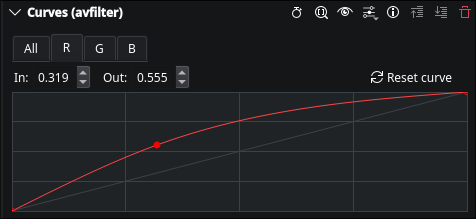
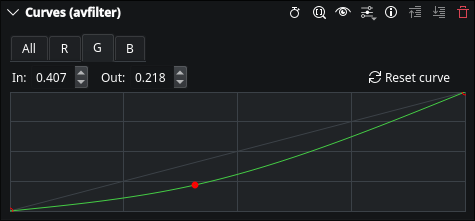
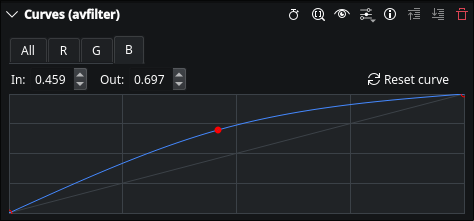
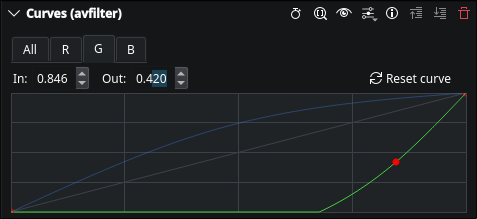
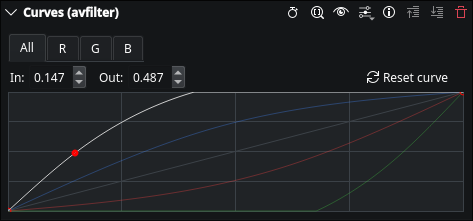
Per-channel curve colors
With four tabs (All/R/G/B) it wasn't obvious at a glance which channel
you were editing. JB suggested passing a color through the XML:
The color attribute is now read in AssetParameterModel and passed
down to KisCurveWidget, which uses it to draw that channel's curve
line instead of the default neutral color. All/R/G/B use
#CCCCCC/#FF4444/#44CC44/#4488FF.
Reset button for the active channel
A small button next to the point spinboxes resets only the currently
active tab's curve back to identity, going through
KisCurveWidget::reset(); the same model update path as a normal edit,
so it persists correctly on save.
Input/Output value display
JB asked for the selected point's X/Y to be shown numerically, like
GIMP's curve editor, for finer adjustments and reproducibility. The
underlying DragValue spinboxes for this already existed in the curve
widget's .ui file but had never actually rendered, for either
frei0r.curves or avfilter.curves; a layout ordering bug going back
years. Rather than untangle that legacy code, I added two new
QDoubleSpinBox widgets directly, wired to the existing
currentPoint signal that fires on point selection/drag.
Ghost overlay of edited channels
JB also suggested copying GIMP's behavior of showing all non-null curves
at once, so you can see how channels relate while editing one. When a
channel's curve is active for editing, the other channels are now drawn
faintly, in their own colors, if they've been edited away from identity.
The active channel stays fully opaque on top.
All four changes are in MR !887.
48 unit test assertions pass; also fixed a test-environment issue where
avcurvetest wasn't loading the Kdenlive XML effect definitions, which
had been masking proper av_curve parameter typing.
JB's m_widgets null-placeholder feedback from last week is still
unresolved, waiting on his direction before touching it.
A new Craft cache has been published about a week ago. The update has already been rolled out to KDE's CD and Windows CI with the update to Qt 6.11 beeing the most important change.
Changes (highlights)
General
We added updated our base image to build the Linux cache from AlmaLinux 8.10 to AlmaLinux 9.8. This implies a newer minimum required GLIBC.
We did inital work on MSVC 2026 support, but given that it is not supported by Qt 6.11, we did not complete it yet.
Blueprints
OpenSSL 3.6.2
Qt 6.11.1
New Qt modules QtGraphs and QtQuick3D
FFmpeg 8.1.1
FFmpeg is build with libass and x264 on MSVC now
tiff 4.7.1
libffi 3.5.2
About KDE Craft
KDE Craft is an open source meta-build system and package manager. It manages dependencies and builds libraries and applications from source on Windows, macOS, Linux, FreeBSD and Android.
In 2015, some members of the KDE community began a conversation about where KDE was heading and how it would get there. That conversation became the seed of what is now KDE Goals - a community initiative to help guide KDE's efforts around shared objectives.
KDE Goals reaches its fifth cycle at a special milestone: KDE turns thirty this year. Thirty years of building software that puts people in control of their digital lives and enjoy freedom and privacy. The fourth cycle brought three goals that built toward this vision. Streamlined Application Development Experience focused on making KDE development smoother and more joyful. We Care About Your Input aimed to deliver a seamless out-of-the-box experience for input devices used by artists, gamers, and people with accessibility needs. KDE Needs You! worked on building a sustainable community growth targeting individuals and institutions alike. Checkout the one-year recap at Akademy last year.
Now, as that cycle draws to a close and launches us into the next upward spiral, it is time once again to ask: what matters most to KDE right now? What should the community rally behind for the next two years?
The floor is open. Dream big. The fifth cycle begins!
Join in
Anyone passionate about KDE and has a vision to share is welcome to submit a proposal. You do not have to be a developer to participate.
The past two weeks went by fast. The learnings I gained while building the toy project I experimented around with Qt during Contribution Period are quite useful now. In the second week of GSoC, I ported the TM Manager from a separate dialogbox to TM Tab. It was done mainly for ease and with the reasoning that everything related to TMs can be in a single place. I kept most of the things as is. A lot of thought went into the UI Design.
The TM Manager is currently a standalone window which is accesible from any tab.
The "Manage Translation Memories" option is already available in the Tools Menu and again in the ToolBar of TM Tab since it's specific to it.
After the changes, pressing F7 or "Translation Memory" option from Tools menu will directly lead to TM Manager too as it is set on the left of TM Tab with a QSplitter. I believe this takes away a little redundancy in the design. This change is also justified pertaing to the future changes regarding Multi-TM selection and quering.
The buttons restrict resizing the splitter horizontally. Intially I put all the actions in a QToolButton as I thought putting them in a right-click context menu might render them undiscovered. But such menus were already being used in some other parts of the app( and obviously other KDE apps).
From coding perspective, all I had to do was instantiate it in TM Tab instead. Since, it was no longer being used as a window( which would also have worked), it no longer inherits from KMainWindow. It used Grid Layout which I think is not exactly needed and just used a VBoxLayout for simplicity.
The splitter state is saved and restored using existing methods.
The obsolete references and methods for TM Manager are cleaned up.
During Week 3, I added checkboxes to DBFilesModel for TM selection which will be used in querying later in TM View for suggestions, autofill etc. and TM Tab for search. In th beginning of the project, I proposed adding another proxy layer over DBFilesModel for the checkboxes to not to disturb other things. But for ease of work, consistent architecture( couldn't find multiple proxy layers being used in the codebase) and with the solace that it won't impact other methods using DBFilesModel for their specific purpose, I went ahead to add checkboxes directly to it.
This is a deviation from my GSoc Proposal wherein I proposed to replace Combo Box with a List Widget having entries with checkboxes for Multi-TM selection. Since there would be TM dbs on the left of the tab anyways, I thought of enabling selection there itself, than to have two places(TM Manager and the List Widget) listing all the TMs.
Setting new flag for checking, showing checked state with data() and storing selected TM names to a set is done. The checked state persistence is to be worked upon. This is where I got stuck. TM names were to be saved and loaded from global and local config based on user's selection but when my mentor reviewed that this complex setup probably is not the best, we reached back to translators who originally requested the feature.

 @the_epicman:matrix.org
 GSoC
GSoC
 Wolthera