We received multiple reports of problems when importing the Penpot library file. Users would see a Penpot instance crash upon loading our library.
One of our contributors noticed that there was a problematic graphic in the library that, when removed, did not make the Penpot instance crash.
I noticed that the graphic in question is a SVG export from Figma and contained calls that were not supported by Penpot. This color collection had a detail of all our Ocean colors and their gradients. I made the change to a png image instead so that the svg graphics from Figma in Penpot were no longer a problem.
The Ocean Foundations Penpot library is now updated and no longer crashes on import. Users are welcomed to update their libraries.
Penpot Additions
The Penpot library also contains a few new section headers so that it’s easier for users to understand what they are looking at. Please note that any sets that say “BASE *” means that they are parent components and are not needed for building components.
Base components are denoted by their name, it starts with a “_*”. This means, this is a parent component. Their purpose is to make it faster for designers to edit many components at once.
For example, a button has two versions “_Buttonbase” and “Button”. In this case, “_Button Base” is the parent componen and if you change the corner radius, all “Button” components will update accordingly.
There are always shared components than base components. Hence the need to accelerate component editing.
When you download our library, you can easily identify these components and make the changes that fit your design.
Updated Folder Icons for Legibility
In a previous iteration, I created folder clones from one size and mathematically shrunk them for another size. While this works, it’s not optimized. A few of the folder icons were like this and looked blurry, not sharp.
After remembering the need for work there, I adapted those folders and they are now published in the git page for Ocean. Places at 32px should now look more polished.
Progress with App Icons
DISCLAIMER: ICONS ARE NOT FINAL! THIS IS A PREVIEW!
App icons are moving along well. I recently picked them back up to continue the work after receiving some initial feedback. I have settled on a style based off subtle and soft gradients.
At the same time, previous versions of these icons seemed dull and lifeless, color-wise. I decided to look for better, more vibrant colors and this is where I landed. I also worked on better rounded shapes. Note that we are following 3 different ideas around these icons, icons with a round background, icons with a squared background, unbounded icons (Icons not anchored to a background shape). In this way, we have more ways to express the best icon idea we want to share.
I also realized that Qt does not support layer blend modes. I was using some of that in the icons to have an easier time adapting colors in borders and edges. I had to undo those and re-adapt the colors to not use blend modes. Maybe in the future Qt will have support for them.
Ocean + Union
Union is about to make its first appearance to the public as an engine. Plasma 6.7 will bring this to light. I have communicated with the Union team and we expect to work together after this first launch to begin creating Ocean components in code.
I tried working through building a Storybook using the Penpot MCP server but it seemed pretty convoluted and is not a documented process. I will keep trying and maybe just create the Storybook site manually.
Akademy Presentation
Akademy is once again on the horizon. I submitted a progress update talk about Ocean. I am hoping by then, we have actual Ocean UI components to show. We will work toward that.
See you all in September in Graz to celebrate our 30th year!
The KDE Qt5 Patchset Collection remains open in case something very very very very very very very very very very very very very very very very very very very very very critical is needed.
We just had a release of a new library, and future framework: kirigami-app-componets, which is a new repository where a certain kind of Kirigami extensions will go.
This repository will contain modules that are intended to be building blocks for applications to integrate within the KDE Frameworks ecosystem.
Why start a new repository when kirigami-addons already exists?
We now had a standalone release of kirigami-app-components with a single module inside for testing purposes, but the target here is to move it to frameworks releases, with all the stability promises and quality constraints of Frameworks.
Kirigami-addons is a bit more experimental of nature and have modules which, while they are a good first approach at solving a particular problem, would definitely need some work and refactoring for us to be comfortable having them in Frameworks, while other kirigami-addons modules will be a more straightforward import into kirigami-app-components.
An example of a module that was very useful but needed some work in its architecture is the StatefulApplication module (import org.kde.kirigamiaddons.statefulapp). It provides a Kirigami ApplicationWindow subclass and a way to map QActions to Kirigami actions.
The central idea is having a series of actions that can have their keyboard shortcuts configured by the user (while also providing a component for such configuration UI).
A problematic aspect of StatefulApp is that it’s based too much on C++: in order to add actions, it is necessary for the app to create a subclass and add them as QActions, then the QML part has to connect the QActions and Kirigami.Action using the proper API.
This is OK for the parts of the app where the logic is completely on the C++ side, but when it is necessary to add a very simple action (closing a page, opening a search dialog, and so on), this brings far too much boilerplate.
org.kde.kirigami.actioncollection
ActionCollection is the module that we introduce with kirigami-app-components. It’s all about collections of actions that are defined declaratively via QML (with the option of creating collections on the C++ side as well) and that have shortcuts configurable by the user via the standard interface.
In order to define a new collection, we would write the following QML:
The ActionCollectionManager will be a single instance for the whole application, and it is what takes care of instantiating the common actions (such as About Application, About KDE, Configure Shortcuts, and so on) and doing the plumbing with the configuration dialogs and so on.
ActionCollection is a set of actions semantically grouped together in the same category (if an application would have, for instance, actions that operate on photos and actions that operate on videos, those could be two different collections).
ActionData is the semantic representation of an action (internally it is a QAction, so it has all its properties) and will be defined only once for the whole application. Instances of Kirigami.Action will be attached to it (even more than one), and those will define the actual buttons and menu entries in the application.
A Kirigami.Action is attached to an ActionData via an attached property:
Kirigami.Action {
    // Here shows how important is that each ActionCollection has
    //  an app-global unique name and each action has a collecion-global
    // unique name as well
    AC.ActionCollection.name: "org.kde.myapp.mainactions"
    AC.ActionCollection.action: "hello"
    onTriggered: {
        // Logic here
    }
}
The Kirigami.Action instance will not have text, shortcut, or icon defined, because everything comes from the attached ActionData. Only the onTriggered logic will be defined there (as well as the logic for when the action is enabled or visible).
When an ActionCollectionManager is created, a collection named org.kde.globalactions will be automatically created as well, which also contains an action called "KeyBindings“. When triggered, this dialog will open:
This is the configuration UI where it is possible to configure all the application shortcuts.
Another action called “FindAction" is also available: when triggered, this other dialog will open instead:
This is the classical Ctrl+Alt+I dialog also present in QWidget applications, where it is possible to search and trigger all the application’s actions.
A new release of Kirigami Addons is out. This is a minor release containing mostly
bug fixes and small refactoring. Thanks to everyone who contributed to this release.
Smoking is bad for you. Testing software is good for you though.
A while ago I wrote about detecting memory leaks in KDE CI. That works beautifully, and has already lead to real-world improvements, but it assumes that CI actually runs some code, usually a unit test.
While some KDE projects have fairly good test coverage, others do not so much. Particularly UI code isn’t very easy to usefully unit-test. More complex forms of testig like Selenium exist for UI testing, but doing it well is a significant investment and commitment from the developer.
That doesn’t mean there are no low-hanging fruits for more testing in KDE though. Many kinds of issues can be spotted by only running some piece of code, and checking for any abnormal signs. This kind of test is often known as smoke testing. Abnormal signs here would include things like crashes, QML errors, runtime warnings, or memory leaks. This is particularly useful when combined with debugging tools like asserts, address sanitizer, leak sanitizer etc.
A simple way to do smoke testing for applications is to use a command-line option for it that starts the application normally and automatically exists after some amount of time (e.g. 1 second). If the exit code is non-zero the test is considered failed. Alligator is an example of an application that has such a smoke test.
Applications are not the only smoke-testable thing though. We can also do it for systemsettings modules. Recently I added such a smoke test flag to kcmshell6, which can be used to smoke test KCMs. Doing that in a few projects already exposed some issues like memory leaks or missing dependency declarations, which since have been fixed.
Other things that could be tested in a similar way are Plasma applets (using e.g. plasmawindowed), runners, KIO workers, thumbnailers, or really anything that can be instantiated in a test. It could also be done for packaged binaries like Flatpaks, APKs, or distribution packages. Patches for this are most certainly welcome.
One of the things I think modern software quietly forgot is fun.
Maybe we became to distracterd on the day to day life of affordance and usability,.... we forgot to have a bit of FUN!!
So while revamping the old Oxygen icon set into today, and maybe more importantly filling in all the missing icons that are well… still missing!!… me and mostly Pravin Kumar have been pushing a bunch of new mimetypes into Oxygen.
Just look at the android apk mimetype Kumar made. Its fun. It makes me smile a little bit when I see it and honestly I think we need more of that.
Not everything has to look like it came out of a enterprise dashboard generated by AI trained on airport signage systems, hey I love airport signage!!! but... ...
And thinking about fun I'm also thinking again about possible ideas for a future design language for O².
What if icons looked more like depressions on a canvas? Almost paper like. Soft shapes cut from the material while still sharing geometry with the symbolic counterparts.
Somthing like this:
wouldnt this be fun???
Dont forget to check the new old Oxygen in the upcoming Plasma release. We had fun making it... maybe you can have fun using it too
And yes... we still have a ton of plans for old Oxygen in the upcoming releases.....
I did some exploration on KDE's code base. It's amazing what you can find when you have almost 30 years of public history in git.
In doing so I ran some statistics on KDE's core software. That core is relatively well-defined, even over the years. It's the libraries (Frameworks), the desktop (Plasma), and the standard applications shipped together on a regular release schedule (Gear). Of course there are other fine applications in Extragear and elsewhere, but I didn't look at them for now.
In 2009 I did an analysis of KDE's sources and found 4,273,291 lines of code. So I was curious to see where we are today. The numbers are not 100% comparable, because the shape of KDE's core software has changed a bit, but when you look at what is in git (omitting graphics, translations, and other non-code files) you find 8,173,148 lines of code.
But wait, didn't the title say 55,041,902 lines of code?
Yes, when you look at the history, there is more. There is churn, code gets added, code gets modified, code gets deleted. It evolves. So behind every line of code which is shipped today, there are about 7 lines of code which have been written, changed, deleted. This is what you find in git.
So 55 million lines of code have been written to arrive at 8 million lines of code today. They represent progress, learning, and adaptation to a changing world. You see life there.
The most amazing part for me is actually not the code itself, but that there are thousands of people behind this code who have worked together for decades to continuously improve KDE's software. That's the real story.
P.S. Take the numbers with a grain of salt. They are based on a couple of assumptions and influenced by quirks of tools and history. This is not science, it's the report of a hobby code historian.
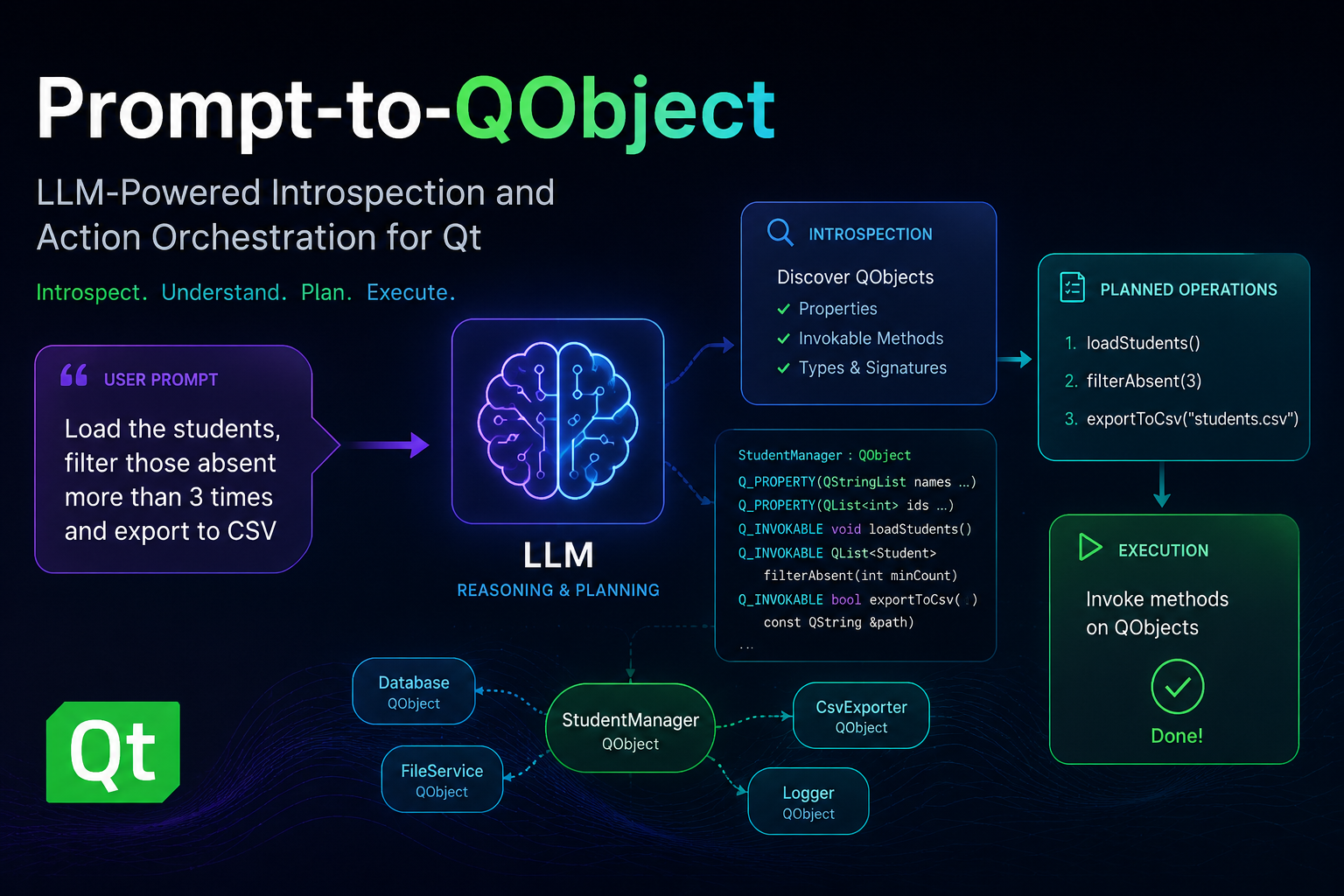
TL;DR: this post presents an introspectable action runtime for AI-enabled Qt applications, where selected QObject instances are exposed through a smart-object registry, translated into a bounded planning context, and mutated through previewable, validated plans. The approach relies on Qt’s existing meta-object system, using Q_PROPERTY, Q_INVOKABLE, object registration, recursive type discovery, and structured operations to keep LLM-generated actions constrained to the actual runtime object graph. The Smart Shapes QML and C++ examples show promising results with both a self-hosted qwen3-coder:30b model and OpenAI’s gpt-5.4, while also exposing practical challenges around prompt refinement, context size, multi-action requests, operations versus JavaScript fallback, and domain-specific instructions. Future work points toward larger applications, stronger validation and permissions, better context management, and possibly a generic reflective MCP server for Qt applications.
Developing AI-enabled Qt applications often starts with a deceptively simple idea: let users describe what they want, then translate that intent into concrete changes in the running application. However, moving from a natural-language prompt to safe mutations over live QObject instances is not straightforward. The application needs to decide which objects are available, what properties and methods can be used, how to represent the intended changes before applying them, and how to keep LLM-generated output constrained to the actual runtime object graph. Given that, I've been working on designing an introspectable action runtime for Qt applications: selected objects are exposed through a smart-object registry, an LLM provider turns user prompts into previewable plans, and an applier executes validated operations or controlled scripts against those objects. In this article, I’ll explore how these modules work together to transform prompts into structured, introspectable, and executable actions over Qt applications.
Given this, such action runtime platform should satisfy three key requirements:
First, it must be generic and non-intrusive enough to be applied to a wide range of Qt applications, regardless of whether the UI is implemented with Qt Widgets, Qt Quick, or a combination of both. This means the infrastructure should rely on Qt’s existing object model, meta-object information, properties, methods, and object ownership rules, instead of requiring application-specific adapters for every use case.
Second, it must be accurate when translating a user prompt into effective application behavior: natural-language requests should be converted into explicit, previewable, and validated plans that only reference exposed objects and supported operations.
Finally, performance should remain a first-class concern. The planning context sent to the provider must be rich enough to avoid ambiguous actions, but compact enough to keep latency under control, avoid unnecessary traversal of large object hierarchies, and preserve UI responsiveness while plans are generated and applied.
Architecture Overview
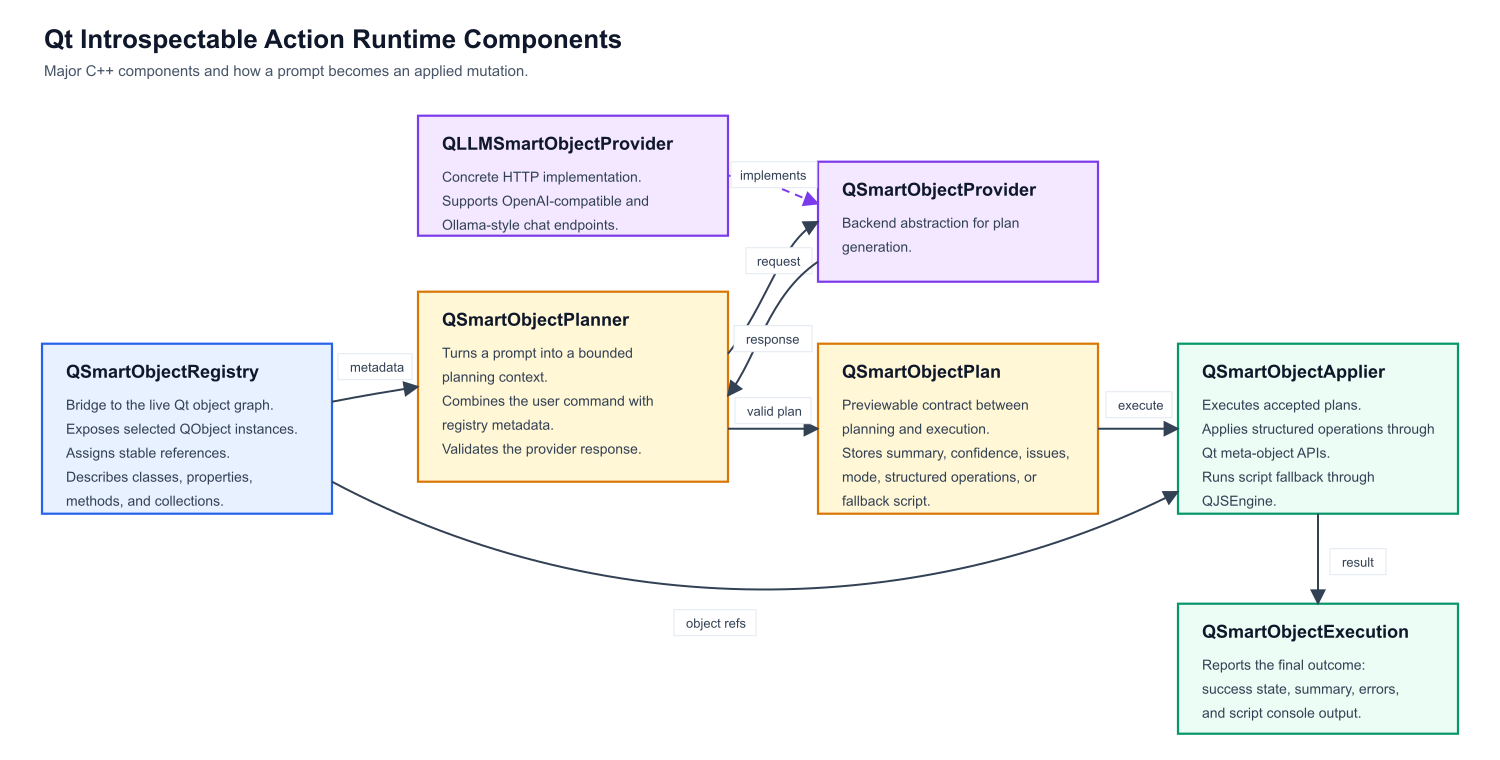
Figure 1 presents the major components of our introspectable action runtime platform.
Figure 1: main components of Qt Instrospectable Action Runtime platform
QSmartObjectRegistry is the bridge to the live Qt object graph. It exposes selected QObject instances, assigns stable references, and describes classes, properties, methods, and collections. QSmartObjectPlanner turns a prompt into a bounded planning context. It combines the user command with registry metadata, sends that context to a provider, and converts the response into a validated QSmartObjectPlan. QSmartObjectProvider is the AI backend abstraction. QLLMSmartObjectProvider is the concrete HTTP implementation, supporting OpenAI-compatible and Ollama-style chat endpoints. QSmartObjectPlan is the previewable contract between planning and execution. It stores the summary, confidence, issues, mode, structured operations, or fallback script. QSmartObjectApplier executes accepted plans. It either applies structured operations directly through Qt meta-object APIs or runs script fallback through QJSEngine. QSmartObjectExecution reports the final outcome, including success state, summary, errors, and script console output.
For an application to be endowed with an intelligent prompt, its relevant runtime state and behavior must be made visible through Qt’s meta-object system. In practice, this means modeling the objects that the prompt should control as QObject-derived classes, exposing editable state as Q_PROPERTY, and exposing safe actions as Q_INVOKABLE methods or slots (many Qt application are already implemented as such). Properties define what the system can inspect and mutate, while invokable functions define the operations that can be requested explicitly by the user. This is an important constraint: the prompt should not operate over arbitrary implementation details, but over a deliberate application surface that the developer decided to expose. The better this surface is named, typed, and organized, the more accurately a natural-language request can be translated into an effective application action.
Object registration and type discovery build on that exposed surface. The application registers selected live objects with QSmartObjectRegistry, optionally giving them stable semantic identifiers and human-readable labels. From there, the registry assigns internal references to these objects and uses Qt meta-object introspection to discover their readable and writable properties, invokable methods, class names, and QObject-based collections. This metadata becomes the planning context consumed by QSmartObjectPlanner: it tells the provider which objects exist, which types can be created or modified, and which operations are actually legal. In other words, registration selects the live objects that participate in prompting, while type discovery describes what the prompt is allowed to do with them.
Type discovery follows the QObject surface exposed by the application. Starting from the objects registered in QSmartObjectRegistry, the implementation inspects their meta-objects and recursively discovers QObject-derived types referenced by Q_PROPERTY declarations, including direct QObject* properties and supported QObject collections such as QObjectList or QList<T>. It also walks readable runtime property values to find live child objects and collection items, so the planning context can include not only the explicitly registered object, but also the relevant object graph reachable from it. This keeps discovery aligned with Qt’s meta-object system: arbitrary C++ implementation details remain hidden, while declared properties, invokable methods, and QObject relationships become available for planning. This enables registering central components, such as a Core object, which can end up registering all important objects in the application, such as controllers. Of course, developers can also define a more limited exposure model by individually registering only the desired objects or by turning off recursive type discovery.
Prompt Engineering
One of the main challenges in this approach is that a fully generic prompt can describe the mechanics of object discovery, planning, validation, and execution, but it cannot always capture the application’s domain semantics. The same property names and methods may have different meanings depending on the example, and some user requests require contextual rules that are not obvious from the meta-object data alone. For this reason, the generic smart-object prompt may be complemented by example-specific instructions. These instructions explain how the exposed objects should be interpreted in that particular application, which coordinate system is being used, how collections should be handled, which operations are preferred, and how ambiguous commands should be resolved. In practice, the generic prompt provides the execution contract, while the example-specific prompt gives the model the domain knowledge needed to produce accurate plans.
These are the most important fragments of currently adopted generic prompt:
You translate natural-language editing requests into a smart-object mutation plan. Return only a JSON object. Do not wrap it in markdown. The JSON object contains either structured operations or a JavaScript script that will run against live QObject wrappers. The planning context contains two authoritative sections: availableClasses and instances. Use availableClasses as an exhaustive class catalog for all exposed objects and QObject-derived member types, and instances for live objects, aliases, and collection membership. Prefer operations mode. Use script mode only when the request cannot be represented with the supported operation vocabulary. ... Supported operations are setProperty, adjustProperty, callMethod, createObject, and destroyObject. Operation targets are direct object refs, created ids, or collection selections. Collection sources can use ownerRef for one owner, owner for a target resolving to one owner, or owners for a target resolving to many owners, including nested selection targets. ... For setProperty and adjustProperty, the property field must exactly match a writable property listed in availableClasses for the target object's class. For collection predicates, the predicate property must exactly match a readable property listed in availableClasses for the collection item class. ... Treat the planning context as authoritative. Do not invent members that are not explicitly listed there. ... If the request cannot be satisfied with the available classes, objects, properties, methods, or collection relations, do not approximate it. Return confidence 0.0, at least one issue, empty operations, and an empty script. ... The result must have this structure: {"summary":"short summary","confidence":0.0,"issues":["optional issue"],"mode":"operations","operations":[{"op":"setProperty","target": {"type":"object","ref":"registry-ref"},"property":"propertyName","value":"value"}],"script":""} ... For script fallback, set mode to script, operations to [], and script to the JavaScript statements. If the request is ambiguous, return an issue and the safest minimal plan.
Example Application
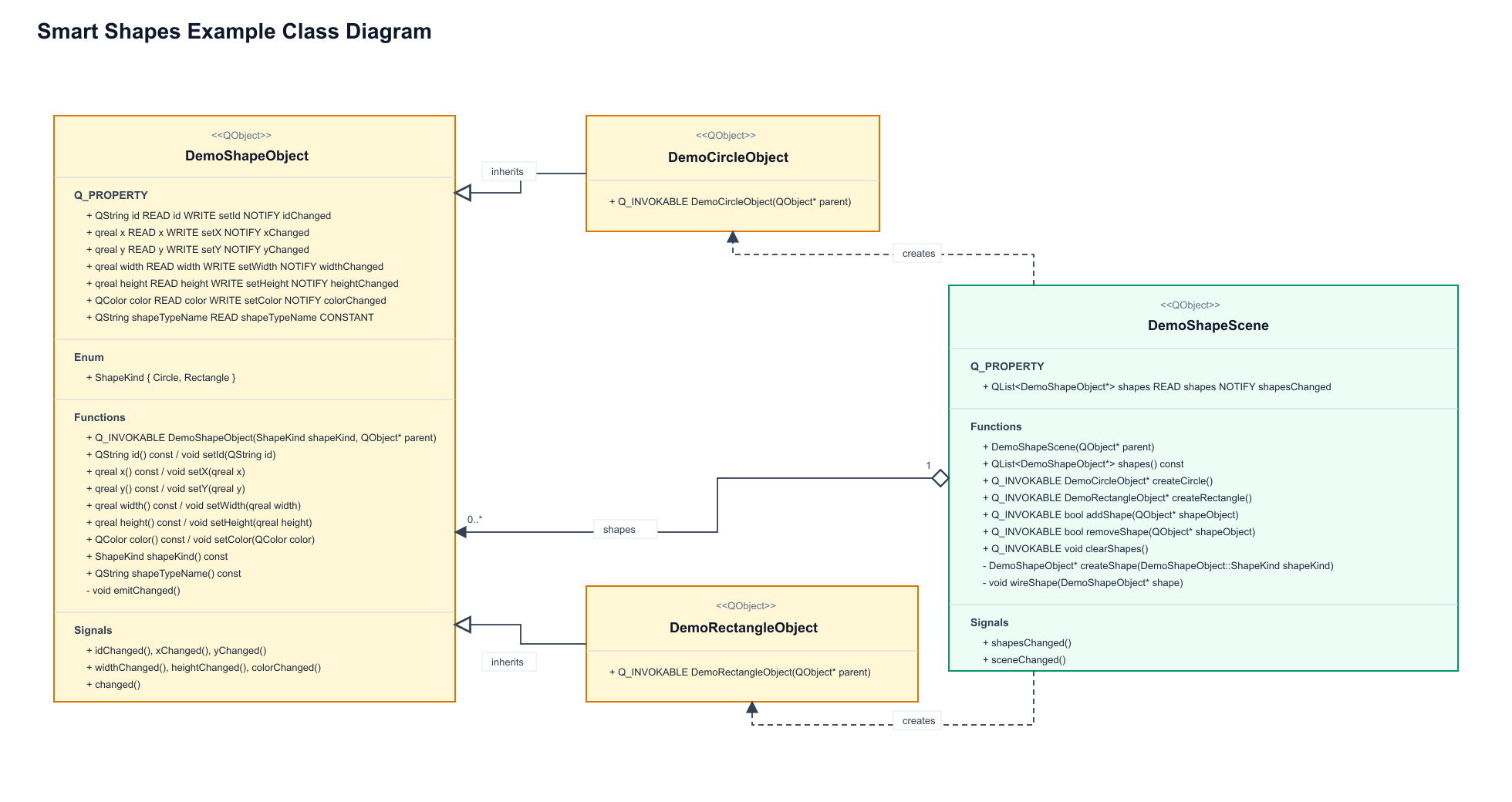
The current implementation includes both QML and C++ examples built around the same shape-editing scenario. In the QML example, the application uses the QtActionRuntime.SmartObjects QML API directly: shapes are created in a Qt Quick scene, exposed through SmartObjectRegistry, and controlled through LLMSmartObjectProvider, SmartObjectPlanner, and SmartObjectApplier objects declared from QML. The C++ example implements the same workflow with a Qt Widgets interface and a SmartObjectsDemoController, wiring the registry, provider, planner, and applier from C++ and reflecting the generated plan back into the UI before it is applied. Both examples expose shape objects with properties such as position, size, color, and type, then allow prompts like moving a circle or changing its color to be translated into validated smart-object plans, as described in Figure 2.
Figure 2: smart shapes example's domain objects
Results
We tested the Smart Shapes example with both a self-hosted Ollama backend running qwen3-coder:30b and OpenAI’s gpt-5.4 model, and both produced good results for a range of natural-language commands. The prompts covered simple creation and editing requests, such as “create a new yellow circle”, “rename the yellow circle to myCircle”, and “move myCircle to the right of rectangleOne”, as well as destructive and spatial operations like “remove the red circle” and “arrange all circles evenly around rectangleOne, using a radius of 200 and the rectangle’s center as the arrangement center”. These tests helped validate that the exposed object model, generated planning context, and structured operation format were expressive enough for both local and hosted models to translate user intent into effective changes in the scene.
0:00
/0:13
Video 1: results for prompt "create a new yellow circle and a new purple circle in different positions"
The next step was to investigate object collection traversal and object discovery in more complex object graphs. The Smart Shapes example already exercises a simple collection through the scene’s list of shapes, but real applications usually expose deeper hierarchies: controllers own models, models expose collections, and collection items may reference other domain objects. The goal is to verify how well the planner can discover these relationships from registered root objects, follow QObject-valued properties and supported collections, and still generate accurate operations without requiring every object to be registered manually.
0:00
/0:13
Video 2: results for prompt "change yellow circle's id to myCircle and position it to the right of circleTwo"
No example-specific instructions were required, so far, for this example because the exposed QObject properties and invokable methods already provided enough semantic information for the planner to generate accurate operations.
Next, we want to try prompts involving multiple objects and multiple actions in a single request. Simple commands are useful to validate the basic planning pipeline, but real user interaction will often combine several intentions at once, such as creating an object, positioning it relative to another one, changing its visual attributes, and updating its identifier in the same prompt. These scenarios are important because they test whether the planner can decompose a compound request into a complete sequence of operations, preserve the correct order of execution, and avoid summarizing changes that were not actually represented in the generated plan. At this point, qwen3-coder:30b occasionally started producing incorrect plans, while gpt-5.4 performed quite well.
0:00
/0:13
Video 3: results for prompt "move rectangleOne to (200, 200) and position all circles evenly distributed around the angles of a circle centered at rectangleOne and with a radius of 150"
Notice that the circles are not actually distributed around rectangleOne’s center. This happens because gpt-5.4 has no way to infer how shape centers are computed from the exposed properties alone. The issue was easily fixed by adding example-specific planning instructions, such as: “In this shape demo, x and y are top-left coordinates. Object centers are computed as (x + width / 2, y + height / 2)”.
Challenges and Future Work
The implementation also showed that the hard part is not simply calling an LLM, but defining a stable contract between the model and the Qt object graph. The implementation moved from an initial JavaScript-oriented approach to an “operations first, JavaScript after” architecture, then added asynchronous plan generation, cancellation, richer registry metadata, collection predicates, runtime property values, and several rounds of prompt refinement. Prompt design became a central concern because the model must not invent properties, confuse planning metadata with writable object properties, skip parts of multi-action requests, or summarize mutations that were not actually emitted.
Context window sizing is another practical issue: the planning context must include enough classes, instances, collection relations, and runtime values to make accurate decisions, but not so much that local models lose reliability or exceed their useful context. The operations mode gives a safer and more introspectable path for common mutations such as setting properties, calling methods, creating objects, destroying objects, and selecting collection items. JavaScript remains useful as a fallback, but it is harder to validate and has a larger execution surface. Other important challenges include handling provider differences between Ollama-style and OpenAI-compatible endpoints, validating JSON responses, resolving object references safely, and deciding how much of the live object graph should be exposed to the prompt.
A natural direction for future work is to package this infrastructure as a generic reflective MCP server for Qt applications. Instead of each application embedding its own prompt-to-object bridge, a Qt MCP layer could expose selected QObject instances, properties, invokable methods, object collections, and runtime state through a standard protocol, allowing external agents to inspect and operate on live Qt applications in a controlled way. Beyond that, there are several interesting extensions: better permission models for deciding which objects and operations are visible, richer schema generation for enums and value types, configurable recursive discovery policies, stronger plan validation before execution, undo/redo integration, transaction support for multi-step plans, visual plan previews, and model-independent test suites for comparing local and hosted providers.
Another promising direction is to improve context management, so large applications can expose only the subset of the object graph relevant to a given prompt while still preserving enough semantic information for accurate planning.
Last but not least, this solution must be tested in larger and more complex applications. The Smart Shapes example is useful because it makes the core ideas easy to see, but real Qt applications have deeper object graphs, richer domain rules, long-lived controllers, asynchronous operations, permissions, and state that changes while the user is interacting with the system. Those are the scenarios that will really test whether reflective discovery, bounded planning contexts, structured operations, and fallback scripting can scale beyond a controlled demo. If this approach continues to work there, it opens an interesting path: Qt applications that can expose their own runtime capabilities and let users interact with them through intent, not just through predefined UI controls. What about including API documentation, in a Retrieval-Augmented Generation (RAG)-like approach?
That’s all for now. Lots of fun happening over here. 😉

 anditosan