Skip to content

Saturday, 10 January 2026

Welcome to a new issue of This Week in Plasma!

Let’s thank Lubos Krystynek, Rafal Krawczyk, and John Veness for stepping up to help with this week’s issue. Thanks, guys!

This week, the first car running KWin won the “Car of the Year” award. Yes, really — KDE in the car! Here’s KDE’s Victoria Fischer talking about it at Qt World Summit 2023:

KDE in the Kar!

Almost all of these posts end with “KDE has become important in the world…” and I think this is a good reminder that it’s true, not just some empty platitude. KDE is important. And all of you building or using KDE’s software are important, too.

But KDE is not only important to cars; we’re incredibly important to computers! And on that subject, some really nice features and user interface improvements landed for the upcoming Plasma 6.6 release. The hard feature freeze is coming up soon, at which point we’ll move into full bug-fixing and polishing mode.

But until then, enjoy some juicy new goodies! Check it out:

Notable New Features

Plasma 6.6.0

You can now save your current visual settings as a new global theme! (Vlad Zahorodnii, plasma-desktop MR #6097)

Global Themes page in System Settings showing the opportunity to create a new global theme from the current visual settings

Added a “Forget device” action to the Bluetooth system tray widget, allowing users to remove paired devices without opening System Settings. (Andrew Gigena, KDE Bug #434691)

You can now search for processes in System Monitor based on their full command-line invocation when the “Command” column is visible. (Alexey Rochev, KDE Bug #448331)

On supported systems, the logout screen now mentions when the system will restart into a different operating system or boot option after it reboots. (Nikolay Kochulin, plasma-workspace MR #5469)

Logout screen showing that a different OS will be booted into after restart

Notable UI Improvements

Plasma 6.6.0

The Power and Battery widget now tells you what specific power management actions apps are blocking, instead of assuming that they’re all blocking both sleep and screen locking. (Jakob Petsovits, KDE Bug #418433)

Power and Battery widget telling you what each app is actually blocking

System Settings’ Thunderbolt page now hides itself when the device doesn’t support Thunderbolt. (Alexander Wilms, plasma-thunderbolt MR #47)

When there are many windows open, the Task Manager widget will now scroll to the active one when you open its window thumbnail list. (Christoph Wolk, KDE Bug #499716)

Notifications no longer waste space showing the same icon in two places. (Kai Uwe Broulik, plasma-workspace MR #6151)

Spectacle now remembers the size (and on X11, also the position) of its main window across launches. (Aviral Singh, KDE Bug #499652)

Made multiple UI improvements to the “Configure Columns” dialog in System Monitor. (Arjen Hiemstra, plasma-systemmonitor MR #405)

System Monitor’s new “Configure Columns” dialog

In the Weather Report widget, when a weather station isn’t reporting the current wind speed, the widget now says it doesn’t know the wind speed, rather than claiming it’s “calm”. (Tobias Fella, kdeplasma-addons MR #969)

The Kickoff Application Menu widget now does a better job of handling a huge number of favorite apps. Now the favorites column eventually becomes scrollable, instead of letting icons overlap. (Christoph Wolk, KDE Bug #424067)

You can now find System Settings’ Wallpaper page by searching for “desktop background” and some other related terms. (Shubham Arora, plasma-workspace MR #6152)

Frameworks 6.23

Made it possible to see more items at once in the “Get New [thing]” dialogs. (Nate Graham, frameworks-knewstuff MR #380)

More items visible at a time in the Get New Stuff dialogs

Open/Save dialogs now use relative-style date formatting for recent dates and times, which matches how Dolphin shows them. (Méven Car, frameworks-kio MR #2103)

Folders that show thumbnails of their contents now refresh the thumbnail immediately when any of those files are removed. (Akseli Lahtinen, KDE Bug #497259)

Notable Bug Fixes

Plasma 6.5.5

Fixed a strange issue that broke key repeat only in the Brave web browser. (Nicolas Fella, KDE Bug #513637)

Fixed an issue that could make the panel configuration dialog appear on the wrong screen with certain panel and screen arrangements. (Aleksey Rochev, plasma-workspace MR #6140)

Fixed two issues with the “Show Alternatives” popup: one that made it get cut off outside of the screen area for widgets positioned on certain areas of the desktop, and another that made it not disappear when it lost focus. (Aleksey Rochev, KDE Bug #511188 and KDE Bug #511187)

Plasma 6.6.0

Fixed an issue that made Plasma quit when you disconnected the last screen. (Xaver Hugl, KDE Bug #513003)

Fixed an issue with the Applications table on System Monitor’s Overview page being blurry with certain scale factors. We had already previously fixed this, but it turned out there were more remaining cases where it still happened, so this should take care of the rest! (Arjen Hiemstra, KDE Bug #445759)

Notable in Performance & Technical

Plasma 6.6.0

Implemented support in Plasma for the up-and-coming oo7 Secret Service provider. (Marco Martin and Harald Sitter, plasma-workspace MR #6109)

Fixed a hilarious issue that caused the wallpaper to bounce a tiny bit with certain fractional scale factors on secondary screens using direct scan-out while on a very recent kernel version. (Xaver Hugl, KDE Bug #513277)

How You Can Help

KDE has become important in the world, and your time and contributions have helped us get there. As we grow, we need your support to keep KDE sustainable.

You can help KDE by directly getting involved. Donating time is actually more impactful than donating money. Each contributor makes a huge difference in KDE — you are not a number or a cog in a machine! You don’t have to be a programmer, either; many other opportunities exist.

For example, helping out to write these posts is warmly appreciated. Anyone interested in getting involved should check out the evolving documentation on the topic.

You can also help out by making a donation! This helps cover operational costs, salaries, travel expenses for contributors, and in general just keep KDE bringing Free Software to the world.

To get a new Plasma feature or a bugfix mentioned here, feel free to push a commit to the relevant merge request on invent.kde.org.

Friday, 9 January 2026

QtNat is a lightweight C++ library built with Qt 6 that simplifies NAT port mapping using UPnP (Universal Plug and Play). It is designed to help developers easily expose local services to external networks without requiring manual router configuration for users.

By leveraging UPnP, QtNat automatically communicates with compatible routers to create port forwarding rules at runtime. This makes it particularly useful for peer-to-peer applications, multiplayer games, remote access tools, and any software that needs reliable inbound connectivity behind a NAT.

QtNat provides a simplified API to do all steps automatically: discovery and mapping. This has been tested on my local device. Feel free to test it and improve it.

Use it

    UpnpNat nat;

    QObject::connect(&nat, &UpnpNat::statusChanged, [&nat, &app]() {
        switch(nat.status())
        {
        case UpnpNat::NAT_STAT::NAT_IDLE:
        case UpnpNat::NAT_STAT::NAT_DISCOVERY:
        case UpnpNat::NAT_STAT::NAT_GETDESCRIPTION:
        case UpnpNat::NAT_STAT::NAT_DESCRIPTION_FOUND:
            break;
        case UpnpNat::NAT_STAT::NAT_FOUND:
            nat.requestDescription();
            break;
        case UpnpNat::NAT_STAT::NAT_READY:
            nat.addPortMapping("UpnpTest", nat.localIp(), 6664, 6664, "TCP");
            break;
        case UpnpNat::NAT_STAT::NAT_ADD:
            qDebug() << "It worked!";
            app.quit();
            break;
        case UpnpNat::NAT_STAT::NAT_ERROR:
            qDebug() <<"Error:" <<nat.error();
            app.exit(1);
            break;
        }
    });

    nat.discovery();

  1. We create the object (l:0)
  2. We connect to statusChanged signal to get notified (l:2)
  3. When status is NAT_FOUND, we request the description (l:11)
  4. When status is NAT_READY, we request the port mapping (l:14)
  5. When status is NAT_ADD, It means the port mapping request has been added, It worked! The application quits.(l:17)
  6. When status is NAT_ERROR, Error occured and display the error text. The application exits on error. (l:21)
  7. We connect to error changed in order to detect errors. (l:14)
  8. We start the discovery. (l:28)

Technical explainations

The discovery

Basically, we need to know if there is a upnp server around. To do so, we send an M-SEARCH request on the multicast address.

Here is the code:

#define HTTPMU_HOST_ADDRESS "239.255.255.250"
#define HTTPMU_HOST_PORT 1900
#define SEARCH_REQUEST_STRING "M-SEARCH * HTTP/1.1\n"            \
                              "ST:UPnP:rootdevice\n"             \
                              "MX: 3\n"                          \
                              "Man:\"ssdp:discover\"\n"          \
                              "HOST: 239.255.255.250:1900\n"     \
                                                            "\n"
void UpnpNat::discovery()
{
    setStatus(NAT_STAT::NAT_DISCOVERY);
    m_udpSocketV4.reset(new QUdpSocket(this));

    QHostAddress broadcastIpV4(HTTPMU_HOST_ADDRESS);

    m_udpSocketV4->bind(QHostAddress(QHostAddress::AnyIPv4), 0);
    QByteArray datagram(SEARCH_REQUEST_STRING);

    connect(m_udpSocketV4.get(), &QTcpSocket::readyRead, this, [this]() {
        QByteArray datagram;
        while(m_udpSocketV4->hasPendingDatagrams())
        {
            datagram.resize(int(m_udpSocketV4->pendingDatagramSize()));
            m_udpSocketV4->readDatagram(datagram.data(), datagram.size());
        }

        QString result(datagram);
        auto start= result.indexOf("http://");

        if(start < 0)
        {
            setError(tr("Unable to read the beginning of server answer"));
            setStatus(NAT_STAT::NAT_ERROR);
            return;
        }

        auto end= result.indexOf("\r", start);
        if(end < 0)
        {
            setError(tr("Unable to read the end of server answer"));
            setStatus(NAT_STAT::NAT_ERROR);
            return;
        }

        m_describeUrl= result.sliced(start, end - start);

        setStatus(NAT_STAT::NAT_FOUND);
        m_udpSocketV4->close();
    });

    connect(m_udpSocketV4.get(), &QUdpSocket::errorOccurred, this, [this](QAbstractSocket::SocketError) {
        setError(m_udpSocketV4->errorString());
        setStatus(NAT_STAT::NAT_ERROR);
    });

    m_udpSocketV4->writeDatagram(datagram, broadcastIpV4, HTTPMU_HOST_PORT);
}

The whole goal of the discovery is to get the description file from the server with all available devices and services. The result is stored in m_describeUrl.

Request Description file

Simple request using QNetworkAccessManager.

void UpnpNat::requestDescription()
{
    setStatus(NAT_STAT::NAT_GETDESCRIPTION);
    QNetworkRequest request;
    request.setUrl(QUrl(m_describeUrl));
    m_manager.get(request);
}

Parsing Description file

Your physical network device may act as several Upnp devices. You are looking for one of these device type:

  • urn:schemas-upnp-org:device:InternetGatewayDevice
  • urn:schemas-upnp-org:device:WANDevice
  • urn:schemas-upnp-org:device:WANConnectionDevice

Those type are followed with a number (1 or 2), It is the Upnp protocol version supported by the device.

void UpnpNat::processXML(QNetworkReply* reply)
{
    auto data= reply->readAll();

    if(data.isEmpty()) {
        setError(tr("Description file is empty"));
        setStatus(NAT_STAT::NAT_ERROR);
        return;
    }

    setStatus(NAT_STAT::NAT_DESCRIPTION_FOUND);

    /*
     Boring XML&nbsp;parsing in order to find devices and services.
     Devices:
        constexpr auto deviceType1{"urn:schemas-upnp-org:device:InternetGatewayDevice"};
        constexpr auto deviceType2{"urn:schemas-upnp-org:device:WANDevice"};
        constexpr auto deviceType3{"urn:schemas-upnp-org:device:WANConnectionDevice"};

     Services:
        constexpr auto serviceTypeWanIP{"urn:schemas-upnp-org:service:WANIPConnection"};
        constexpr auto serviceTypeWANPPP{"urn:schemas-upnp-org:service:WANPPPConnection"};  
     */

     m_controlUrl = /* Most important thing to find the controlUrl of the proper service.*/

    setStatus(NAT_STAT::NAT_READY);
}

Send mapping Request

Sending a request is just sending HTTP request with the proper data.

I use inja to generate the http data properly.

This is the inja template.

<?xml version="1.0" encoding="utf-8"?>
<s:Envelope
  xmlns:s="http://schemas.xmlsoap.org/soap/envelope/"
  s:encodingStyle="http://schemas.xmlsoap.org/soap/encoding/">
  <s:Body>
    <u:AddPortMapping
      xmlns:u="{{ service }}">
      <NewRemoteHost></NewRemoteHost>
      <NewExternalPort>{{ port }}</NewExternalPort>
      <NewProtocol>{{ protocol }}</NewProtocol>
      <NewInternalPort>{{ port }}</NewInternalPort>
      <NewInternalClient>{{ ip }}</NewInternalClient>
      <NewEnabled>1</NewEnabled>
      <NewPortMappingDescription>{{ description }}</NewPortMappingDescription>
      <NewLeaseDuration>0</NewLeaseDuration>
    </u:AddPortMapping>
  </s:Body>
</s:Envelope>

Then, let’s create a json object with all data. As final step, we need to create a request, set its data, and then post it.

void UpnpNat::addPortMapping(const QString& description, const QString& destination_ip, unsigned short int port_ex,
                             unsigned short int port_in, const QString& protocol)
{
    inja::json subdata;
    subdata["description"]= description.toStdString();
    subdata["protocol"]= protocol.toStdString();
    subdata["service"]= m_serviceType.toStdString();
    subdata["port"]= port_in;
    subdata["ip"]= destination_ip.toStdString();

    auto text= QByteArray::fromStdString(inja::render(loadFile(key::envelop).toStdString(), subdata));

    QNetworkRequest request;
    request.setUrl(QUrl(m_controlUrl));
    QHttpHeaders headers;
    headers.append(QHttpHeaders::WellKnownHeader::ContentType, "text/xml;  charset=\"utf-8\"");
    headers.append("SOAPAction", QString("\"%1#AddPortMapping\"").arg(m_serviceType));
    request.setHeaders(headers);
    m_manager.post(request, text);
}

Finally, just check the answer

The reply has no error, it worked, the status changes to NAT_ADD. Otherwise, the status changes to error.

void UpnpNat::processAnswer(QNetworkReply* reply)
{
    if(reply->error() != QNetworkReply::NoError)
    {
        setError(tr("Something went wrong: %1").arg(reply->errorString()));
        setStatus(NAT_STAT::NAT_ERROR);
        return;
    }
    setStatus(NAT_STAT::NAT_ADD);
}

Don’t hesitate to test it on your own device. Just to validate, it works everywhere. Any comment or change request, please use Github for that.

Source code

Thursday, 8 January 2026

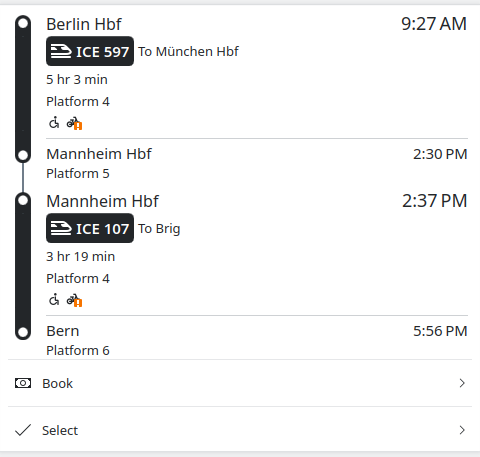
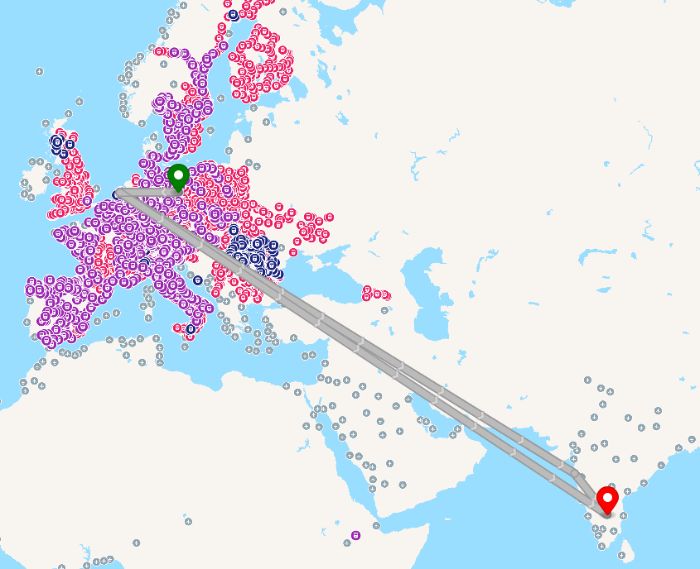
December was quite an eventful month for me, with over 4,000 km travelled by train. This was in part caused by the holidays and visiting family, but also by the KDE PIM sprint in Paris and the 39th Chaos Communication Congress.

KDE PIM sprint in Paris

From the 12th to the 14th of December, I was in Paris. It was actually my first time there for more than a day trip, so I arrived a day earlier to explore the city a bit. I went on a walk across the city with Tobias and Nicolas, and I took some photos.


The weekend was also very productive. We advanced our goal of making KMime a proper KDE Framework; made Message-IDs in emails more privacy-conscious; and discussed various important topics such as the retirement of the Kolab resource and the switch to SQLite as the default backend for Akonadi.


Huge thanks to enioka Haute Couture for having us in their office in Paris.

The sprint being in Paris also allowed me to afterward go visit my grandma, 350 km further south of Paris, so this was particularly convenient.

39th Chaos Communication Congress (39c3)

Another event I went to was 39c3, which is the third year in a row that I attended, and this year again we had an assembly as part of the Bits und Bäume umbrella, thanks to Joseph.


I love the vibe of this event. It’s not very dry or only tech-focused, but also has a big artistic and political aspect to it. And while the number of attendees is very large, at the same time it’s very chill and I don’t feel overwhelmed, unlike at FOSDEM.

At the KDE assembly, we met a lot of interested users, some GNOME friends, and since a bunch of KDE devs were there, we managed to work on a few productive things, like switching the map backend from Itinerary to MapLibre.

And this year, I even managed to go on national TV for a few seconds to speak about Nextcloud. My German grandma called me the day afterward, very happy to have seen me.


Tuesday, 6 January 2026

Kraft 2.0 logo interpretationWith the start of the new year, I am very happy to announce the release of version Kraft 2.0.0.

Kraft provides effective invoicing and document management for small businesses on Linux. Check the feature list.

This new version is a big step ahead for the project. It does not only deliver the outstanding ports to Qt6 and KDE Frameworks 6 and tons of modernizations and cleanups, but for the first time, it also does some significant changes in the underlying architecture and drops outdated technology.

Kraft now stores documents not longer in a relational database, but as XML documents in the filesystem. While separate files are more natural for documents anyway, this is paving the way to let Kraft integrate with private cloud infrastructures like OpenCloud or Nextcloud via sync. That is not only for backup- and web-app-purposes, but also for synced data that enables to run Kraft as distributed system. An example is if office staff works from different home offices. Expect this and related usecases to be supported in the near future of Kraft.

But there are more features: For example, the document lifecycle was changed to be more compliant: Documents remain in a draft status now until they get finalized, when they get their final document number. From that point on, they can not longer be altered.

There is too much on the long Changes-List to mention here.

However, what is important is that after more than 20 years of developing and maintaining this app, I continue to be motivated to work on this bit. It is not a big project, but I think it is important that we have this kind of “productivity”-applications available for Linux to make it attractive for people to switch to Linux.

Around Kraft, a small but beautiful community has built up. I like to thank everybody who contributed in any way to Kraft over the years. It is big fun to work with you all!

If you are interested, please get in touch.

Sunday, 4 January 2026

I've been writing for something like 50 years now. I started by scribbling letters on paper as a child because I was fascinated that these expressed meaning. I wrote a lot for school, for university, for work, and privately. I wrote letters, emails, posts on social media, articles, papers, documentation, diaries, opinion pieces, and presentations. I've been writing my blog for more than 20 years.

Writing always has been a way for me to connect to the people, to the community, around me, communicating with my tribe. It also has always been a way to express, refine and archive my thoughts, a bit like building a memory of insights. It also has been a way to record some of my personal history and the history of the projects I'm involved with.

My writing has changed over the last couple of years. I'm writing less publicly and more focused on specific projects. It feels like it has become less personal and more utilitarian.

Part of this is that the Internet has lost a good part of its strength as a neutral platform to reach the world. For a long time I knew where to reach the people I wanted to address and had control about my content and how it was distributed. Nowadays social media platforms act as distributors, but we are prey to their algorithms. So while publishing content is still simple, it's much harder to get it to your audience without compromising to the mechanisms which make the algorithms tick.

Another part is the disrupting advance of AI writing capabilities. While I have relied on humans to give me feedback in the past, to get into a conversation on the topics of my posts to refine the thoughts in them, now there is this all-powerful-seeming assistant in my editor who is eager to take over those roles. And it would even write for me in my own style. So what's the value of writing in 2026? Is it even worth bothering with trying to express your thoughts in writing, when a machine can produce content which looks the same, much faster and in much larger quantity? What does this do to readers, do they still care about what I would write?

My feeling is that it's still worth to put in effort to create genuine, trustworthy, truthful writing. The format, the tools, the channels might change, but the values don't. The challenge will be to figure out how to create a signal which transports these values.

I have always liked the format and style of a blog, as a stream of thoughts, coming from a personal perspective, but focused on topics of relevance to others. I enjoy reading this from others and I enjoy writing in this style. And I don't have to rely on a platform I don't control, but can use my own.

So it looks like this blog won't go away, but will channel my thoughts in 2026 as well.

A new whiteboard app, Vector-based map rendering in Itinerary, and new releases

Welcome to a new issue of "This Week in KDE Apps"! Every week (or so) we cover as much as possible of what's happening in the world of KDE apps.

We kick off the year with everything that's new in the KDE App scene. Let's dig in!

Travel Applications

KDE Itinerary Digital travel assistant

Jonah Brüchert added a MapLibre-based backend to Itinerary maps views. This allows us to render vector-based tiles, which means they can be displayed at any size without visible pixels. Zooming in and out should also be much smoother. Another advantage is that the map now shows labels in the local language as well as English. This makes the map much more useful in case you cannot read a locally used script. In the future, we might even be able to use map tiles that can display labels in your preferred language. (26.04.0 - pim/itinerary MR #454)

Carl Schwan ported multiple dialogs to a convergent dialog/bottom drawer style (26.04.0 - pim/itinerary MR #413 and pim/itinerary MR #464).

Volker Krause added support for marking reservations as cancelled in your timeline, so that these reservations are not counted in your yearly statistics (26.04.0 - link).

Luca Weiss updated the KLM boarding passes extractor to also extract the boarding group (25.12.1 - pim/kitinerary MR #205). Thomas Arrow added an extractor for KLM's "Ticket for your trip" emails (25.12.1 - pim/kitinerary MR #206).

Tobias Fella added support for extracting GOMUS annual tickets (25.12.1 - pim/kitinerary MR #207).

PIM Applications

KMail A feature-rich email application

Albert Astals Cid made KMail's system tray icon also work when KMail is run inside Kontact (26.04.0 - pim/kmail MR #187).

Office Applications

Okular View and annotate documents

Cody Neiman fixed the extreme downscaling of custom stamps, which resulted in pixelated stamp annotations (25.12.1 - graphics/okular MR #1280).

Creative Applications

Drawy Your handy, infinite brainstorming tool

Thanks to Prayag Jain, KDE has a new whiteboard app called Drawy! It combines a simple interface with an infinite canvas, giving users the freedom to think and draw without limits.

Some of its features are:

  • An infinite canvas with no drawing constraints
  • Support for drawing tablets and touchscreens
  • Tools to group and ungroup items on the canvas
  • A text tool for typing notes

Drawy is still under development, but you can already download a nightly flatpak. You are invited to test the app and share feedback to help shape Drawy as your handy, infinite brainstorming tool!

Since the incubation started, Prayag Jain has been fixing various performance issues (graphics/drawy MR #108 and graphics/drawy MR #115), and Laurent Montel did a lot of code cleanup to follow KDE best practices more closely (link).

Utilities Applications

Konsole Use the command line interface

Leonardo Malaman added a new "Force New Tabs" option to Konsole. This forces Konsole to open a new tab in an already open Konsole window instead of opening a new window (utilities/konsole MR #1112).

Kate Advanced text editor

Christoph Cullmann added out-of-the-box support for neocmakelsp, an LSP server for CMake (26.04.0 - utilities/kate MR #1974).

KAIChat AI Chat

Laurent Montel released KAiChat 0.6.0. This release introduces Wikipedia and weather integration, the capability to copy block code to the clipboard, and a quick search widget.

Network Applications

NeoChat Chat on Matrix

Károly Veres unified the space selection logic, so that using the quick switcher or clicking on a notification to jump to a room will now switch to correct space (26.04.0 - network/neochat MR #2551).

Nate Graham improved the hamburger menu button. Now the menu opens right beneath the button, the button has a pressed state while the menu is open, and the menu will close when clicking on the button again. (26.04.0 - network/neochat MR #2553)

Azhar Momin added a button to cycle through unread highlights (26.04.0 - network/neochat MR #2552).

Joshua Goins re-arranged the profile dialog and grouped similar actions together (26.04.0 - network/neochat MR #2544). And he made it possible to view the profile dialog when receiving an invitation (26.04.0 - network/neochat MR #2548).

Tobias Fella added some fixes for the new version of Matrix rooms (26.04.0 - network/neochat MR #2550).

Kaidan Modern chat app for every device

Melvin Keskin released Kaidan 0.14.0. This release allow you to resend failed messages via the context menu, cancel and restart uploads, join group chats or add contacts by their XMPP URIs, and improves compatibility for servers using LDAP.

System Applications

KCron Task Scheduler

Alexander Wilms fixed running commands containing spaces in their path (26.04.0 - system/kcron MR #46).

…And Everything Else

This blog only covers the tip of the iceberg! If you’re hungry for more, check out This Week in Plasma, which covers all the work being put into KDE's Plasma desktop environment every Saturday.

For a complete overview of what's going on, visit KDE's Planet, where you can find all KDE news unfiltered directly from our contributors.

Get Involved

The KDE organization has become important in the world, and your time and contributions have helped us get there. As we grow, we're going to need your support for KDE to become sustainable.

You can help KDE by becoming an active community member and getting involved. Each contributor makes a huge difference in KDE — you are not a number or a cog in a machine! You don’t have to be a programmer either. There are many things you can do: you can help hunt and confirm bugs, even maybe solve them; contribute designs for wallpapers, web pages, icons and app interfaces; translate messages and menu items into your own language; promote KDE in your local community; and a ton more things.

You can also help us by donating. Any monetary contribution, however small, will help us cover operational costs, salaries, travel expenses for contributors and in general just keep KDE bringing Free Software to the world.

To get your application mentioned here, please ping us in invent or in Matrix.

A few days ago I attended the 39th Chaos Communication Congress (39C3) in Hamburg, Germany, as part of the KDE presence there.

39C3 Power Cycles

KDE

Like at 38C3 in the previous year we had a small KDE assembly as part of the Bits & Bäume Habitat.

There were two talks with KDE contributors in the main program:

The End of 10 campaign also had organized a meetup and a install party.

As Jonah has already reported we got very positive feedback from attendees about KDE’s work.

KDE banner with colored LED decoration.
39C3 KDE Assembly (photo by Carl Schwan)

Itinerary

Itinerary was a frequent discussion topic for me, both with the KDE team and attendees in general.

  • The MapLibre-based vector tile map integration got pushed over the finishing line (see also Jonah’s report).
  • Reaching the end of the year and people being interested in their travel wrap-up, a few issues regarding handling of cancelled reservations in the statistics got fixed. And as people’s trip lists are growing longer and longer that also got a better grouping.
  • We talked about possible ways to improve the stop picker, in particular the country selector which is becoming increasingly annoying to use as it gets longer and longer as Transitous coverage keeps expanding.
  • Ideas for a better first-start onboarding page.
  • We need to investigate whether we handle Zügli’s ticket revocations correcty that were mentioned in the Deutschlandticket fraud investigation talk.

Android

I also had the opportunity to talk to developers of F-Droid and other FOSS Android applications, who share a lot of the pain we are also dealing with in bringing KDE applications to Android.

A big concern especially for people not associated with a bigger umbrella organization is the upcoming requirements by Google for developer verification. While KDE might be less affected by this directly, any negative effect on the larger FOSS ecosystem is of course also bad for us. The continuous close-down of AOSP development is also not helping, making it significantly harder for Google-free Android variants.

None of that is entirely surprising, and it increases the pressure on fully open Linux systems becoming a viable alternative on more mobile devices. Both that as well as collaboration on adjacent infrastructure such as fully open push notification infrastructure has been making good progress in 2025 fortunately.

Transitous

We had a Transitous meetup on the last day at Wikimedia’s assembly, hosted by Jonah, Julius and myself. We should organize and announce this earlier next time, but the space was nevertheless full. Meeting notes are in the wiki.

We had quite a few conversations around Transitous beyond this as well:

  • It looks like we should be able to get SIRI-FM data for a number of operators in Germany in Q1 2026. That’s facility monitoring information such as current or planned elevator outages, something highly relevant for wheelchair routing.
  • We talked about finding better ways to maintain data augmentation than the currently used MOTIS Lua scripts. While there’s options on where to store such information (e.g. Wikidata or OSM), the main challenge is matching GTFS data lacking stable identifiers to such an external data set.
  • We met with the team behind esel.ac, a community-run bike sharing system in Aachen. It’s using OpenBike and produces a GBFS feed that we now also have in Transitous. Community-run mobility services and a community-run routing service are of course the perfect match, and I’d like us to use those cases to showcase what the whole stack of open standards, open hardware and open software can do together. We discussed possible extensions to the GBFS feed such as booking links, geo fencing zones and return constraints for this.
  • There was some prototyping towards using Wikidata as a source of “temporary POIs” for Transitous. That’s events that are tied to a specific location (e.g. a conference) which then can be used as a destination for routing. We managed to produce an abomination of a SPARQL query that resulted in a technically valid set of events. However we haven’t found a proper solution yet for reliably excluding events we would not want in there, such as those of fascist parties.
  • There’s people working on implementing deck layouts in NeTEx. While motivated by accessibility and seat booking, this could provide us with train coach layouts as a byproduct as well. There’s public transport operators involved, so this is hopefully not just theory but also going into production in the not too distant future.

It also looks like we might have another iteration of the Transitous Hack Weekend in Berlin, next weekend already (January 9-11). That’s very short notice and not entirely finalized yet. If you are interested in joining please get in touch in the Transitous Matrix channel.

OSM

The OSM assembly was conveniently directly next to the KDE one, so I could easily drop into conversations about indoor mapping, indoor routing or indoor positioning there. Interest in all parts of this seems to be increasing, we probably should improve the introduction material for this a bit.

There’s also a plan to have an (offline) meeting in the next months to get some of the pending tagging proposals and open questions e.g. around “thick” walls, stairs and fractional levels sorted out and over the finishing line.

We also had the opportunity to discuss the FOSSGIS e.V. becoming a possible umbrella organization for Transitous and/or the Open Transport Community Conference. Especially the latter is becoming slightly more pressing as we got a few sponsorship offers while looking for a venue, and that’s something we can only make use of with an organization behind us that can actually handle money.

Weather and Emergency Alerts

I also met with FOSSWarn to discuss the next steps on the public alert distribution server:

  • Better monitoring to notice system failures, task queue backlogs, source feed outages, increasing parser or push notification submission error rates, or suspiciously large subscription areas. As a byproduct this might also provide interesting insights in the alert data.
  • Better ways to deal with rate limits on push servers. This needs to be ultimately resolved at those servers, as public alerts are very prone to produce notification bursts. This is also a blocker for scaling this up further and e.g. deploying this in a default KDE Plasma installation.
  • Performance improvements for the alert area vector tile generation. That wasn’t a focus initially as this was meant purely as a diagnostic tool, but it has become popular to the point that FOSSWarn wants to integrate this directly into the app. This will probably require geometry simplification on ingested “inline” CAP geometry, which would benefit everyone by smaller and cheaper to parse/render CAP data.

You can help!

Events like Chaos Communication Congress are enormously useful for bringing together, connecting and enabling collaboration between people from different areas or initiatives. The sheer size and diverse set of attendees help a lot with that.

Attending events however incurs cost for travel, accommodation and entrance. Your donation to organizations like KDE e.V. or FOSSGIS e.V. support such activities.

Saturday, 3 January 2026

This post will show the NixOS way of adding a custom package and explain the benefits of this approach in the context of system immutability.

Plasma Pass

KDE Ni! OS recently got a new package installed by default – Daniel Vrátil’s Plasma Pass applet.

Plasma Pass is a Plasma applet to access passwords from pass, the standard UNIX password manager. You can find more information about the applet in Dan’s blog post.

As NixOS doesn’t currently offer Plasma Pass in its repositories, the package is installed in Ni! OS from the sources as in some other BTW, I use … distributions.

In NixOS, this is easily done via overlays. We can create an overlay that defines the plasma-pass package so that it can be installed as if it were a real NixOS package.

Package definition

This is the overlay definition used in Ni! (ni/packages/plasma-pass.nix):

self: prev: {
  kdePackages = prev.kdePackages.overrideScope (kdeSelf: kdeSuper: {
    plasma-pass = kdeSelf.mkKdeDerivation rec {
      pname = "plasma-pass";
      version = "1.3.0-git-59be3d64";

      src = prev.fetchFromGitLab {
        domain = "invent.kde.org";
        owner = "plasma";
        repo = "plasma-pass";
        rev = "59be3d6440b6afbacf466455430707deed2b2358";
        hash = "sha256-DocHlnF9VJyM1xqZx/hoQVMA/wLY+4RzAbVOGb293ME=";
      };

      buildInputs = [
        kdeSelf.plasma-workspace
        kdeSelf.qgpgme
        self.oath-toolkit
      ];

      meta = with prev.lib; {
        description = "Plasma applet for the Pass password manager";
        license = licenses.lgpl21Plus;
        platforms = platforms.linux;
      };
    };
  });
}

Most of this file is self-explanatory (except for the strange looking syntax of the Nix language :) ).

Since Plasma Pass is a KDE project, we want it visible as a part of kdePackages collection, and as it uses the common build setup that all KDE projects use (or should use), it uses mkKdeDerivation to define the plasma-pass package. This defines some basic dependencies, commonly used by KDE projects and adaptations needed for them to work properly in NixOS. For non-KDE-friendly packages, you’d base your package on the standard mkDerivation instead.

The project sources are located on the KDE’s GitLab instance at invent.kde.org, therefore the package definition uses fetchFromGitLab to retrieve the sources. It is also possible to clone repositories on GitHub, fetch and use source tarballs, etc. All fetchers are described at NixOS Manual > Fetchers.

The rev field in the fetchFromGitLab command is the GIT revision that you want to install, and hash you can get by using the nix-prefetch-git command:

nix shell nixpkgs#nix-prefetch-git
nix-prefetch-git https://invent.kde.org/plasma/plasma-pass \
    --rev 59be3d6440b6afbacf466455430707deed2b2358

The buildInputs part defines additional dependencies needed by Plasma Pass, and meta defines some meta information about the package such as the description and the license.

Using the definition

After defining the package, we have to add it to nixpkgs.overlays in any of our NixOS configuration files. In the case of Ni! OS, this is done in ni/modules/base.nix which defines the UI software that Ni! OS installs by default.

nixpkgs.overlays = [
    (import ../packages/plasma-pass.nix)
  ];

With this overlay, plasma-pass can be used as if it was a normal NixOS package.

environment.systemPackages = with pkgs; [
  ...
  kdePackages.plasma-pass
  ...
  ];

When plasma-pass gets added to the nixpkgs repository, the only action that will be needed in Ni! OS to switch to the official version is to remove the import...plasma-pass.nix from the overlays (this is the reason why we explicitly placed it in kdePackages collection – otherwise, we could have just put it top-level).

Custom packages and immutability

The main point of this post is not really to announce that a single new package is added to the Ni! OS setup. Even if it is a cool one like Plasma Pass.

The point is to show how a custom package that is not available in the vast collection of nixpkgs can be added to a NixOS-based system.

The custom package becomes a proper regular Nix package and gets all the benefits of Nix’s particular approach to immutability. If Plasma Pass gets broken after an update (either if new Plasma version breaks Plasma Pass, or if the new version of Plasma Pass no longer works as expected), you can always boot into the version before the bad update.

With distributions with immutable core and custom applications installed as Flatpaks, downgrading is possible, but a bit more involved and relies on 3rdparty keeping the old package versions still available for download.

With NixOS, all the previous versions remain on your system until you decide to remove them.

Welcome to a new issue of This Week in Plasma!

Plasma developers are starting to trickle back from their vacations, and are polishing up and merging work that was nearing completion late last year. Among them are some impactful accessibility features, plus lots more holiday goodies!

Also, allow us to thank everyone who donated to KDE’s 2025 end-of-year fundraiser. Thanks to all of you, we raised an additional €385,000 for KDE e.V. — a staggering, awe-inspiring sum of money! KDE e.V. will put it to good use keeping KDE financially and technically sustainable for years to come.

Finally, please welcome to TWiP John Veness, who has helped out with this week's post! Contributions here are warmly appreciated.

Anyway, let’s check out the work:

Notable New Features

Plasma 6.6.0

The “Slow Keys” accessibility feature has been implemented for Plasma’s Wayland session! (Martin Riethmayer, KDE bug #490826)

The Zoom effect now has a mode where the pointer never leaves the center of the physical screen. (Ritchie Frodomar, KDE bug #513145)

The Emoji Selector app now lets you choose a preferred skin tone for emojis of hands and people. (Tobias Ozór, plasma-desktop MR #3399)

Emoji Selector app showing skin tone chooser menu

It’s now possible to disable the visible timeout indicators on notifications if they stress you out. (Anton Birkel, KDE bug #411613)

Option on System Settings’ Notifications page to disable notification timeout indicators

Notable UI Improvements

Plasma 6.5.5

When Discover prompts you to search the internet for an app that it couldn’t find, the search string now includes the correct OS name if you’re not using a Linux-based OS. (Jaimukund Bhan, KDE bug #513366)

Plasma 6.6.0

Using a game controller will now count as “activity”, stopping the system from automatically going to sleep or locking the screen. (Yelsin Sepulveda, KDE bug #328987)

When a laptop is plugged in or unplugged while asleep, it now wakes up being aware of the current state. (Nate Graham, KDE bug #507203)

System Settings’ Touchscreen page now hides itself when there are no touchscreens connected. (Nicolas Fella, KDE bug #513566)

The screen chooser OSD now has a button to open the full System Settings page if none of the built-in options are relevant. (Kai Uwe Broulik, kscreen MR #442)

Button in screen chooser OSD to configure screen settings in more detail

Creating a sticky note on the desktop via middle-click paste now focuses the text area immediately, ready for editing. (Kai Uwe Broulik, kdeplasma-addons MR #967)

Subtly improved the appearance of overlay badges on Plasma widgets, particularly the ones in the system tray. (Noah Davis, plasma-workspace MR #6118)

Nicer-looking widget badges

In the Application Dashboard launcher widget, category highlights now span the full width of the area, making it more visually consistent. (Christoph Wolk, plasma-desktop MR #3408)

The Large Icons Task Switcher style now does a better job of showing a large number of icons by wrapping them onto multiple rows rather than scrolling horizontally. (Christoph Wolk, KDE bug #513436)

Notable Bug Fixes

Plasma 6.5.5

Fixed an issue that made some Plasma popups inappropriately stay open when they lost focus. (Aleksey Rochev, KDE bug #511187)

Plasma 6.6.0

Possibly fixed one of the most common panel-related Plasma crashes. (David Edmundson, plasma-workspace MR #6086)

Fixed an issue in Spectacle that could make some toolbars in Rectangular Region mode appear off-screen when using a multi-monitor setup where not all screens share a baseline. (Mario Roß, KDE bug #468794)

Fixed a bug that could make the “New!” badge on newly-installed apps in Kickoff overflow for apps with very long names. (Christoph Wolk, KDE bug #513272)

Fixed a weird issue that could make the Task Manager start a drag-and-drop operation when double-clicking a task right on the screen edge. (Aleksey Rochev, KDE bug #501922)

Notable in Performance & Technical

Plasma 6.6.0

Improved and fixed support for OpenBSD in multiple places. (Rafael Sadowski, KPipeWire MR #229, KInfoCenter MR #284, Solid MR #228)

How You Can Help

“This Week in Plasma” needs your help! Publishing these posts is time-consuming and needs community assistance to be sustainable. Right now there are two ways to help:

Work can be coordinated in the relevant Matrix room.

Beyond that, you can help KDE by directly getting involved in any other projects. Donating time is actually more impactful than donating money. Each contributor makes a huge difference in KDE — you are not a number or a cog in a machine! You don’t have to be a programmer, either; many other opportunities exist.

You can also help out by making a donation! This helps cover operational costs, salaries, travel expenses for contributors, and in general just keep KDE bringing Free Software to the world.

To get a new Plasma feature or a bugfix mentioned here

Push a commit to the relevant merge request on invent.kde.org.

I made substantial changes in the KDE Developer Platform documentation over the years. I am effectively its docs maintainer and have the largest number of commits in the repository. This is due in large part because I started contributing to it in 2021, applied as a KDE documentation contractor in late 2023, and started officially working with KDE development onboarding docs in 2024. I'm one of multiple furries contributing to KDE. :3

You can skip reading about my Linux history and go straight to my KDE docs job or to the current state of KDE onboarding docs.

A bit of my history🔗

Back in 2015 I was using Windows 8 Home Single Language when I started searching for some art software to learn to draw. Photoshop is actually very unintuitive and the keyboard shortcuts weren't working for me; Paint Tool Sai had better shortcuts, but the UI confused me. It's when I found Krita, which became my favorite software in large part because the basics seemed intuitive and the keyboard shortcuts were so much more comfortable than the alternatives, but also in part because it had a cute mascot drawn by a furry. That's how I heard about KDE for the first time.

Being a Portuguese and German Language and Literature university student who was trying to learn German, in 2016 I was pissed off by Windows making money with licenses that prohibited you from installing other languages. It's effectively knowledge gating for greed reasons, so I went looking for the reasonable alternative, Linux. I started with LXDE and XFCE, of course, since I wanted everything to be lightweight (unlike Windows).

I switched to KDE Plasma 5 in 2017.

A year later, in 2018, I started using Reddit. By then I knew one thing or two about Linux, and started providing user support there. Later on I was dissatisfied with the r/KDE sidebar, so I volunteered to fix it as a moderator; more importantly and selfishly, I wanted custom flairs for myself, so I selflessly fixed all custom flairs on new Reddit (I strongly dislike old Reddit to this day). The current sidebar of the new Reddit version of r/KDE still is 90% of what I did back then.

Whenever I think about that one video from Kurzgesagt about selfish altruism, I think of how I improved r/KDE for others if even tangentially because I wanted a flair and nicer links to docs that I used often. My selfish needs were met by improving things for everyone, that’s how it should be. It's just another way of saying scratch your own itch.

Now being a mod, I started partaking in KDE Promo as well.

In late 2018 I started contributing to the KDE wikis, specifically fixing most of the Get Involved pages. That was around the time I got a job as a translator at an academic papers translation agency / publisher.

Because of this, I started contributing to translations, becoming a trusted KDE translator in late 2019 with an account with merge rights. That would go on until mid 2020.

2019 is when I really started going down the rabbit hole 🐰. I like ergonomics and I was a work overachiever: I produced more than what was needed, and was always seeking ways to optimize my workflow. This partially lead to me being burned out and leaving the company years later.

Hence I made a bunch of keyboard shortcut analyses on my blog at the time. Back then I felt very proud of what I accomplished, if anything, because it lead to a consistent keyboard shortcut scheme in Plasma that uses its virtual desktop strengths instead of trying to imitate GNOME, i3wm or Windows. Meta is associated with moving, Ctrl is associated with switching, and Shift is associated with transferring. Hence, Meta+Ctrl+Shift transfers a window between desktops and Meta+Shift transfers a window between screens; Meta+Ctrl+Shift also switches between desktops as a result of transferring windows between them, Meta+Ctrl switches between desktops without transferring; lastly, Meta moves the window around by snapping it (and additional snapping moves it to another screen). It’s all very smart.

I might now regret those blog posts because of how badly they were written and how overwhelming it is to read them, but I’m definitely proud of the intuitive shortcut scheme I devised.

It was around that same time when I made the "Contributing to KDE is easier than you think" series of blog posts.

Moving on, 2020 was pretty active. I started contributing to KDE web, while still being a Reddit mod and translating occasionally, and playing a bit with desktop publishing and Scribus. That was around the time Phabricator was being deprecated in favor of Gitlab (I think).

I got a large interest in debugging and triaging, though my triaging was very fleeting and didn’t last long. Debugging in particular was reflected in me fixing the wikis as well.

Soon after I’d start learning development while having no formal IT knowledge prior to this. I had tried my hands with multiple programming languages so far, but none actually sticked; the closest was Perl (and Raku is also pretty cool). I'd eventually find out that I actually really liked C++. The parts of C++ I liked the least were actually old C++, as it's closest to C. I quite liked this talk by Kate Gregory about having developers stop teaching C++ like it's C, and I enjoy keeping up to date with the latest C++ 20/23/26 like Concepts, ranges and monadic functions.

Actively focusing on learning development is why in early 2021 I’d start with my first major code contribution: the “Default Applications” section in System Settings. Coming from XFCE, I wanted a good looking default applications page. I made it work, actually! But the requested changes were too much for me even 2 years later, so Méven took over what I did and got it to the finish line in late 2022.

My attempts at development also reflected in learning how to compile raw, with Kate, KDevelop and QtCreator, in attempting to contribute to Subtitle Composer, and in adding many KRunner web shortcuts because Gitlab search just plain sucked.

(On the matter of subtitling, did you know I subtitled Veritasium's What Everyone Gets Wrong about Gravity to Brazilian Portuguese using Subtitle Composer? If you download the subtitles you'll see my credits at the end.)

By then I had a good understanding of KDE infrastructure in all areas, pretty much.

2022 is when I started touching docs.

To summarize my history:

  • user support
  • promo
  • wikis
  • translations
  • websites
  • triaging
  • development

My KDE docs history🔗

I was originally not a fan of QtQuick and QML. It didn’t help that our Kirigami tutorial was in a terrible shape back then. I knew some C++, so I started with small QtWidgets / KXmlGui.

The most complicated part about our tutorials was actually the poorly explained CMake.

CMake is important because without it you can’t build. So it doesn’t really matter how well written the development part is unless it builds.

Rule number one of documentation:

Never break the docs.

If the user can’t get a functional project by the end of a tutorial, the tutorial failed. So that should be priority number one. I did an entire Akademy talk talking about how docs is part of the product, and broken docs effectively means a broken product.

Now, I actually quite like CMake. I’m just dissatisfied with the state of CMake docs.

To this day I think there is only 5 good resources on CMake, to be checked in this specific order:

Anyway, I first touched KXmlGui by making it fully functional and have screenshots, in addition to mentioning actual build instructions. My fix was so effective, in fact, that there were very few changes to this day.

KXmlGui is our framework for making application windows using only C++. It extends QtWidgets with lots of convenience and standard features, like default Settings and Help menus that show app credits.

I started fixing our flatpak documentation next. In particular I was displeased with the requirement of knowing JSON syntax to be able to even make the thing build (as I myself struggled to understand JSON syntax), so I added some general explanation on how to write a JSON flatpak manifest.

I started a CMake tutorial that went unfinished after a year, and was closed. I still want to make a proper CMake tutorial leveraging our extra-cmake-modules.

extra-cmake-modules (ECM), is a collection of convenience features for CMake, like default compiler settings or the ability to uninstall. Any application using CMake can use it, not just KDE applications!

In 2023 I started touching the Kirigami docs. I finally did the plunge into QML, and the Kirigami tutorial was in a very bad shape. Like real bad. The code samples were incomplete, almost no links, too technical explanation, the order of pages was wrong, when things would build they wouldn’t run, no docs to figure out how to troubleshoot.

I figured it was a priority to fix most links and to at least make things buildable. I made the mistake of doing everything in one go, rendering a merge request with 185 threads and 131 changes.

I then went on to do housekeeping in Develop with smaller fixes. Such a large MR burned me out a bit. In the meantime I started porting KTimeTracker to Qt6, which was a major breakthrough for my development learning, though I would only publish it later on.

With the lessons learned from the KXmlGui and Kirigami tutorials, I made formatting and style guides for Develop. Note the final section about learning about standard documentation practices!

Making established practices known to others is a best practice in the documentation world, and I had been reading about improving documentation since early 2022, so by then I had a good idea of how it works.

I then went on to write docs for Kirigami Addons after I tried my hand at it for a while. It’s a cool QML library for Kirigami settings pages, I felt like new contributors should know about it for their new apps.

Then another majorly significant merge request: Plasma Style. It is one of the docs projects I felt most proud of, and it was recently mentioned in a video from a designer called Juxtopposed.

It was extremely painful and miserable to fix. I had to reverse engineer the inside of SVG files from both Breeze and Oxygen in order to make it a reality. After this I made it look nicer and more readable.

In effect that tutorial is not really a tutorial, but rather a reference guide. The actual tutorial is a video series by Niccolo Veggero, without its foundations I would not have been able to make the guide.

While continuing the housekeeping of Develop, I started looking into other platforms, like Windows. This rendered an interest in Craft and in application styling, or rather, having Kirigami apps actually look correct everywhere. This was a longstanding issue in our Kirigami docs: how inconsistent the resulting project would be when built normally on Linux, as a flatpak, as when built on Windows.

I ended up learning Craft, qqc2-desktop-style and the new KIconThemes effort driven by Christoph Cullmann to make KDE apps look correct in other platforms.

Naturally, this was the next goal to be tackled in our Kirigami docs. The Kirigami tutorial now worked on Linux; it now had to look right and work on Windows, too.

I also got interested in how our infrastructure works, and through playing with my own selfhosted test Gitlab instance, I managed to update our CI wiki page.

My new job working for KDE🔗

By the end of 2023, I saw a job offer as a documentation contractor for KDE, and I took it. I was already a fairly established contributor and I was already working on docs, so I got the job despite having no formal training in technical writing or IT.

Now, I must say two things about this:

  • I knew beforehand that applying and not getting the job is still better than not applying and then regretting it
  • I knew beforehand that more often than not the most desirable job offers get less applicants than they should because people think they're not suitable to apply

This might sound obvious when put into text, but it isn’t. Most people need to be slapped in the face with this for it to actually sink in. Leader training and coaching might be misuse of social psychology to make cash cows using garbage language, but this one thing they get right.

Anyway: if you are passionate about open source and want to put in the effort to improve it, you should check your favorite projects’ websites and see if they have any openings. Then apply. You might get it. I sure hope actual passionate humans will be the ones applying to these sorts of jobs before any LLM sloperators / DevSlops apply to them...

Moving along, now in 2024 I was effectively a contractor. I immediately started searching for technical writing resources to learn more.

Turns out that the vast majority of good technical writing content only exists in books. The rest is just online talks. Unfortunately, of these, too many are enterprise focused, and are thus difficult to apply in open source environments. This means I had to do some filtering.

However, one source stood out as the gateway into this topic: Write The Docs. Go check it out together with the Google Technical Writing courses, it's really good.

While learning on the side, I was also thinking of how to go about KDE docs from then on. I already had plans for Kirigami and the Get Involved pages, but I needed to devise priorities. I also needed more development experience for me to document development practices.

I spent a large amount of time working on KTimeTracker to get development experience and doing work on the KXmlGui API (since at the time the QML docs generation was rather broken). Then I went on to fix our wiki page for getting involved with development.

I had some priorities in mind:

  • Porting tutorials to Qt6
  • Development wiki
  • Moving Development wiki contents to Develop
  • Prepare to switch to kde-builder
  • Better multilanguage support (Python, Rust)
  • Plasma tutorial
  • Appium tests
  • Building software without kdesrc-build / kde-builder

Porting the tutorials to Qt6 was straightforward, although I had to make tutorial adaptations for this.

The development wiki page required some updates and was straightforward to port to Develop. I also made buttons to make it more presentable, but MediaWiki is really not suitable for this.

An Appium tests tutorial was added soon after testing every aspect of the development wiki page, since it was directly related to it. This was actually painful because I had to rely on my weak Python knowledge to understand how other KDE people were doing GUI tests, and it was very difficult to find the correct docs for upstream Appium and Selenium as it’s spread out in multiple places. Like seriously, the upstream docs were both so barebones and so spread out that even our current tutorial linking is all over the place.

In the meantime I’d be learning Python and Rust on the side.

With the money acquired by working for KDE, I managed to purchase a Steam Deck in March 2024. As you probably know, it came with a Plasma 5 X11 session for the desktop. I tried using it as my main computer for quite a while (forcing the Wayland session), and this resulted in two things: the Building KDE software manually and the Building KDE software with distrobox and podman pages. I’m already a podman fan and had been using it before getting my Deck, and with my prior CMake experience all I needed to do was put my knowledge on paper.

I’m proud to say my current CMake docs are effectively one of the best out there (even if it’s just about the cmake tool), and that many of our new contributors have been using distrobox on their immutable systems ever since (but especially in 2025).

In the middle of the year it became clear that we would switch from kdesrc-build to kde-builder as the de-facto tool to develop KDE software, so I put a migration plan in place that would stick around for half a year. It’s important to have a migration plan of some level in our current docs, otherwise we get confused users who effectively lose support docs with no warning. It was nevertheless quite the major effort.

Now the Plasma tutorial... well. That was a jigsaw that required too many pieces for me to assemble. As mentioned before, QML doc generation was broken back then, so the only reasonable source for learning our QML API was the source code docs. But that required knowing Kirigami extensively and... well, our Libplasma QML API was actually lacking even source code docs, so in practice what one needs to do is read the actual source code to figure things out. There was also a lot of historical baggage to go through.

I think you might have noticed by now, but the way documentarians do docs is by first learning the subject and then teaching it. This means becoming enough of an expert on a topic before writing about it. You should never write new docs not based on your knowledge or experience (this also means no LLMs by the way).

Anwyay, Plasma was too large a thing for me to address this soon.

That plus the fact that Plasma itself got an update in Qt6 to use less Libplasma specific stuff and more Kirigami stuff meant I had to focus on Kirigami instead anyway. Additionally, there was now a potential fix for our broken QML doc generation on sight: Qt’s internal QDoc tooling.

The rest of 2024 mostly consisted of doing the required kdesrc-build / kde-builder changes, polishing it together with the Kirigami and Python tutorials. By the end of the year I also helped port quite a bunch of APIs to QDoc, though I definitely wasn’t the star of the show, Nicolas Fella was.

I struggled because I had to learn an entirely new thing, QDoc, as well as address its jank. Every documentation tool has its jank mind you, you just have to deal with the existing problems, and the end result with QDoc was still much better than our previous Doxygen system.

It was cool to finally work with actually well generated QML docs. I was supposed to work on that since the beginning, but it was sure painful by the time I started.

This year, 2025, I managed to work on that and on supporting kde-builder, Craft, Python with Kirigami, adding a new Rust with Kirigami section, test all aspects of kde-builder, test it on all major distros, testing Kirigami on Android, started porting QML things to the new declarative registration, and added many new sections to assist with our existing kde-builder stuff.

And this while having to deal with IRL family health emergencies from the second half of 2024 onwards.

The current state of KDE onboarding docs🔗

All that just to say that I’m finally content with the state of beginner onboarding docs in our KDE Developer Platform. That is to say, all the beginner docs fixes I wanted to add to Develop are either already there or have merge requests ready or almost ready.

Here’s the following improvements I did in Develop since I started contributing there:

  • Kirigami tutorial

    • Builds and runs
    • Has examples that match the screenshots
    • Full source code at the end of relevant pages
    • All links are functional
    • Is ported to Qt6
    • Is ported to declarative registration (MR)
    • You can start the Kirigami tutorial with C++, Python or Rust now
    • You can prepare the project to build on Windows
    • You can prepare the project to build on Android (MR)
    • Is tested on Linux, Windows, building manually or with distrobox
  • KXmlGui

    • Builds and runs
    • Has examples that match the screenshots
    • Full source code at the end of relevant pages
    • All links are functional
    • Is ported to Qt6
  • Building KDE software

    • Fully functional
    • All links are functional
    • kde-builder mentions custom Qt installs now for older distros
    • kde-builder has a troubleshooting page
    • kde-builder has a common developer tips and tricks page
    • Craft on Windows page
    • Building manually with CMake page
    • Building with distrobox page for people on immutable distros
    • There’s a table explaining distro compatibility
    • You can now learn how to figure out the most common problems yourself
    • There’s a full blown page for Qt/KDE learning resources curated by moi
    • You can now learn how to crossreference KDE source code
  • Python tutorial

    • Builds and runs
    • Has examples that match the screenshots
    • Full source code at the end of relevant pages
    • You can now understand how Python packaging works
    • You can use Flatpak for packaging
    • It mentions KDE Frameworks Python bindings
  • Rust tutorial

    • Builds and runs
    • Has examples that match the screenshots
    • Full source code at the end of relevant pages
    • You can use Flatpak for packaging
    • It mentions KDE Frameworks Rust bindings (MR)
  • Contribution guidelines

    • You can now learn how to use Hugo-specific formatting in Develop
    • You can now learn how to style your docs in Develop
    • The style guide links to well-known technical writing resources for beginners

In other words, we have accomplished the following goals:

  • The beginner docs are not broken
  • Kirigami should be the entrypoint for new apps
  • The flagship tool kde-builder is extensively documented and tested
  • Users in immutable distributions are not left in the cold
  • We can appeal to Python devs now
  • We can appeal to Rust devs now

It took a long time to arrive here, in large part because our building tutorials required a lot of care, and Kirigami has 33+ pages to maintain. This is a lot of pages for one person to maintain actively!

Now the beginner onboarding docs can (hopefully) just get iterative fixes, unless at some point we make larger changes.

That is, ignoring the elephant in the room: Plasma.

Now with QDoc and me fixing the documentation in Libplasma, it should be much easier to actually fix our Plasma widgets tutorial, so it could be a goal for next year. In the meanwhile I see Zren started working on it.

Speaking of next year, I can now actually focus on the non-beginner onboarding docs! In particular I feel like adding content related to branding for companies and distros should align with KDE’s current goals now that Plasma is a strong contender for use in enterprise. That, and fixing the one other section I’ve postponed fixing for too long: the Features section, which showcases our KDE Frameworks libraries.

Now that beginners are well served, we can focus on intermediate content and making our products appealing. This means our flagship product Plasma and our flagship libraries.

Naturally that would go side by side with fixing our API docs. But it sure is looking like a great future: KDE onboarding docs is good now, and it will be awesome next.