I did some exploration on KDE's code base. It's amazing what you can find when you have almost 30 years of public history in git.
In doing so I ran some statistics on KDE's core software. That core is relatively well-defined, even over the years. It's the libraries (Frameworks), the desktop (Plasma), and the standard applications shipped together on a regular release schedule (Gear). Of course there are other fine applications in Extragear and elsewhere, but I didn't look at them for now.
In 2009 I did an analysis of KDE's sources and found 4,273,291 lines of code. So I was curious to see where we are today. The numbers are not 100% comparable, because the shape of KDE's core software has changed a bit, but when you look at what is in git (omitting graphics, translations, and other non-code files) you find 8,173,148 lines of code.
But wait, didn't the title say 55,041,902 lines of code?
Yes, when you look at the history, there is more. There is churn, code gets added, code gets modified, code gets deleted. It evolves. So behind every line of code which is shipped today, there are about 7 lines of code which have been written, changed, deleted. This is what you find in git.
So 55 million lines of code have been written to arrive at 8 million lines of code today. They represent progress, learning, and adaptation to a changing world. You see life there.
The most amazing part for me is actually not the code itself, but that there are thousands of people behind this code who have worked together for decades to continuously improve KDE's software. That's the real story.
P.S. Take the numbers with a grain of salt. They are based on a couple of assumptions and influenced by quirks of tools and history. This is not science, it's the report of a hobby code historian.
TL;DR: this post presents an introspectable action runtime for AI-enabled Qt applications, where selected QObject instances are exposed through a smart-object registry, translated into a bounded planning context, and mutated through previewable, validated plans. The approach relies on Qt’s existing meta-object system, using Q_PROPERTY, Q_INVOKABLE, object registration, recursive type discovery, and structured operations to keep LLM-generated actions constrained to the actual runtime object graph. The Smart Shapes QML and C++ examples show promising results with both a self-hosted qwen3-coder:30b model and OpenAI’s gpt-5.4, while also exposing practical challenges around prompt refinement, context size, multi-action requests, operations versus JavaScript fallback, and domain-specific instructions. Future work points toward larger applications, stronger validation and permissions, better context management, and possibly a generic reflective MCP server for Qt applications.
Developing AI-enabled Qt applications often starts with a deceptively simple idea: let users describe what they want, then translate that intent into concrete changes in the running application. However, moving from a natural-language prompt to safe mutations over live QObject instances is not straightforward. The application needs to decide which objects are available, what properties and methods can be used, how to represent the intended changes before applying them, and how to keep LLM-generated output constrained to the actual runtime object graph. Given that, I've been working on designing an introspectable action runtime for Qt applications: selected objects are exposed through a smart-object registry, an LLM provider turns user prompts into previewable plans, and an applier executes validated operations or controlled scripts against those objects. In this article, I’ll explore how these modules work together to transform prompts into structured, introspectable, and executable actions over Qt applications.
Given this, such action runtime platform should satisfy three key requirements:
First, it must be generic and non-intrusive enough to be applied to a wide range of Qt applications, regardless of whether the UI is implemented with Qt Widgets, Qt Quick, or a combination of both. This means the infrastructure should rely on Qt’s existing object model, meta-object information, properties, methods, and object ownership rules, instead of requiring application-specific adapters for every use case.
Second, it must be accurate when translating a user prompt into effective application behavior: natural-language requests should be converted into explicit, previewable, and validated plans that only reference exposed objects and supported operations.
Finally, performance should remain a first-class concern. The planning context sent to the provider must be rich enough to avoid ambiguous actions, but compact enough to keep latency under control, avoid unnecessary traversal of large object hierarchies, and preserve UI responsiveness while plans are generated and applied.
Architecture Overview
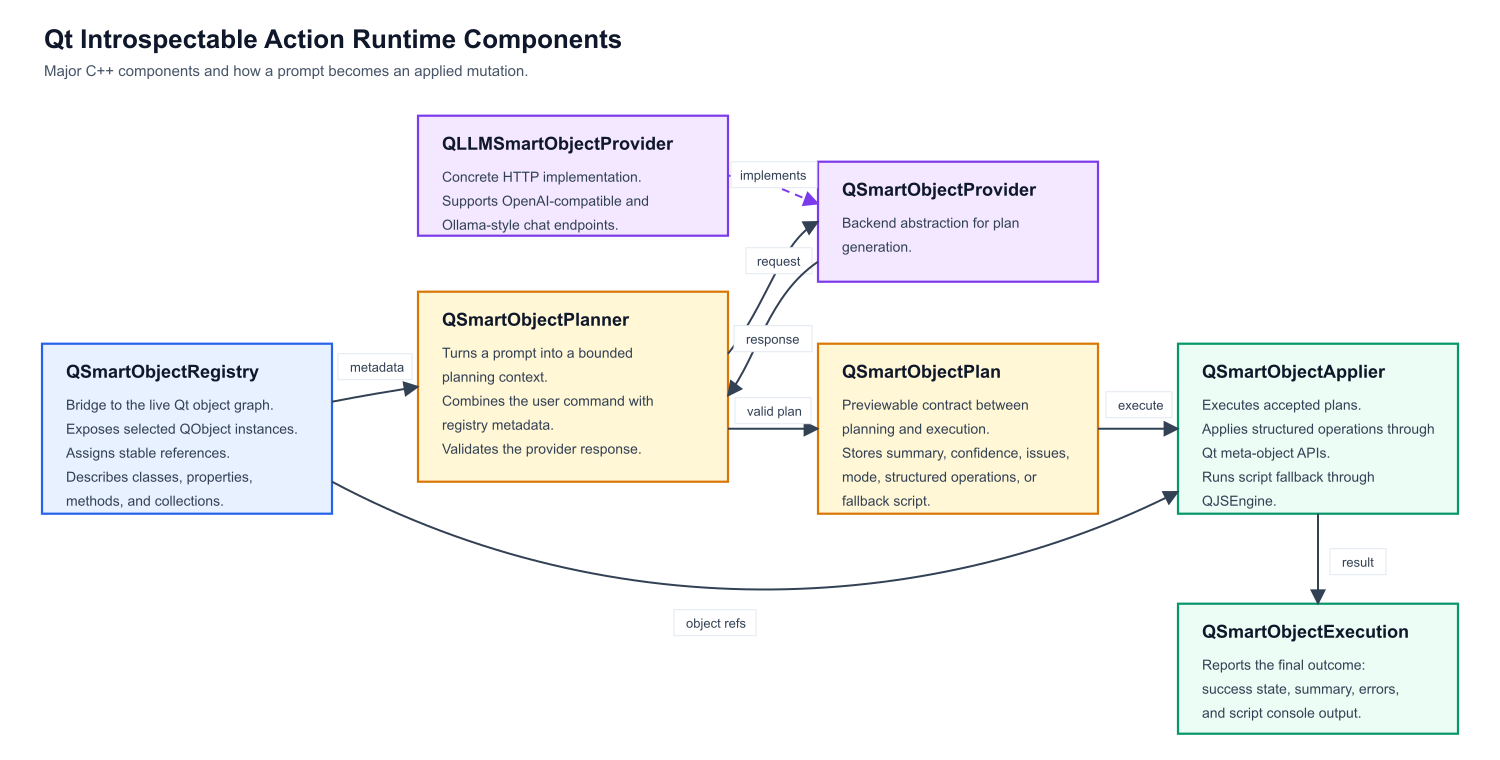
Figure 1 presents the major components of our introspectable action runtime platform.
Figure 1: main components of Qt Instrospectable Action Runtime platform
QSmartObjectRegistry is the bridge to the live Qt object graph. It exposes selected QObject instances, assigns stable references, and describes classes, properties, methods, and collections. QSmartObjectPlanner turns a prompt into a bounded planning context. It combines the user command with registry metadata, sends that context to a provider, and converts the response into a validated QSmartObjectPlan. QSmartObjectProvider is the AI backend abstraction. QLLMSmartObjectProvider is the concrete HTTP implementation, supporting OpenAI-compatible and Ollama-style chat endpoints. QSmartObjectPlan is the previewable contract between planning and execution. It stores the summary, confidence, issues, mode, structured operations, or fallback script. QSmartObjectApplier executes accepted plans. It either applies structured operations directly through Qt meta-object APIs or runs script fallback through QJSEngine. QSmartObjectExecution reports the final outcome, including success state, summary, errors, and script console output.
For an application to be endowed with an intelligent prompt, its relevant runtime state and behavior must be made visible through Qt’s meta-object system. In practice, this means modeling the objects that the prompt should control as QObject-derived classes, exposing editable state as Q_PROPERTY, and exposing safe actions as Q_INVOKABLE methods or slots (many Qt application are already implemented as such). Properties define what the system can inspect and mutate, while invokable functions define the operations that can be requested explicitly by the user. This is an important constraint: the prompt should not operate over arbitrary implementation details, but over a deliberate application surface that the developer decided to expose. The better this surface is named, typed, and organized, the more accurately a natural-language request can be translated into an effective application action.
Object registration and type discovery build on that exposed surface. The application registers selected live objects with QSmartObjectRegistry, optionally giving them stable semantic identifiers and human-readable labels. From there, the registry assigns internal references to these objects and uses Qt meta-object introspection to discover their readable and writable properties, invokable methods, class names, and QObject-based collections. This metadata becomes the planning context consumed by QSmartObjectPlanner: it tells the provider which objects exist, which types can be created or modified, and which operations are actually legal. In other words, registration selects the live objects that participate in prompting, while type discovery describes what the prompt is allowed to do with them.
Type discovery follows the QObject surface exposed by the application. Starting from the objects registered in QSmartObjectRegistry, the implementation inspects their meta-objects and recursively discovers QObject-derived types referenced by Q_PROPERTY declarations, including direct QObject* properties and supported QObject collections such as QObjectList or QList<T>. It also walks readable runtime property values to find live child objects and collection items, so the planning context can include not only the explicitly registered object, but also the relevant object graph reachable from it. This keeps discovery aligned with Qt’s meta-object system: arbitrary C++ implementation details remain hidden, while declared properties, invokable methods, and QObject relationships become available for planning. This enables registering central components, such as a Core object, which can end up registering all important objects in the application, such as controllers. Of course, developers can also define a more limited exposure model by individually registering only the desired objects or by turning off recursive type discovery.
Prompt Engineering
One of the main challenges in this approach is that a fully generic prompt can describe the mechanics of object discovery, planning, validation, and execution, but it cannot always capture the application’s domain semantics. The same property names and methods may have different meanings depending on the example, and some user requests require contextual rules that are not obvious from the meta-object data alone. For this reason, the generic smart-object prompt may be complemented by example-specific instructions. These instructions explain how the exposed objects should be interpreted in that particular application, which coordinate system is being used, how collections should be handled, which operations are preferred, and how ambiguous commands should be resolved. In practice, the generic prompt provides the execution contract, while the example-specific prompt gives the model the domain knowledge needed to produce accurate plans.
These are the most important fragments of currently adopted generic prompt:
You translate natural-language editing requests into a smart-object mutation plan. Return only a JSON object. Do not wrap it in markdown. The JSON object contains either structured operations or a JavaScript script that will run against live QObject wrappers. The planning context contains two authoritative sections: availableClasses and instances. Use availableClasses as an exhaustive class catalog for all exposed objects and QObject-derived member types, and instances for live objects, aliases, and collection membership. Prefer operations mode. Use script mode only when the request cannot be represented with the supported operation vocabulary. ... Supported operations are setProperty, adjustProperty, callMethod, createObject, and destroyObject. Operation targets are direct object refs, created ids, or collection selections. Collection sources can use ownerRef for one owner, owner for a target resolving to one owner, or owners for a target resolving to many owners, including nested selection targets. ... For setProperty and adjustProperty, the property field must exactly match a writable property listed in availableClasses for the target object's class. For collection predicates, the predicate property must exactly match a readable property listed in availableClasses for the collection item class. ... Treat the planning context as authoritative. Do not invent members that are not explicitly listed there. ... If the request cannot be satisfied with the available classes, objects, properties, methods, or collection relations, do not approximate it. Return confidence 0.0, at least one issue, empty operations, and an empty script. ... The result must have this structure: {"summary":"short summary","confidence":0.0,"issues":["optional issue"],"mode":"operations","operations":[{"op":"setProperty","target": {"type":"object","ref":"registry-ref"},"property":"propertyName","value":"value"}],"script":""} ... For script fallback, set mode to script, operations to [], and script to the JavaScript statements. If the request is ambiguous, return an issue and the safest minimal plan.
Example Application
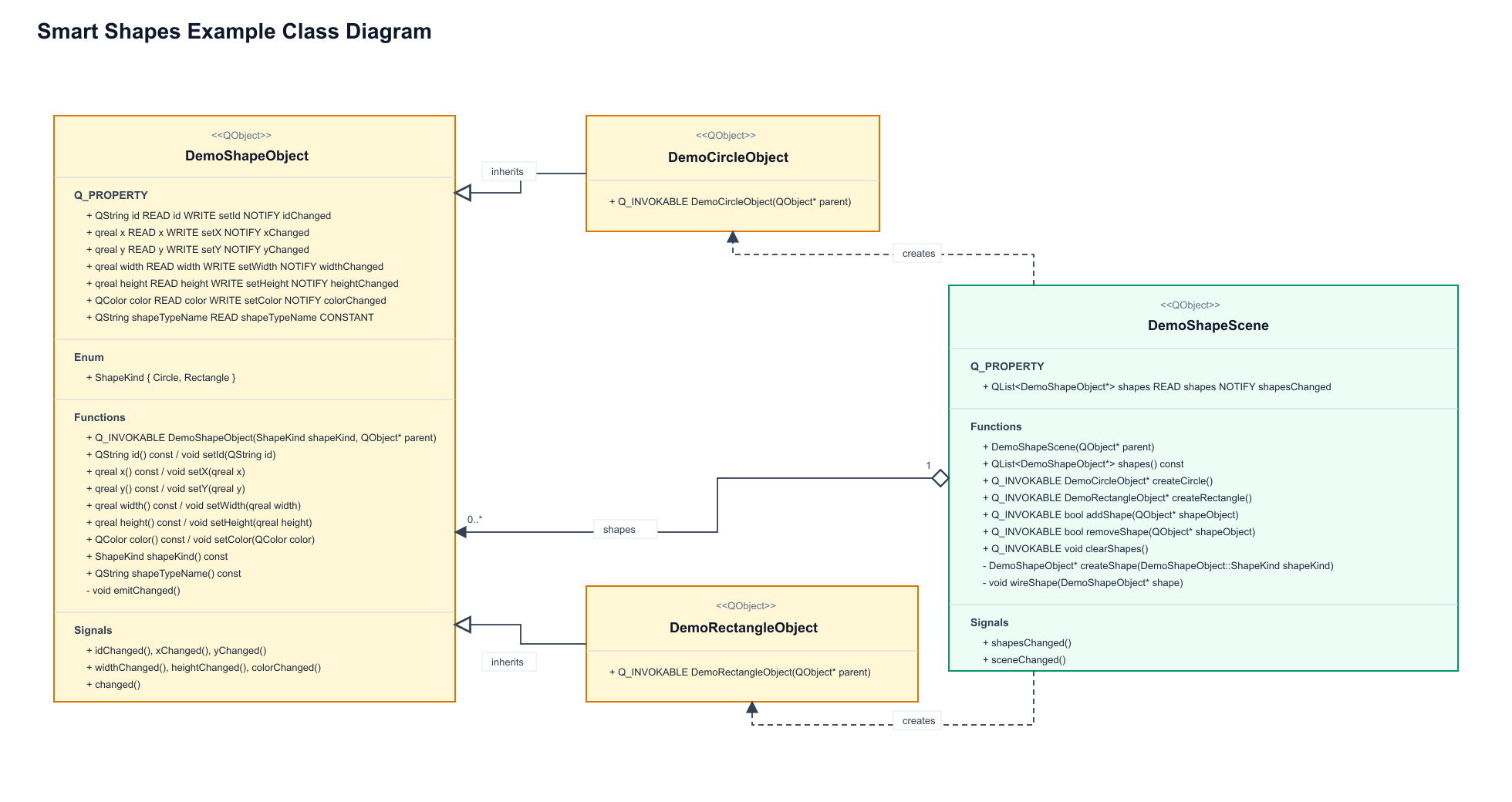
The current implementation includes both QML and C++ examples built around the same shape-editing scenario. In the QML example, the application uses the QtActionRuntime.SmartObjects QML API directly: shapes are created in a Qt Quick scene, exposed through SmartObjectRegistry, and controlled through LLMSmartObjectProvider, SmartObjectPlanner, and SmartObjectApplier objects declared from QML. The C++ example implements the same workflow with a Qt Widgets interface and a SmartObjectsDemoController, wiring the registry, provider, planner, and applier from C++ and reflecting the generated plan back into the UI before it is applied. Both examples expose shape objects with properties such as position, size, color, and type, then allow prompts like moving a circle or changing its color to be translated into validated smart-object plans, as described in Figure 2.
Figure 2: smart shapes example's domain objects
Results
We tested the Smart Shapes example with both a self-hosted Ollama backend running qwen3-coder:30b and OpenAI’s gpt-5.4 model, and both produced good results for a range of natural-language commands. The prompts covered simple creation and editing requests, such as “create a new yellow circle”, “rename the yellow circle to myCircle”, and “move myCircle to the right of rectangleOne”, as well as destructive and spatial operations like “remove the red circle” and “arrange all circles evenly around rectangleOne, using a radius of 200 and the rectangle’s center as the arrangement center”. These tests helped validate that the exposed object model, generated planning context, and structured operation format were expressive enough for both local and hosted models to translate user intent into effective changes in the scene.
0:00
/0:13
Video 1: results for prompt "create a new yellow circle and a new purple circle in different positions"
The next step was to investigate object collection traversal and object discovery in more complex object graphs. The Smart Shapes example already exercises a simple collection through the scene’s list of shapes, but real applications usually expose deeper hierarchies: controllers own models, models expose collections, and collection items may reference other domain objects. The goal is to verify how well the planner can discover these relationships from registered root objects, follow QObject-valued properties and supported collections, and still generate accurate operations without requiring every object to be registered manually.
0:00
/0:13
Video 2: results for prompt "change yellow circle's id to myCircle and position it to the right of circleTwo"
No example-specific instructions were required, so far, for this example because the exposed QObject properties and invokable methods already provided enough semantic information for the planner to generate accurate operations.
Next, we want to try prompts involving multiple objects and multiple actions in a single request. Simple commands are useful to validate the basic planning pipeline, but real user interaction will often combine several intentions at once, such as creating an object, positioning it relative to another one, changing its visual attributes, and updating its identifier in the same prompt. These scenarios are important because they test whether the planner can decompose a compound request into a complete sequence of operations, preserve the correct order of execution, and avoid summarizing changes that were not actually represented in the generated plan. At this point, qwen3-coder:30b occasionally started producing incorrect plans, while gpt-5.4 performed quite well.
0:00
/0:13
Video 3: results for prompt "move rectangleOne to (200, 200) and position all circles evenly distributed around the angles of a circle centered at rectangleOne and with a radius of 150"
Notice that the circles are not actually distributed around rectangleOne’s center. This happens because gpt-5.4 has no way to infer how shape centers are computed from the exposed properties alone. The issue was easily fixed by adding example-specific planning instructions, such as: “In this shape demo, x and y are top-left coordinates. Object centers are computed as (x + width / 2, y + height / 2)”.
Challenges and Future Work
The implementation also showed that the hard part is not simply calling an LLM, but defining a stable contract between the model and the Qt object graph. The implementation moved from an initial JavaScript-oriented approach to an “operations first, JavaScript after” architecture, then added asynchronous plan generation, cancellation, richer registry metadata, collection predicates, runtime property values, and several rounds of prompt refinement. Prompt design became a central concern because the model must not invent properties, confuse planning metadata with writable object properties, skip parts of multi-action requests, or summarize mutations that were not actually emitted.
Context window sizing is another practical issue: the planning context must include enough classes, instances, collection relations, and runtime values to make accurate decisions, but not so much that local models lose reliability or exceed their useful context. The operations mode gives a safer and more introspectable path for common mutations such as setting properties, calling methods, creating objects, destroying objects, and selecting collection items. JavaScript remains useful as a fallback, but it is harder to validate and has a larger execution surface. Other important challenges include handling provider differences between Ollama-style and OpenAI-compatible endpoints, validating JSON responses, resolving object references safely, and deciding how much of the live object graph should be exposed to the prompt.
A natural direction for future work is to package this infrastructure as a generic reflective MCP server for Qt applications. Instead of each application embedding its own prompt-to-object bridge, a Qt MCP layer could expose selected QObject instances, properties, invokable methods, object collections, and runtime state through a standard protocol, allowing external agents to inspect and operate on live Qt applications in a controlled way. Beyond that, there are several interesting extensions: better permission models for deciding which objects and operations are visible, richer schema generation for enums and value types, configurable recursive discovery policies, stronger plan validation before execution, undo/redo integration, transaction support for multi-step plans, visual plan previews, and model-independent test suites for comparing local and hosted providers.
Another promising direction is to improve context management, so large applications can expose only the subset of the object graph relevant to a given prompt while still preserving enough semantic information for accurate planning.
Last but not least, this solution must be tested in larger and more complex applications. The Smart Shapes example is useful because it makes the core ideas easy to see, but real Qt applications have deeper object graphs, richer domain rules, long-lived controllers, asynchronous operations, permissions, and state that changes while the user is interacting with the system. Those are the scenarios that will really test whether reflective discovery, bounded planning contexts, structured operations, and fallback scripting can scale beyond a controlled demo. If this approach continues to work there, it opens an interesting path: Qt applications that can expose their own runtime capabilities and let users interact with them through intent, not just through predefined UI controls. What about including API documentation, in a Retrieval-Augmented Generation (RAG)-like approach?
That’s all for now. Lots of fun happening over here. 😉
I just realized it has been a full year since I blogged last. Time flies and I will try to do (much much) better this year.
My last entry was about foss-north 2025 and now foss-north 2026 has just passed. It was a successful event and Tobias really helps bringing new energy to the event – including a whole crew of volunteers.
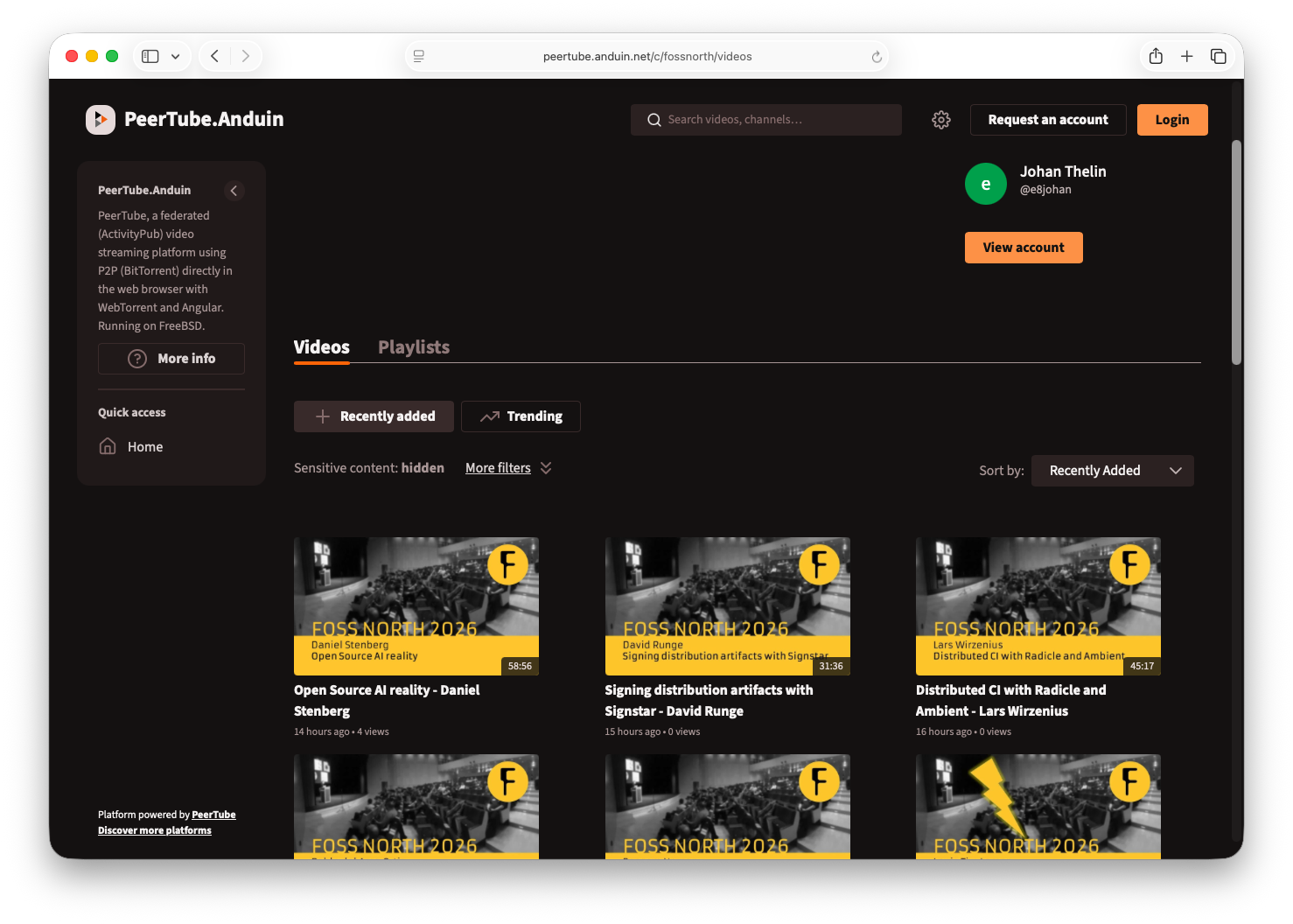
During the foss-north events all talks are recorded. These are then made available on YouTube and on a peertube instance. Historically this has been conf.tube which was provided by a kind supporter to the cause. However, now the costs has exceeded what is reasonable, so it was migration time.
We’ve looked at taking over the full peertube instance, but quickly realized the costs were too high for us as well. Instead we took over the domain (thank you!) and one of our speakers offered to host us on his instance. Thus, all past foss-north videos, and the new ones for 2026, have been migrated to https://peertube.anduin.net/c/fossnorth/videos .
So, what about migration? The intra peertube transfer failed – much because the aging conf.tube setup did not want to produce the 360GB export. So we had to take another path.
What path you ask? Python scripts! (of course)
So first, we created a Python script storing all URLs from conf.tube. Both for playlists and videos. Then we created a script collecting the corresponding links from YouTube.
Since the new peertube instance does not have direct import from YouTube enabled, the script downloads the video file, metadata and cover picture from YouTube, and then uploads the video to the peertube instance with the metadata and cover picture. As this is a fully automated flow, it is very convenient.
(for 2026 I adapted the script to sync a YouTube playlist, which is very convenient)
The final output from the migration scripts was a set of redirection statements for nginx which is now deployed to the conf.tube server. This means that all old links to foss-north material at conf.tube should redirect to the corresponding video at peertube.anduin.net, so hopefully no links are dead.
Hi, I'm Ansh Singhal, I am an undergrad Engineer from India, majoring in computer science. My journey in open source started with KDE only, while I was looking for projects to contribute to, I came across the kde mentorship website, tried building it and failed, and then somehow successfully able to build it locally I had my first contribution a line in the readme file of the mentorship site "Note : Ensure your hugo version matches the one in CI/CD pipeline". Then, I discovered about Season of KDE but the contributors for it have already been selected so I texted Paul and he informed me about a new site Join.kde.org that I can work on while the SoK occurs under the mentorship of Anish Tak and so my journey with KDE began, with questions and hiccups along the way I learnt and improved.
From the mentorship site i learnt about GSoC and decided to put in a proposal for the site after consulting Paul and Anish about it, Fortunately my proposal was accepted for GSoC, and over the next 12 weeks, I'll be working on "Building Join.KDE.org" and will be sharing my journey.
About the project
The project, Join.KDE.org, focuses on several things:
Build Join.KDE.org as KDE's new contributor entry point and ensure they can find the perfect project based on their skillset and interests. It will also help with retain said contributors as they can find new projects easily.
This will be done by creating several sections based on interest
Learn
Add
Divulge
Work on Projects
Meet
Incubate
Explore
Suggest
Read
This will allow new contributors to figure out the path they want to follow instead of looking for scattered resources all over ultimately unifying the entry points and resources into join.kde.org.
The goal isn't to replace existing resources but provide a hub/ router to access these easily.
Community Bonding Period
In the community bonding period the goal is to make a template for the front page/landing page and collect all the resources for incubating projects into KDE environment
Hey everyone! This is my first post and Week 1 status report.
I started this week by setting up:
The project and configuring jj, a local version control system that has been a lifesaver for testing, simulating, and keeping my commits organized.
The first step was to build and refactor Plasma NM in parallel while setting up a bare-bones folder structure. Here is the Commit I made.
After creating the initial folder structure, I started refactoring the main backend service for WifiSecurities, which includes creating separate components for the Enterprise section, authentication, and Wi-Fi security options.
This week, I learned a lot of new things about local version control, architecture for Qt Widgets, and QML.
Image by: Nuno Pinheiro Following posts on specific work being done on Oxygen, this post is going to try to go beyond the manifest work and look at the bigger picture driving it. The motivation for writing it came when I was listening to a music artist who had completely rebranded himself by appending "Frutiger"...... Continue Reading →
Twice a year FOSSGIS e.V. (the German local chapter of OpenStreetMap) hosts a multi-day meeting at
Linuxhotel, for people to work on primarily non-technical topics, such as organizing conferences,
presence at events, public communication and outreach, lobbying and political
activities around FOSS/Open Data, finances and fundraising, and operations of the FOSSGIS e.V.
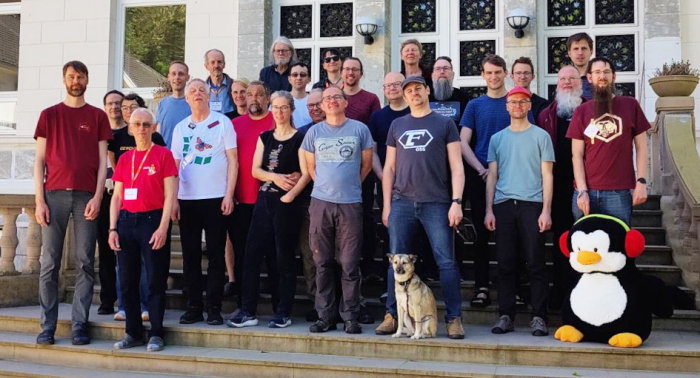
I had been at Linuxhotel for a KDE sprint before, but only after looking up the group photo from back then I realized that this was already 18 years ago…
Open Transport Community Conference
While the first edition of the Open Transport Community Conference
last year was very successful and ran very smoothly overall, one important thing that had
to change to make this long-term sustainable was moving this under the umbrella of some form
of legal entity. We are looking at doubling the length, doubling the number of attendees and
a 40x increase in budget this year, way beyond something you’d want to have individuals carry
the legal and financial risks for.
I’m therefore very happy that with the FOSSGIS e.V. we have found a suitable organization for this. Besides
the obvious overlap in domain and partially also in people, FOSSGIS e.V. has extensive experience
in organizing conferences we can tap into, as well as infrastructure we can use.
This should allow us for example to handle sponsors this year, as well as offering (optional) paid tickets
for people attending for their employers. And with that we could then (given enough income)
provide some kind of travel support program for community attendees to soften the impact of the
rather expensive location in Switzerland.
The weekend provided an opportunity to work out a number of legal, financial, organizational
and operational implementation details for that. Some aspects have still to be resolved with the tax
advisor though, given Switzerland isn’t in the EU, which should then unlock finally opening the
registration for the conference.
Transitous
Transitous is in a somewhat similar situation, although with less time
pressure for now. To improve long-term sustainability we’d also need a legal entity to hold
assets (such as the domain), handle money and sign contracts.
We are extremely lucky so far that the “big” servers doing the heavy lifting are provided to
us for free, including all hosting cost. While there’s no indication that might change anytime
soon, we at least want to have options ready should this change, or in case we need additional
capacity.
Our current yearly budget is around 60€, if we’d have to pay market prices for our
entire infrastructure we’d need to increase that significantly, 50x before the global madness in recent months,
more like 100x now. Obviously not something we can do overnight, so starting to explore and ramping
up fundraising options sooner rather than later makes sense.
And that’s just the direct cost for server operations, it would also be great to be able to support
community members with travel costs for example.
Just as with the conference, the plan is to attach Transitous to the FOSSGIS e.V..
FOSSGIS e.V. is “gemeinnützig” in Germany, which allows receiving tax-deductable donations,
something we’d be unlikely to achieve with a separate organization on our own.
FOSS and Open Data
With my KDE hat on, there were also a number of other relevant and interesting topics:
Lobbying for recognizing FOSS/Open Data work as charitable (“gemeinnützig”) in Germany, to receive all
the legal, tax and PR benefits associated with that, and without the current workarounds and uncertainties
(see also the ongoing petition for that).
Lobbying for FOSS use in public administration, in particular in the context of the current interest in
“digital sovereignty” there.
I think for all this we could benefit from building more bridges between the various
communities and organizations affected by or interesting in those topics.
You can help!
It’s foundations like FOSSGIS e.V. or KDE e.V. that provide
all the boring legal, financial and operational infrastructure for Free Software and Open Data communities
and initiatives to do their work, and keep doing that independently. Your donations enable this.
The first maintenance release of the 26.04 series is now available, with the usual batch of stability fixes and workflow improvements.
This release also contains an important security fix, so we strongly advise all users to upgrade to the latest 26.04.1 version.
Thanks to an NLnet/NGI0 grant, we had a security audit provided by Radically Open Security. The audit found one serious vulnerability that can happen when opening a malicious project file, allowing remote code execution. This is fixed with Kdenlive 26.04.1. Thanks to Edoardo Geraci and Radically Open Security for helping us make our software safer!
We are not aware of the vulnerability being exploited so far. It is important to understand that this security issue is about a manipulated .kdenlive project file containing potentially malicious code. Therefore, it is only relevant if you open a .kdenlive project file that you received from someone else or downloaded from the internet. If you are working only with your own projects or with shared projects in collaboration with fully trusted partners, there is no security risk.
If you cannot upgrade, do not open a project file that was not created by you.
Although the vulnerability is fixed in 26.04.1, we have also implemented another layer of security checks for the upcoming 26.08.0 to warn the user if some other unexpected input is detected in a project file.
Head to our download section to get the latest binaries, or check the updates from your package manager. Please note that for Linux only AppImage and Flatpak are supported by the Kdenlive team.
After you have registered, you think which interesting talks will we have on the weekend?
And you know who has something to say? *YOU*
Yes, *YOU*. I'm sure you've been working on something interesting, or have a great idea to share.
*YOU* may think that your idea is not that great or the things you work on are not interesting, but that's seldomly the case when someone explains me their "boring" thing they've been working on, i always think "Wow that's great".
Ok, so now that I've convinced you to send a talk proposal, when better than *TODAY* to send it?
Yes I know the Call for Participation is open until the 17 of May, but by sending it today you make sure you don't forget sending it later and also [more important for me] you help those of us in the Program Committee not to worry when the final date starts approaching and we don't have lots of talks yet because you all prefer sending talks on the very last minute.


 sandroandrade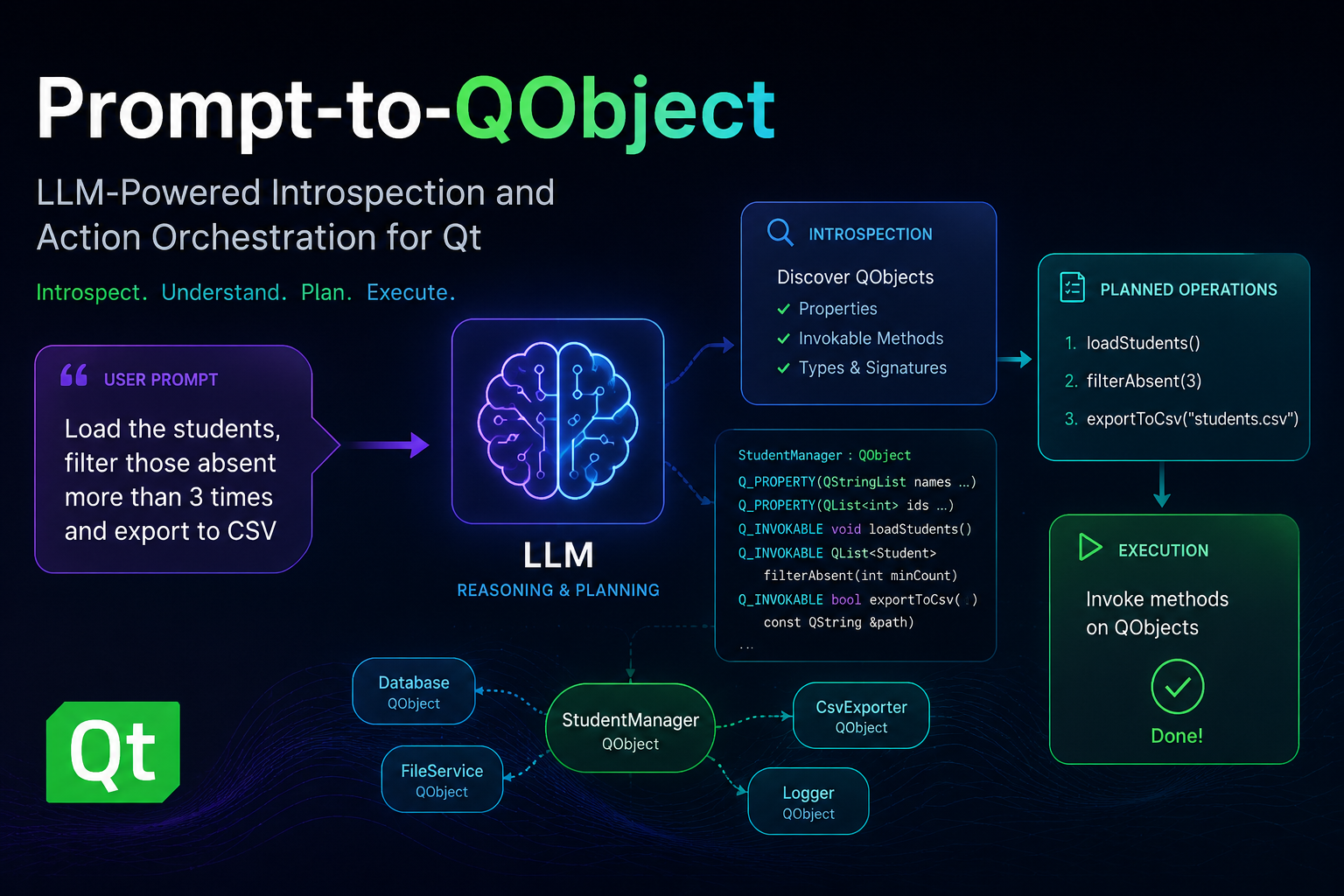


 @anshs-lab:matrix.org
 GSoC
GSoC