In other words, this allows you to add shortcuts to custom actions that can be run on currently-selected files or folders in Dolphin.
This was implemented by a new contributor Albert Mkhitaryan, who also did the necessary library work with my assistance. Kudos to Albert.
Most of Dolphin's UI could already benefit from shortcuts with some caveats and the new feature does not apply to context menu plugins, such as Ark's "Extract here" or Dolphin's "Set Folder Icon".
Another thing worth mentioning is the memory leak detection effort started by Nicolas Fella, as this allowed me to find a couple of uncommon mem leaks. The work is not complete as KIO CI tests don't pass under LSAN scrutiny yet. I have been working on it and only a couple of hard cases remain to be solved - help welcome.
Next will be activating LSAN for Dolphin tests and CI for further stability but that is alreadyfruitfull.
Having stopped my personal blog, I am now using kde-blogs.
Firstly, thank you to the entire community and mentors for selecting my proposal for GSOC. Congratulations to all others 🎉
Goals for GSOC
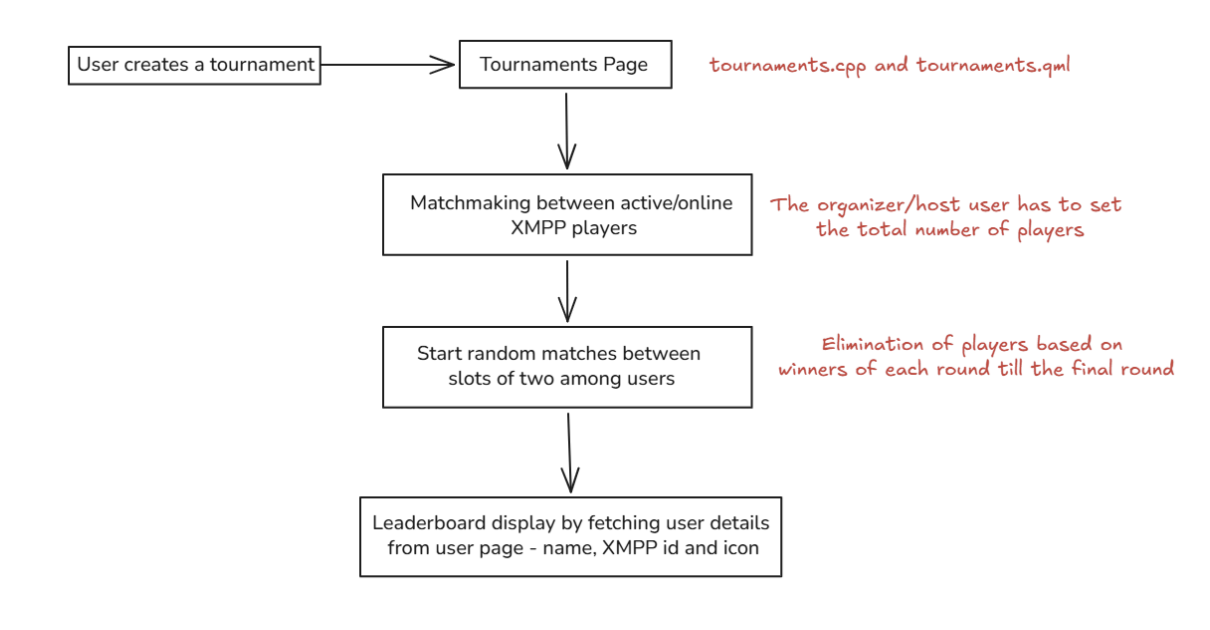
Starting with the goals for ManakalaNextGen, the GUI of Mankala Engine, the main goal is to implement a tournament system for the game. I plan to start with improving the user registrations by giving users the option to create an XMPP account directly from within the game. We can have a minimum of 3 servers, which the game can support.
Based on this, we can also have possible player icons and in-game names for the players, which would be displayed in matches.
Now, coming to the important part for tournaments, my aim is to create a new page for the tournament host and the participants. In that host specifies the game variant like Bohnenspiel, Oware, etc., and also the amount of time each game should run. The participants need to join the game using the room code given by the host. At last, we implement the logic for player elimination and create a leaderboard ranking the players based on their position.
Our main concern?
Yes, the game data might get lost. We need to come up with suitable solutions to export it and make sure that even if a player leaves the game, the game data is not lost and isn't declared invalid.
So, to summarize this, here are the main goals:
Add XMPP server registration option for players and update the registration page.
Create tournaments and logic for player elimination and ranking.
Make other necessary changes based on feedback.
Thanks for reading. Looking forward to a productive summer 🌞
Recently a new submodule has landed in Kirigami: “Forms”.
Until this point, Kirigami had only offered the classic “FormLayout” component. which is used for configuration pages throughoug systemsettings, Plasma, and some apps. It’s the classical form used in desktop toolkits for decades:
This is a fairly clean layout which however is starting to slowly become outdated, as modern toolkits are starting to use a different layout nowdays, based on “cards”
Unfortunately FormLayout very bound to the classic layout, and it wasn’t really possible to adapt it to the new look in a compatible way which didn’t break existing applications in unexpected ways.
This is also the reason a new approach was done provided by kirigami addons: “FormCard”, which is used by a lot of applications; for instance here in NeoChat:
We wanted to have this new style of forms in the base Kirigami API, so after a review of the existing FormCard, we decided to make several changes, for two main reasons: First, FormCard is bound to the card style of form as much as FormLayout was bound to the classic flat style. Also, it tried to provide ready-made components for every kind of control; so it had its own TextField, its own RadioButton and so on — effectively becoming its own separate toolkit.
So we opted instead to go down the route of having a more generic API, so the Forms module includes containers that define a semantic structure of a form, which contains all the normal controls — such as textfields, checkboxes and radiobuttons.
Semantically, a Form will contain one or more FormGroup objects, each of which will contain one or more FormEntry objects. Then a FormEntry will contain the control which represents the configuration of the particular thing. It can be a single control (like a button or a checkbox) or it can be any layout with completely custom contents.
I already ported 4 modules of systemsettings to the new system: the landing page, the “workspace options” kcm, the mouse settings and the touchpad settings.
But wait… this page looks exactly the same as before; why?
A key was to do an API that was as much as separated from any appearance as possible, as we don’t know how UI design trends will evolve in the future. But this also allows us another thing: to have two separate implementations: the new one “card based” and a legacy one which looks exactly like the current FormLayout components. This is used only in systemsettings, so we can port all the kcms without introducing glaring visual inconsistencies, and when we are done, flick the switch and convert the look of everything all in one go.
Since most of KDE’s QML applications already use the existing card-style kirigamiaddons FormCard components, the new look will be used there.
And then in the future, when trends change again, we can re-style all the settings pages in one go.
A call to action
We ideally want the whole set of systemsettings kcms to be ported as soon as possible to the new system, so we can have soon a nice visual overhaul in the whole systemsettings.
In order for this to happen, we need the help of everyone, so… patches welcome
As an example, this is the merge request that ported the first four kcms.
When porting, it’s also possible to see how the kcm will look with the new system as well, to make sure it works well for when we flick the switch. If we run in a terminal:
KDE_KIRIGAMI_FORMS_STYLE=cards systemsettings
We get systemsettings using the new style for pages already ported:
Porting from FormLayout to the new Form/FormGroup/FormEntry system should be really straightforward; it should be possible to make good progress in little time.
With your help, soon KDE’s settings will benefit from greater consistency, a more modern style, and easier adaptation to future designs.
Google Summer of Code (GSoC) is a training/mentorship program that allows new contributors to open source to work on projects for between 175 to 350 hours under the guidance of experienced mentors.
KDE will mentor twelve projects in this year's Google Summer of Code.
Prayag Jain aims to introduce a robust and high performance block editor and a proper markdown parser to Marknote under the guidance of Carl Schwan and Mathis Brüchert.
digiKam is an advanced open-source digital photo management application which provides a comprehensive set of tools for importing, managing, editing, and sharing photos and raw files.
Srirupa Datta, who already successfully completed a GSoC in 2023 working on Krita, will this year work on digiKam to interface the database search engine to an AI-based LLM. This project is mentored by Gilles Caulier, Michael Miller and Maik Qualmann.
Shubham Shinde, a successful participant in last year's GSoC working on Merkuro, will work this year again under the guidance of Carl Schwan to improve the Kirigami framework and the developer experience.
Ojas Maheshwari will work under the guidance of Albert Astals Cid to implement font subsetting when saving PDF files in Poppler (the PDF rendering library used by Okular).
Lokalize is the localization tool for KDE software and other free and open source software.
Navya Sai Sadu will improve Lokalize by redesigning the translation memory tab to help with the translators' experience. This project is mentored by Finley Watson.
KeepSecret is a password manager for viewing, editing, creating, or deleting passwords.
Roshani Kumari will work on improving the user experience and adding new features such as import/export of passwords, adding a built-in password generator, and much more. This work is mentored by Marco Martin.
Ansh Singhal will work on creating a new join.kde.org website which aims to improve the onboarding experience by centralizing the different entry points the KDE community has. This project is mentored by Anish Tak, who was a successful mentee last year on the same topic!
Mankala is a two-player board game containing multiple variants.
Sayandeep Dutta will add a new interface to create tournaments for the Mankala game. This project is mentored by Benson Muite and Srisharan V. S. who completed a successful GSoC contributor on the same project last year.
Sealed bootable container images include all the components needed to create a fully verified boot chain, from the firmware to the operating system composefs image.
This relies on Secure Boot and thus only supports system booting with UEFI on x86_64 & aarch64.
The components are:
systemd-boot as bootloader,
a Unified Kernel Image (UKI) which includes the Linux kernel, an initrd and the kernel command line,
a composefs repository with fs-verity enabled. This is managed by bootc.
Both systemd-boot and the UKI are signed for Secure Boot.
The images are test images so the components are not signed with the official keys from Fedora.
The main direct benefit that we will get from this support is that we will be able to enable passwordless disk unlocking using the TPM in a way that will be reasonably secure by default.
We welcome testing and feedback! Please see the list of known issues and report new issue at github.com/travier/fedora-atomic-desktops-sealed.
We’ll redirect them as needed to the right upstream projects.
Beware, those are testing images. The root account does not have a password set and sshd is enabled, by default, to make debugging easier.
The UKI and systemd-boot are signed for Secure Boot but, since those are test images, they are not signed with the official keys from Fedora.
Don’t use those images in production.
Where can I get more details about how this work?
If you want to know more about how sealed images work (i.e. how we make bootable containers, UKI and composefs work together to create a verified boot chain), see the following presentations and documentation:
Fedora 44 has been released!
🎉 So let’s see what is included in this new release for the Fedora Atomic Desktops variants
(Silverblue, Kinoite, Sway Atomic, Budgie Atomic and COSMIC Atomic).
We have moved the cross-variants issue tracker to the new Fedora forge.
This is the best place to file issues that impacts all variants or to coordinate work between all of them.
If you have issues specific to a given desktop environment then we usually prefer to track them in each respective SIG trackers.
They are listed on the README for the atomic-desktops organization.
Unified documentation, hosted on the new forge
The unified documentation for all Atomic Desktops is finally live!
Unfortunately the translations have not been migrated so we will need help to re-translate everything again, once the translation setup is ready with the new forge.
It should be mostly copy/paste from the previous docs and this time we will only have to translate the docs once and not for every (new) variant.
Some AppImages are still using an old AppImage runtime that relies on FUSE 2 libraries being available on the host.
See the discussion thread for examples on how to check the runtime of an AppImage.
If some of your AppImages do not work on Fedora Atomic Desktops 44, we recommend:
Looking for a Flatpak for the application and giving it another try. Consider helping upstream package their application as a Flatpak.
Reporting the issue upstream so that they are aware that they should use a newer runtime. Consider helping upstream with this as well.
EncFS or CryFS backends for Plasma Vaults are removed
KDE upstream no longer recommend using the EncFS nor CryFS backends for Plasma Vaults, notably because they rely on the FUSE 2 libraries.
If you are using one of those backends, you should migrate your data to a new Vault using the only maintained backend (gocryptfs).
Ideally this should occur before the update to Fedora 44.
If you have already updated to Fedora 44 and need access to your data, you can layer the needed packages (cryfs or fuse-encfs) using rpm-ostree install <package>, then migrate your data and finally reset the layers with rpm-ostree reset.
Dropping compatibility for pkla polkit rules
Support for the legacy pkla polkit rules format has been removed.
It is unlikely that you were relying on support for those rules as most of the ecosystem has moved on to the new Javascript based format.
Unified out of the box experience with KDE Plasma Setup (OEM installation)
Thanks to the new Plasma Setup, it is now possible to install the system with Anaconda with minimal configuration and then complete the installation on the first boot by creating a new user and selecting the timezone.
This is great when you want to install Fedora Kinoite on a computer and don’t want to setup a user in advance.
As always, I heavily recommend checking them out, especially if you feel like some things
are missing from the Fedora Atomic Desktops and you depend on them (NVIDIA drivers, extra
media codec, out of tree kernel drivers, etc.).
What’s next
Helping us with a few nasty bugs
If you are interested in contributing to Fedora Atomic Desktops, here are some bugs that we will have to fix in the short term.
We would greatly appreciate help with:
Fixing root mount options (atomic-desktops#72):
This is a long standing and mostly invisible bug that impacts performance.
Moving away from nss-altfiles (atomic-desktops#108):
This is another long standing source of issues that new users regularly face.
A lot of work is happening to make the transition to Bootable Containers as smooth as possible for our existing users.
You can look at the roadmap for this transition at atomic-desktops#26.
Some time ago I used a feature in KDE called “Run a command” when an event triggered. It triggered for me when a calendar event fired and used Piper TTS to read the event to me out loud. A small popup and a pling don’t work for me.
I tried to get the feature back into KDE, but since the merge request isn’t going anywhere and people don’t give details how to implement it correctly I wrote Sigrun now. It is named after a Norse Valkyrie and is short for Signal Run.
It is a systemd service running as a user and listening on DBus signals. Once it finds a configured one, it runs its command. The desktop doesn’t matter.
Here is the rule that reads my calendar reminders aloud via kde-tts.py:
The Kdenlive team is happy to announce the first major release of 2026. This cycle focuses on stability, interface polish and usability improvements.
For the first time in Kdenlive's history, this version includes features implemented by so many different contributors. Our developer community is growing, don't hesitate to join us building a free and open source video editing program that respects the users privacy and provides a tool to democratize communication.
In case you missed it, check out the State of Kdenlive to learn more about the project's health and the nifty features coming soon.
Monitor Mirroring
This feature allows you to mirror any monitor while working in fullscreen mode. It’s especially useful when working with multiple displays or collaborating with others in the editing room, making it easier to share what you're doing without disrupting your workspace.
Effects and Transitions
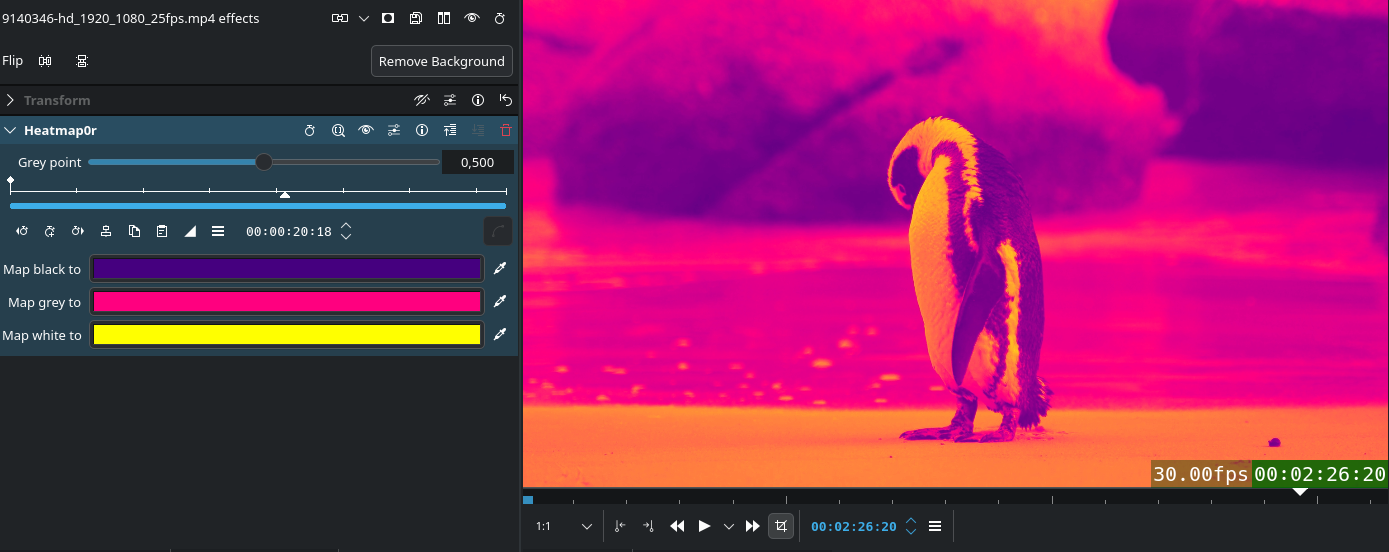
This release improves effect and transition workflow. We improved the logic for luma files to adapt to different project profiles and automatically reload previews of downloaded lumas. We added a dedicated tab in the transitions list to browse luma files and added the ability to drag-and-drop transitions directly onto timeline clips. This release also comes with a new Euclid Eraser transition and a Heatmap effect. We also fixed issues with audio TAP effects and improved internationalization support, fixed a bug in the Video Noise Generator effect and scaling issues in the Transform effect.
Animated Previews
Transitions now include animated previews, making it much easier to visualize how they will look before applying them. Additionally, dropping a transition onto the timeline can now automatically adjust its duration to match the clips above and below, saving time and reducing manual tweaking. The first version of this feature was originally written by Swastik Patel, during KDE's SoK 2025.
Automatic Adjustment
Transitions automatically adjust to the length of the clip they are being applied to.
Math Expressions
Added basic math expression support in effect spinboxes.
New Heatmap Effect
Added a new frei0r heatmap0r effect.
Interface and Usability Improvements
Timeline
This release comes with many usability and workflow improvements to the timeline, such as a Disable Timeline Effects function to timeline hamburger menu, the ability to import and add clips directly from the timeline context menu with a smart length detection function, and sequences now have audio thumbnails. Other highlights include:
Continuous Panning
Hold the middle mouse button and drag to continuously pan the timeline even when going outside of the screen edges. Implemented by Abdias J Moya Perez.
Fixed Playhead
Added the option to lock the playhead at the center of the timeline during playback, scrubbing or seeking. Implemented by Abdias J Moya Perez.
Playhead/Mouse Zoom
Added a button in the Status Bar to toggle between zooming to the mouse cursor position or the playhead position. Implemented by the mrfantastic.
Multi-Clip Speed Changes
Added the ability to change the playback speed of multiple clips at once either by directly ctrl + dragging in the timeline or by using the Clip Speed tool. Implemented by Vineet Tiwari.
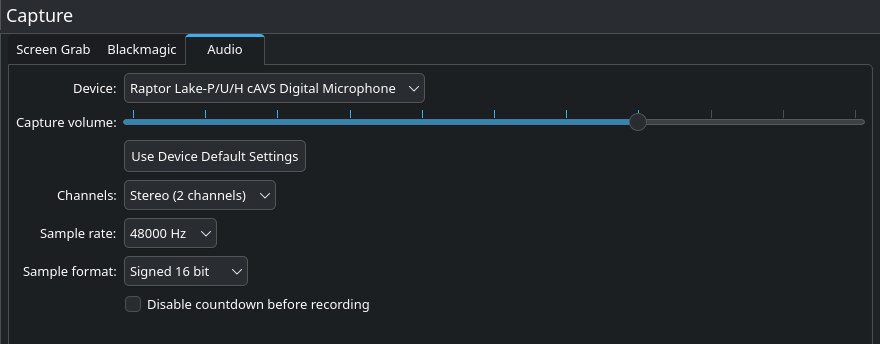
Audio Capture
Improved support for external recording devices, now the channel count and sample rate combo boxes only display values supported by the selected hardware. Also added the option to choose the sample format (8bit, 16bit, 32bit, and float) as well as a button to use the hardware's default settings.
Subtitles and Speech Tools
This release fixes issues with cutting, moving, and saving subtitles, and solves a crash cutting subtitle clips. It also fixes a problem where searching for multiple words in the Speech Editor did not work correctly. We also improved the installation process for the Whisper and SeamlessM4T plugins and updated their requirements.
Other Noteworthy Features
Added Clear Undo History option in the Edit menu
Added HD-ready (1366×768) resolution to project profiles
Added Add to Project Bin option to Render Widget to directly add rendered file to the Project Bin
Hide mouse cursor when placed over monitor in fullscreen and not moving for 2 seconds
Added option to edit a video clip with external program (useful for programs like Gyroflow)
Rearranged Marker menu items into groups and added a Delete All Timeline Markers action
Ability to directly add clips to folders from the context menu in the Project Bin
Added AMF encoding profile for Windows
Give back to Kdenlive
Releases are possible thanks to donations by the community. Donate now!
As an exception to my usual posts, this time I’ll write about a feature that’s already released.
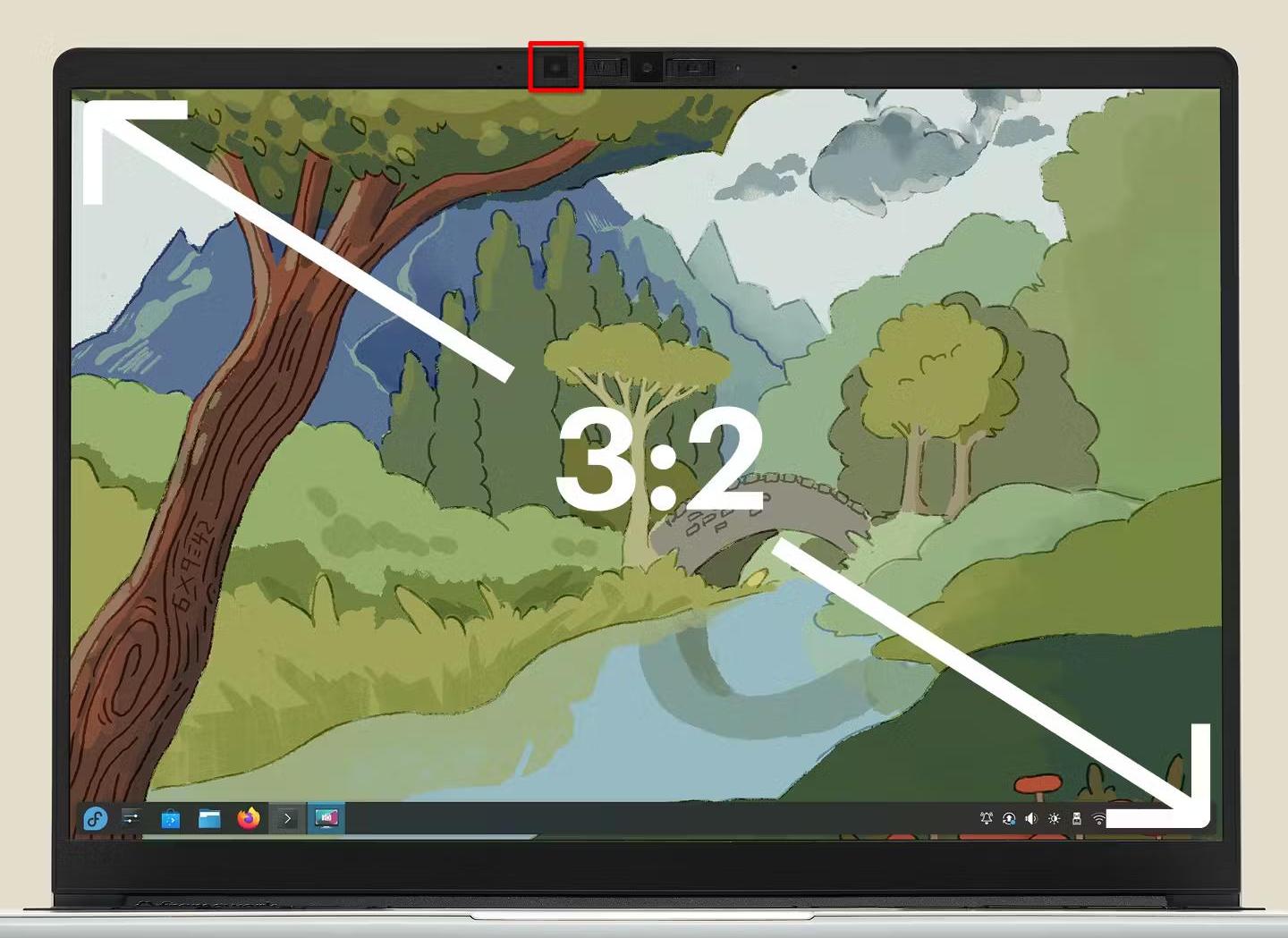
Since Plasma 6.6, you can enable automatic brightness in the display settings… let’s take a look at how it works, and why it took so long to make it happen.
The hardware
This is where the problems start - most laptops unfortunately don’t come with a brightness sensor, and there’s effectively no monitors that have a built-in sensor either (let alone one that can be accessed by the connected PC).
While it’s possible to buy or build a brightness sensor that connects via USB, brightness control for external monitors usually has limitations in how often we can safely adjust the brightness… So for quite some time, there was noone working on Plasma that had the combination of hardware, motivation and knowledge to do something about it.
Luckily, the Framework Laptop 13 comes with a brightness sensor, so on the hardware side I was all set:
The software
Making automatic brightness do something is easy, but making it work well enough that you actually want to use it is a very different story.
My first approach was to assume brightness of the display should scale linearly with environmental brightness. I tried this, and it was sort of usable, but just not good enough. There’s three problems with it:
the brightness setting sadly does not linearly control display luminance. 0% is generally not “off”, and sometimes firmware or drivers make the curve non-linear to make the brightness more “intuitive”
in order for automatic brightness to be easy to use, we can’t expect the end user to configure an equation for their system. We need to automatically detect what they’re doing, and configuring two parameters based off one brightness slider is a challenge
the best brightness curve isn’t necessarily linear. Depending on your personal preferences and how reflective your display is, you might want to keep brightness a lot higher in bright environments than in dark ones, or vice versa.
So a different approach was needed. I looked a bit at other operating systems for inspiration, and from the UX side I definitely wanted to copy Android: You use the brightness slider however you want, and the system should try to replicate what you do on its own. On the implemtation side however, I only saw claims that it uses machine learning, so that wasn’t exactly helpful.
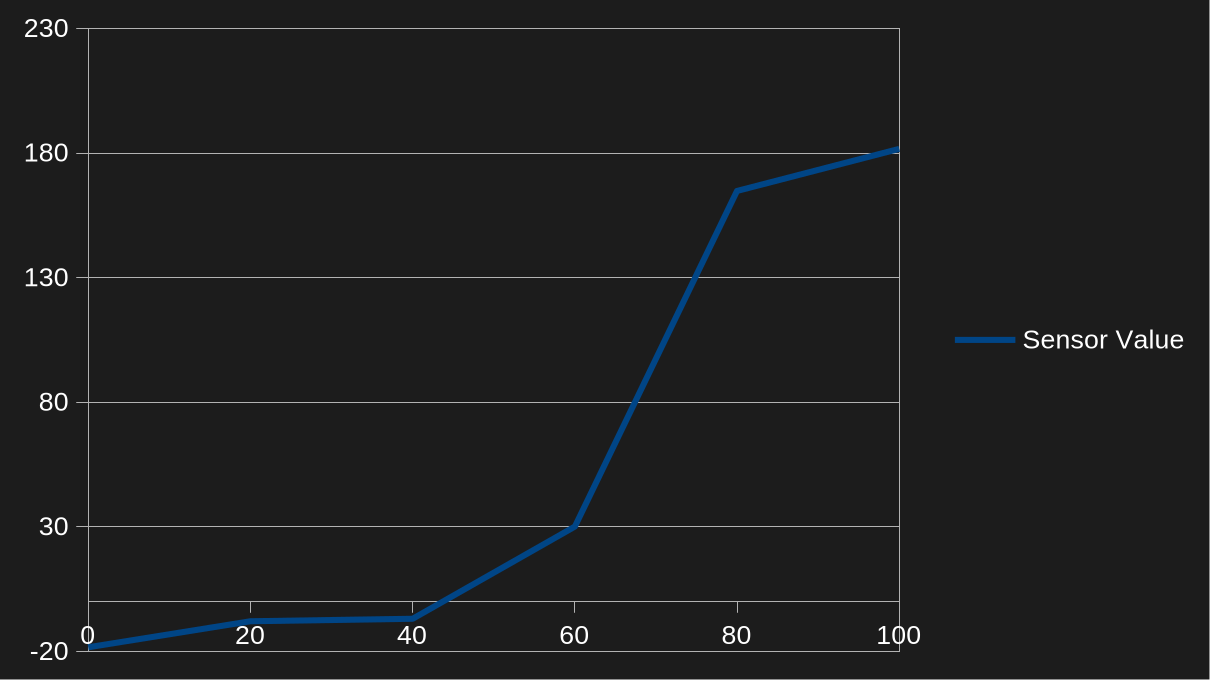
Ultimately, what I settled on is pretty simple: We just store 6 sensor values, one per 20% brightness step. When processing sensor readings, KWin finds the matching brightness setting by linearly interpolating between the two closest sensor values.
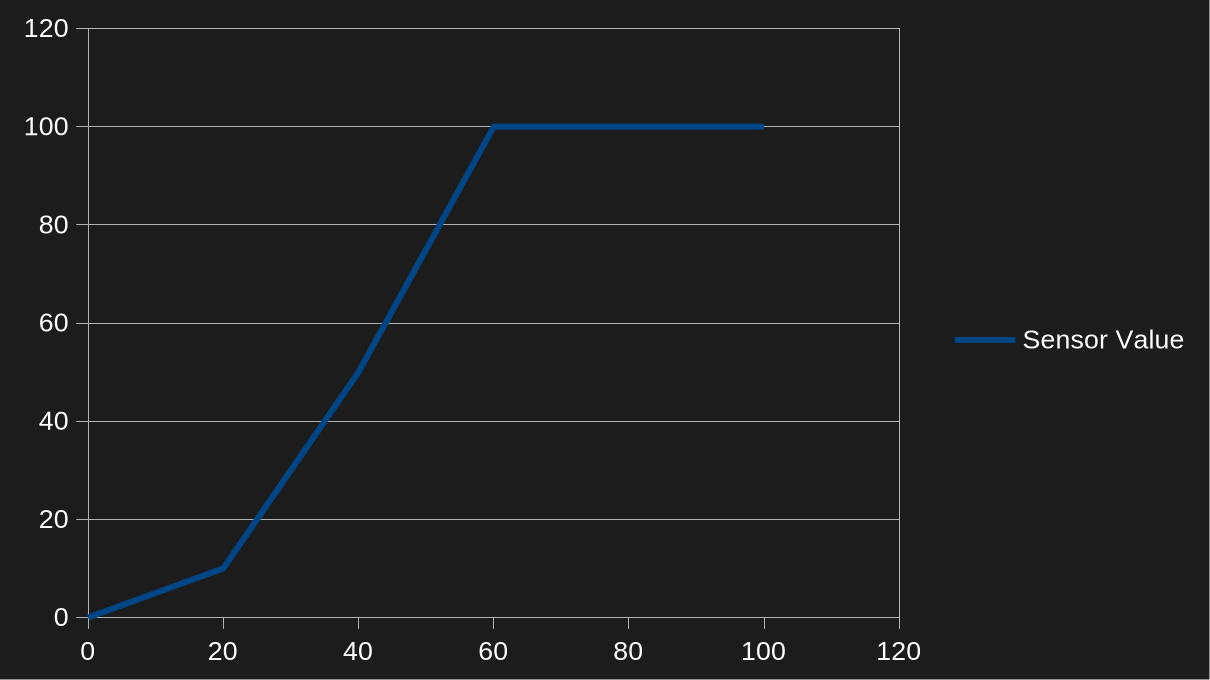
When the user touches the brightness slider or uses the brightness shortcuts, KWin adjusts the curve so the current sensor value will result in that desired brightness setting. At first, I only made it adjust the two closest points and enforce the rest of the curve to be monotonic, but it ended up causing problems:
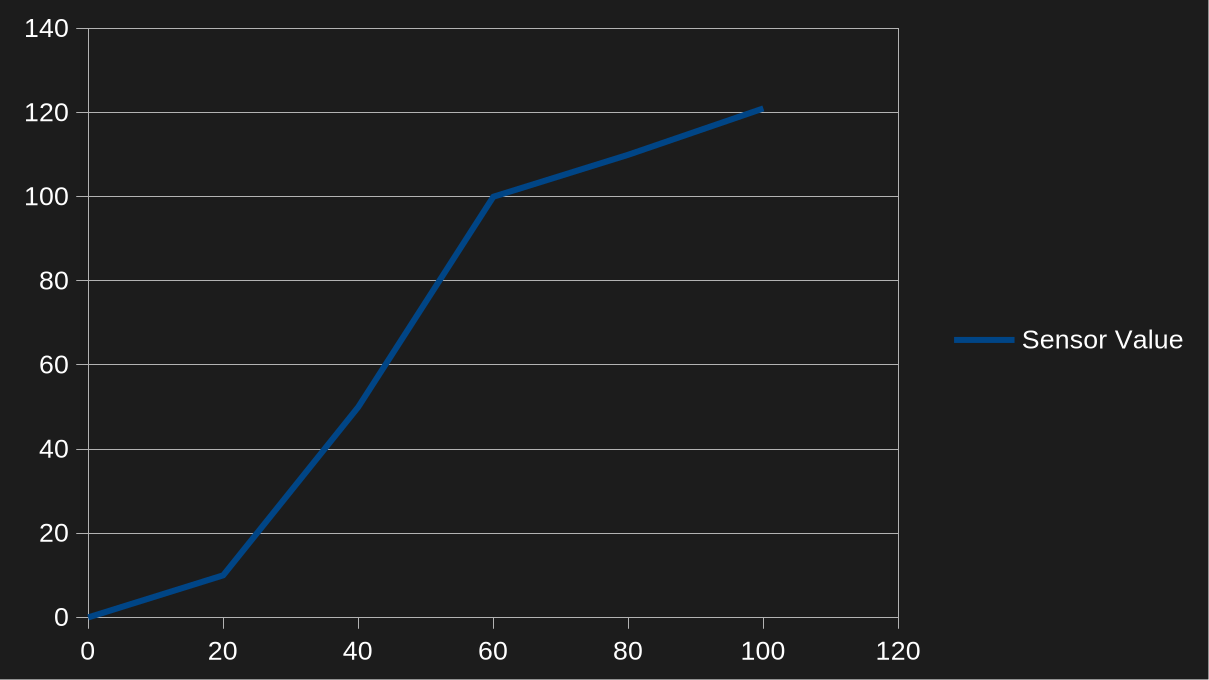
With this configuration, any sensor readings above 100 lux - for example, 101 - resulted in 100% brightness. To fix that, we now enforce a minimum difference of at least 1 lux or 10% between control points, so the curve above would look more like
To ensure the curve would always stay strictly monotonic and so you can have an arbitrary backlight setting at zero lux, values below zero also had to be allowed when updating the curve with those constraints.
However, I was still not done. While it now followed my preferences pretty well, it was still annoying! Especially if you sit in between a light source and the laptop, or if you sit on a train with trees around the tracks (like I recently did, traveling to and from Graz for a Plasma sprint), the brightness constantly fluctuated up and down.
To make it less annoying, I added some more adjustments on top:
some hysteresis. As long as the sensor reports ±10% of the last value, KWin should do nothing
a time delay before changes get applied. If after two seconds the sensor value is back in that 10% range, the brightness stays unchanged
a much slower animation for reducing display brightness (but not that much slower for increasing it)
This is how it was released in Plasma 6.6, and I’m pretty happy with it on both the Framework 13 and on my OnePlus 6 with Plasma mobile.
What now?
Just because I’m happy with it, doesn’t mean it’s done. If you’re using automatic brightness and it’s still annoying you for some reason, please tell me about it! If you’re really happy with it, I won’t complain about being told that either of course ;)
To fully catch up to what phones have done for years though, one feature is still missing: I’d like to adjust not just the brightness, but also the white point of the display to the environment. Unfortunately, none of my devices have a sensor for that… but since the camera module in the Framework 13 is easy to replace, I hope that changes one day!
As many long running projects, Qt too over the years has accumulated some APIs that in hindsight are deemed unsafe or sub-optimal. For example, Qt by default implicitly converts const char* to QString. While that usually only incurs a runtime overhead, maybe encoding problems, but also admittedly less cluttered code, there’s other APIs that can backfire in more subtle ways. One such API is doing a “context-less connect”.
Signals and Slots are a core principle of Qt that make it super easy to connect one object to another and keep a certain separation of concerns. The typical syntax to establish an connection is:
This connects the signal somethingHappened in our sender of Type Foo to the member function doStuff in our receiver (context object) of type Bar. Whenever sender “emits” somethingHappened, doStuff on receiver will be called. The neat part about Qt connections is that when receiver gets destroyed, the connection is severed automatically. However, you can not just connect a signal to a member function but also use a lambda:
In our hypothetical wallpaper selector when the “job” that goes looking for wallpapers found one, it emits a signal and tells us the path of the file, so we can show it to the user. Now what happens when the user closes the dialog (which then gets destroyed) before the job has finished? Well… job still emits the signal which then results in our lambda being called. And then we try to access m_wallpapers on this which is long gone. Boom!
The fix is easy: provide a“context object”, too, just like you would with pointer to member function:
If this gets destroyed, the connection is severed, our lambda will no longer be called and all is well. The receiver object also decides what thread the slot is called, i.e. it will be called in the thread the receivers “lives in”. Context-less connections are always of DirectConnection type. Since Qt 6.7 you can actually enforce the use of a context object by defining QT_NO_CONTEXTLESS_CONNECT.
add_definitions(-DQT_NO_CONTEXTLESS_CONNECT)
It requires you think about the lifetime of your objects more and make a conscious decision about what your context object is. It also removes one thing to look out for in code review. I started adding this option to a couple KDE repositories to improve the quality of our code and I encourage you to do that, too! It probably comes to no surprise that in general, the bigger and older a repository, the higher the probability of it using non-ideal code.
What context object to use?
Of course, the situation is not always as simple as our example above. Here’s a few tips and tricks:
Look at the lambda captures. If you capture this, chances are, you want this as your context object.
If you capture a single object, perhaps you want it as your context object rather than this. If you use the sender, too, that’s fine, capture them both: connect(job, &Job::finished, manager, [job, manager] { manager->report(job); }); When the sender gets destroyed, evidently the connection is useless and will be severed.
You can try to avoid capturing this by doing an init capture, i.e. [foo = m_foo] { ... }
Perhaps you don’t even need a lambda and can just connect to the method directly. Lambdas are so ubiquitous that you tend to forget you could just replace connect(job, &Job::finished, [timer] { timer->start(); }); with: connect(job, &Job::finished, timer, &QTimer::start);
At last, you may also use the sender as context object.
A context object must be a QObject, though. If you don’t have one, you’ll have to find another way. For instance, QObject::connect returns a QMetaObject::Connection object that you can store in a member variable and then disconnect when appropriate, like in your destructor.
For connections where it doesn’t really matter qApp can also be an option.
I’m a huge fan of QT_ENABLE_STRICT_MODE_UP_TO that lets you turn on most strictness features in a single shot. The biggest hurdle of rolling that out more widespread in KDE repositories is actually the Java-style iterators. Qt hates them, many use them, particularly for mutating a container, and imho they’re much more pleasing to look at than STL algorithms. If you start a new project, however, do consider setting your baseline to be as strict as it can be!

 meven
meven

 @devsam:matrix.org
 GSoC
GSoC