During FOSDEM this year, I met a group of very cool people that put together events about Open Source Design. They invited me to participate this year.
The topic was similar to my talk during FOSDEM, but with a twist on the soft skills needed to complete the creation of a new design system for Plasma.
The conference is only one day. Something really cool they did was to have something like BoF (Birds of a Feather) sessions during the afternoon slot before my talk. We had the opportunity to discuss important aspects proposed by the attendees around design and making your way into the field.
Germany, Berlin. FOSS Backstage Design 2026 – Community, Management and Compliance. 18.03.2026 Photo Jan Michalko
Since I was representing KDE in this project, I brought my newly-acquired tshirt from FOSDEM!
The experience was great. Everyone was awesome and even met up with new contributors to the VDG. Comments from after my talk were very positive and I look forward to participating in even more events of this nature.
Design System Update
At this time, the design system keeps evolving. I have gone back to rework some application icons. After reviewing the current designs and consulting with team members, the consensus is that they should be simpler, more approachable. I have made some concepts that I will keep exploring going forward.
Additional to that, new tokens have been created. We now have shadow tokens, and I have applied them to all the components that I can think of. They have replaced manually-created shadows from the previous time.
Radius and spacing tokens now need to also make their way into the components. Unfortunately, Penpot is struggling today on creating new tokens. I will wait for an update. However, the work involves going through out component buttons and applying foundational spacing tokens to the sides and inner spaces for the components.
While this might be long, it is easy. The spacing numbers are already in the component. My part is to create all the spacing components, locate the margin or padding number I see today in buttons, find the base component, and apply the spacing tokens.
I am also closely following up on Penpot’s new beta, hopefully coming out soon, with their new rendering engine.
I have also connected the Penpot team with our LAS (Linux App Summit) event and hopefully they can attend.
More to come!
If you’re interested in participating in this effort and have some awesome design and integration skills, join us!
Last week we released version 1.5 of Marknote, a fast and free
alternative to existing slow and pay-walled note-taking apps. Today we announce a release that fixes some issues and improves a few things across the app.
So here is a list of the most notable changes and improvements:
Pasting text in Source mode no longer clears document content.
Pasting images from clipboard works really well too.
Find and replace text shortcuts are brought back.
Note names are now properly elided.
Markdown syntax highlighter is added to the Source mode.
Code blocks now have their own background.
Items in the Table of Contents will follow active paragraphs.
Edit button is shown in compact mode (for when the format bar is hidden).
Fullscreen mode is brought back for those who need full immersion
(Ctrl+Shift+F on Linux or Alt+Enter on Windows).
The KRunner plugin now works pretty well inside Flatpak.
Single note loading is much faster now.
We optimized image loading and reduced video memory usage by almost
50%.
The future is bright
To address some of the questions since the last release:
Yes, code blocks will have proper highlighting in upcoming versions (please
keep in mind that we don't have the staff of a large enterprise company, and
we probably don't need one either ;)).
Yes again, quotes and some embedded content types are planned to be added too.
Yes once more, cross-platform support is set to be improved. We will release
stable versions for all the major platforms once they get through proper
testing.
And one more thing: the all-new and shiny block editor is a work in progress,
and it will be done when it's done™.
Thank you all
Thanks to everyone for making Marknote your software of choice. We will make sure to keep Marknote up and running at lightning speed for everyone. As always, you can get the latest version of the app via Flatpak, Snapcraft or your favorite package manager. Stay tuned!
Hey there! I'm Vishesh Srivastava, and this is the full write-up for my SoK 2026 project: adding Appium-based UI tests to Lokalize.
So what's Lokalize?
It's KDE's translation tool - the app translators use to work with PO files and manage translation projects. It already had unit tests, but no UI tests. So the goal of this project was to setup a UI testing framework using Appium.
The first task: Bug 514468
Before Appium work started, my first task was Bug 514468. The issue was that copyright year strings in PO headers could become very long, like:
I was asked to write a failing test first, so I added a placeholder simplifyYearString function and wrote a unit test for the expected collapsed output. At first it was pushed with QEXPECT_FAIL, since the actual implementation was meant to be done separately.
This was small compared to the main project, but it helped me get comfortable with setting up KDE's build system and how tests are added to Lokalize.
Building the Appium setup from scratch
Lokalize had no Appium setup at all, so this part started from zero.
The first tests were simple:
simple_open.py just opens Lokalize and closes it
file_open.py opens the File menu and checks that the open dialog path works
workflowtest.py simulates an actual translator workflow
That last one was the main test I was aiming for. It opens a .po file with untranslated entries, types translations into the editor, uses "Approve and Go Next", checks that the UI updates properly, verifies the status bar reaches Not ready: 0, and finally saves the file.
That made it a proper end-to-end test.
Problem encountered in the last test
Appium depends on accessibility information to find and interact with widgets. Lokalize's editor fields did not expose accessibility ids for Appium to call them (found using accessibilityinspector).
So I had to make changes in editorview.cpp to add object names and accessible names to the widgets. Without that, the test scripts could open the app and click menus, but they were basically blind when it came to the translation editor.
Other KDE apps with Appium tests, like Dolphin and KCalc, had tests which used these and were useful references here.
Below is a demo of this working:
Making it run with the rest of the test suite
The next step was integrating the Appium tests into CMake so they could run as part of Lokalize's normal test flow.
I added an appiumtests/CMakeLists.txt and a BUILD_APPIUM_TESTS option, so the tests can be enabled and run through the normal KDE tooling:
That was important because UI tests are much less useful if they live outside the project's regular test workflow. The BUILD_APPIUM_TESTS option was kept because it was not advised to run Appium tests in the CI/CD.
Another issue: Making the tests independent of the local user setup
One issue was that on opening, Lokalize asked for a name and email address which I was earlier typing manually. This was undesired since tests had to be run without user intervention.
So I added a file test_support.py, that creates a temporary config directory, writes a minimal lokalizerc, and launches Lokalize with that isolated configuration. That way the tests do not depend on my own existing settings or require any user input.
I also reused that helper across the test files so they stopped repeating the same Appium setup code again and again.
Writing a failing bug test
After the main workflow test, I also added another Appium test for a real UI bug: after closing a project, translational tab menus should become disabled.
This test is in project_close.py. It opens a project, closes it, and then checks that menus like Edit, Go, and Sync are disabled.
Fixing how the tests are executed
At first, the Appium tests were being discovered and registered individually in CMake. The next task was to run them from a single run_all.py runner. Now all the tests use a single KWin instance like they do in other projects like Dolphin.
This also makes writing new tests simpler since adding a test just means adding a new line in the run_all.py. So instead of CMake looping over every Python file, it now calls the runner once.
There was also one annoying issue here: --run-tests was reporting success even when one of the Appium tests had failed when run manually. Because of that, I had to return sys.exit(1) explicitly from the runner when the test result was not successful. Without that, the tests looked successful even after failing.
Below is a demo of this working:
Outcomes achieved
By the end of the project, Lokalize had:
a working Appium test setup
basic tests for startup and opening files
a full workflow test covering translation editing and saving
helper files to make tests cleaner and independent of local user config
integration into the normal test system through CMake
a single test runner file
documentation on how to run/write tests.
Final thoughts
This was a really enjoyable project. I got to work on Appium testing, the KDE build system, and a bit of bug hunting.
Many thanks to Finley Watson for his guidance throughout the project and for helping whenever I got stuck.
The best part for me is that the work is extendible. New Appium tests can be added without rebuilding the whole setup from scratch, which was the main point of the project in the first place.
Falkon Connect: Architecting a XMPP & WebXDC Bridge from Scratch Computers and networks are faster than ever, yet modern communication software is increasingly bloated, centralized, and locked behind walled gardens like WhatsApp, Slack, or Discord.
The second and third betas for Krita 5.3.0/6.0.0 have been released, with the final release drawing near. There was also a hotfix stable release, 5.2.16, to fix a regression causing problems with HEIF files.
Read on for a look at development news and the Krita-Artists forum's featured artwork from last month.
Development Report
5.2.16 Hotfix Release
This release contains exactly two regression fixes: some HEIF files not loading properly (bug), and the Move Tool movement shortcuts not working until clicking the canvas (bug).
The Krita Manual has been updated with all the new features in 5.3.0, thanks to the efforts of manual writer Wolthera and others.
Having trouble figuring something out? The friendly documentation is there to guide you in multiple languages, thanks to the ongoing work of all the translators!
Second and Third Betas for 5.3.0/6.0.0 Released
The second beta and third beta for 5.3.0/6.0.0 were released, with many bug-fixes and a look at the new splash screen artwork by Tyson Tan.
Thanks to everyone who tested! The beta period is at an end with the final release right around the corner, but you can keep testing the latest nightly builds (found at the bottom of this post), and keep reporting bugs!
Fixes in Beta 2
Zoom In/Out to Cursor is the default canvas input zoom again, and Zoom In/Out to Center is the alternatively configurable action. (bug; change by Carsten)
Qt6 Fixes
Some Krita 6 bugs were caused using an outdated version of Qt6. As updating Qt would cause too many issues before the final release, Dmitry backported the fixes to our version.
On Windows, Krita won't crash when news is enabled (bug; change) and menus won't instantly close when using a stylus with WinTab (bug 1, bug 2; change).
On Linux with Wayland, issues with incorrect stylus cursor position (bug 1, bug 2; change 1, change 2), wrong cursor shape (change), and shortcut keys being auto-repeated (bug; change) are fixed.
The Help menu's Report Bug item is back, so don't be shy to report bugs! (bug; change by Luna)
Fixes in Beta 3
File Layers now allow Inherit Alpha and Layer Styles (change), .kra files used as File Layers now use their color profiles (bug; change), and renaming File, Filter, and Generator Layers is now undoable (bug; change), all thanks to Dmitry.
Agata fixed some regressions. Tools that auto-scroll when dragged to the edge of the canvas, such as the Selection tools, no longer scroll too much when zoomed in (bugchange); Liquify Transform Masks no longer appear different than before (bug; change), plus the new Comics Panel Editing Tool no longer affects text (rather than turning characters into blocks) (bug; change)
On Android, a saving issue where the file is claimed to be unwritable was fixed by Carsten (change).
On Linux with X11/XWayland, there have been reports of Krita 6 running at a low framerate. The fix for this is to switch the OpenGL interface from GLX to EGL. This switch needs testing, so please read the EGL backend testing thread on how to do that and leave some feedback on whether it works or not.
Fixes in the Upcoming Final Release
Crashes were fixed when making a new vector layer after switching to a session (bug; change by Wolthera), converting the only layer of a group into a selection mask (bug; change by Dmitry), or on startup after removing a bundle containing tags. (change by Carsten)
More issues loading and saving HEIF images were fixed (bug; change 1, change 2 by Dmitry).
The Selection Actions Bar was fixed by Luna and Carsten to work with stylus or touch again, and have the right colors. (change 1, change 2; change 3)
More fixes to the Comic Panel Editing Tool by Agata (change): Only cut shapes the cut goes all the way through. Remove shapes that are small enough to be inside the cut gap. Work properly when using Shift for a straight line and putting the cursor on the end of the line. Don't add to the undo stack when nothing happened. The buttons and options have explanatory tooltips now (CCbug; change 1, change 2).
Krita 6 no longer crashes when loading window layouts. (bug; change by Gregg Jansen van Vuren)
On Linux with Wayland, pasting images with multiple sources in the clipboard no longer crashes. (bug; change by Luna)
Krita 6 on Windows no longer crashes when trying to open the background color selector. (bug; change by Dmitry)
A regression in beta 3 that broke translations on Android and Krita 6 has been fixed by Carsten and Freya (bug; change 1, change 2).
Missing translations in Krita 6 were fixed by Dmitry and Ivan (change 1, change 2).
Translations for some standard menu items such as 'New File' or 'About Krita' were also fixed for all versions. (bug; change by Dmitry)
The G'MIC plugin has been updated by Ivan to version 3.7.2 (change) and a crash when using the 'Layers Blend [Seamless]' filter was also fixed by Carsten (bug, change).
Text
The usual plethora of text fixes by Wolthera:
In the Text Properties Docker, Line Height property is now visible by default (change) and the dropdowns are touch-scrollable (change by Carsten). The Style Presets preview now shows properly in paragraph mode (bug; change).
The Text Tool won't modify hidden or locked layers (bug; change). Rendering issues when undoing/redoing text modifications have been fixed (bug; change 1, change 2).
Text-on-path now works properly with RTL and end-anchors (change). Gradients are properly positioned on text-in-shape (change), and flow-text-in-shape only happens for filled shapes (change). Text-on-path can't also be inside a shape (bug; change).
Instead of crashing when loading a font on startup fails, a fallback font is loaded (bug; change). Try harder to load some fonts (CCbug; change 1, change 2).
And Even More!
If that wasn't enough bugfixes for you, there's even more listed in the "Additional Changes" section near the bottom of this post.
Roadmap Revealed
The next major release is almost here! But the work to improve Krita never ends, so the development team got together to decide their next priorities.
Read the 2026 Krita Roadmap post to find out what problems the team wants to address after 5.3/6.0.
Krita is free to use and modify, but it can only exist with the contributions of the community. A small sponsored team alongside volunteer programmers, artists, writers, testers, translators, and more from across the world keep development going.
If this software has value to you, consider donating to the Krita Development Fund. Or Get Involved and put your skills to use making Krita and its community better!
Dockers: Palette: Don't scroll the palette view when the foreground color changes with select nearest palette color on. (change by Carsten Hartenfels)
Android: Fix the UI font being too big with the Enable HiDPI setting disabled. (bug; change by Carsten Hartenfels)
Android: Fix the Add Style Preset dialog being a white box. (bug; change by Carsten Hartenfels)
Android: Go back to the previous way of working around the window not updating when first opening an image. (bug; change by Carsten Hartenfels)
Linux Wayland: Fix a crash when running with --nosplash. (change by Dmitry Kazakov)
Python Plugins: Batch Exporter: Fix script error when exporting. (bug; change by Freya Lupen)
Qt6: Fix line-edits having an unreadable placeholder text color. (bug; change by Freya Lupen)
Qt6 macOS: Fix the SVG Text Editor's background always using macOS style. (change by Freya Lupen)
5.3.0/6.0.0 Beta 3 (Stable pre-release):
Selection Tools: Improve Selection Actions Bar. Switch between light and dark icons. Show the cursor when hovering over it. (change by Luna Lovecraft)
Text Tool: Make sure text selection highlight is synced to changes. (bug; change by Wolthera van Hövell)
Text Tool: Fix double ends being drawn in type setting mode. (change by Wolthera van Hövell)
Text: Avoid crash by testing bounds for cursor pos. (change by Wolthera van Hövell)
Type Setting Mode: Don't maintain pos when there's no selection. (change by Wolthera van Hövell)
File Formats: PNG: Fix the 'Assume sRGB' setting to actually use sRGB for PNG images without a color profile. (bug; change by Dmitry Kazakov)
Input Profiles: Bind mouse button 6 to Eraser Mode in the Krita Default input profile and Eraser Preset in the other default profiles. Bind middle-click on Android to mouse button 6. (change 1change 2 by Carsten Hartenfels)
Bundle Creator: Fix thumbnails of selected resources to not be blank in thumbnails view mode. (bug; change by Dmitry Kazakov)
Plugins: Workflow Buttons: Fix settings button not being visible. (bug; change by Timothée Giet)
Scripting: Avoid crashing if another version of PyQt is on Python's search path, by removing its containing folder (which may contain other modules) from the search path. This also adds a new script function, 'pykrita.qt_major_version()'. (bug; change by Freya Lupen)
Qt6 Dockers: Specific Color Selector: Fix saturation and value/lightness not updating in HSV/HSL mode. (bug; change by Freya Lupen)
Linux Wayland: Fix deploying Wayland client-side-decoration (change by Dmitry Kazakov)
Linux Wayland: Fix error when opening Settings on compositors without the 'wp_color_manager_v1' extension. (change by Luna Lovecraft)
Linux: Make sure Dr.Konqi has a bugreport address (bug; change by Dmitry Kazakov)
Linux Wayland: Fix the Pop-up Palette's docker config dialog not appearing. (bug; change by Luna Lovecraft)
Krita Plus (Stable, 5.3.0/6.0.0):
Tools: Make non-mouse multi-clicks in tools such as Crop and Polyline work. (bug 1, bug 2; change by Carsten Hartenfels)
Freehand Brush Tool: Improve Pixel Smoothing mode and fix it to work with sensor dynamics. (change by Carsten Hartenfels)
Crop Tool: Show negative coordinates in grow mode, snap to the canvas bounds when not in grow mode. (change by Luna Lovecraft)
Comics Panel Editing Tool: Fix the last edge being missing when merging shapes by removing a gutter. (change, by Agata Cacko)
Pasting: Fix missing colorspace with Paste into New Image with a selection. (bug; change by Luna Lovecraft)
Layer Stack: When switching to a mask with a shortcut, show its name in the floating message instead of its parent layer's. (bug; change by Dmitry Kazakov)
Resources: Fix being able to save resources that are inside a subfolder into a document. (bug; change by Dmitry Kazakov)
Palettes: Save modifications to palettes saved in documents. (change by Mike Will)
Palettes: Make the 'Default' palette the default in the FG/BG color selector. (bug; change by Dmitry Kazakov)
Touch Input: Don't touch paint when multiple fingers were down. (bug; change by Carsten Hartenfels)
Touch Input: Disable pointless long-press on the FG/BG color selector. (change by Carsten Hartenfels)
Text Properties Docker: Fix right-clicking slider-spinboxes selecting the text label instead of only the value. (bug; change by Luna Lovecraft)
General: Speed up start-up by making the Text Properties Docker load color theme faster. (change by Carsten Hartenfels)
Krita Next (Unstable, 5.4.0/6.1.0-prealpha):
Pop-up Palette: Add option to not rotate the triangular color selector; 'Settings->Pop-up Palette->Fix sRGB Triangle Selector Rotation'. (change by Dat Le)
Scripting: Add brushFade get/set to the View class. (change by Aqaao Aqaao)
Toolbox Docker: Add horizontal layout and compact mode (remove separators) options to the context menu. (change by Mike Will)
Nightly Builds
These pre-release versions of Krita are built every day.
Note that there are currently no Qt6 builds for Android.
Test out the upcoming Stable release in Krita Plus (5.3.0/6.0.0-prealpha): Linux Qt6Qt5 — Windows Qt6Qt5 — macOS Qt6Qt5 — Android arm64 Qt5 – Android arm32 Qt5 – Android x86_64 Qt5
Or test out the latest Experimental features in Krita Next (5.4.0/6.1.0-prealpha). Feedback and bug reports are appreciated!: Linux Qt6Qt5 — Windows Qt6Qt5 — macOS Qt6Qt5 — Android arm64 Qt5 – Android arm32 Qt5 – Android x86_64 Qt5
Bind QML Values across an Arbitrary Number of Elements
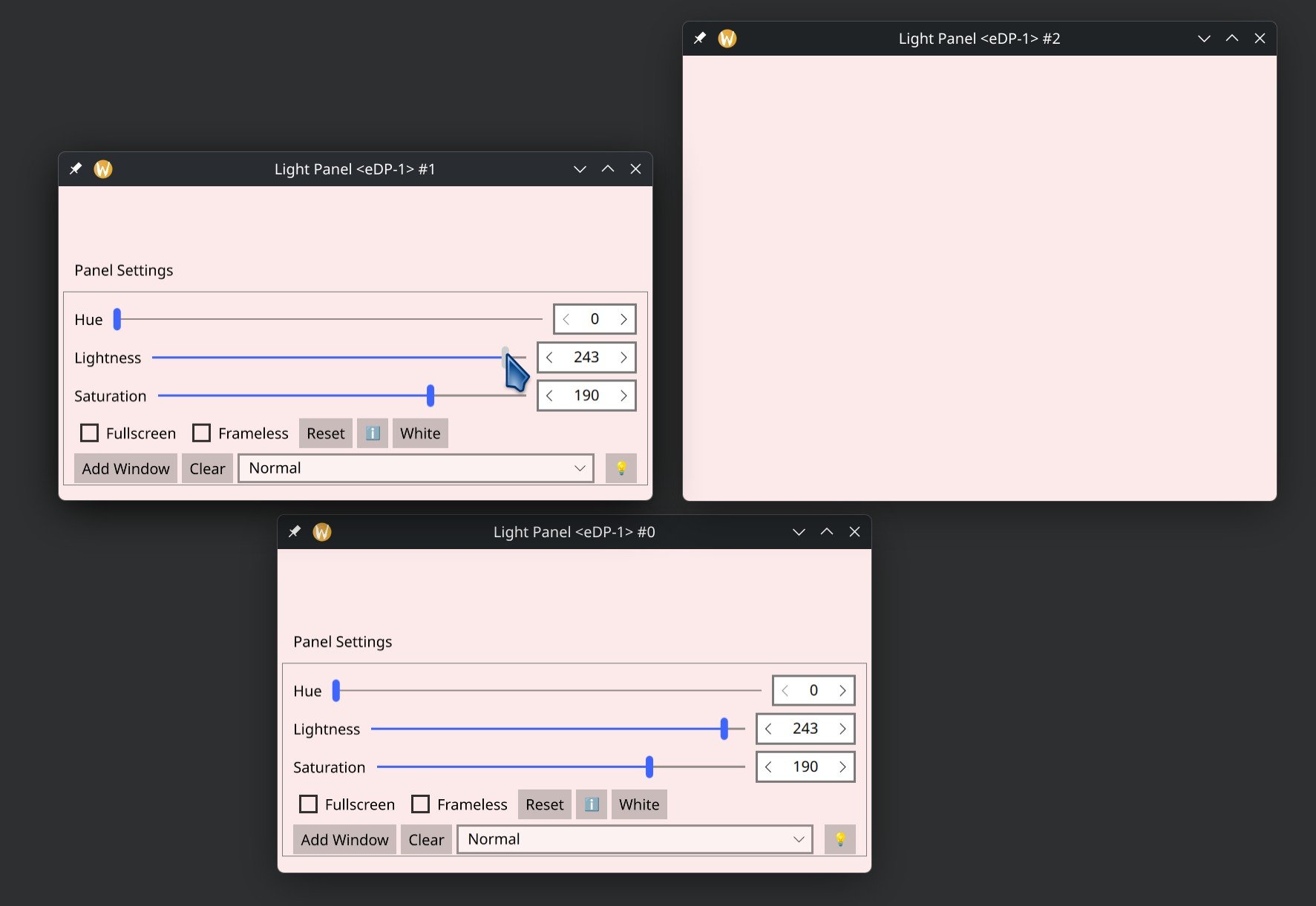
A while back I was writing a program that could instantiate an arbitrary number of windows containing controls synchronized across them. How a control would be synchronized would depend on a condition that determined which window instances would be linked to other instances. There are a few ways this could be implemented. In this entry I'll share my approach, in which I used a singleton C++ class serving as a message broker to bind properties across window instances.
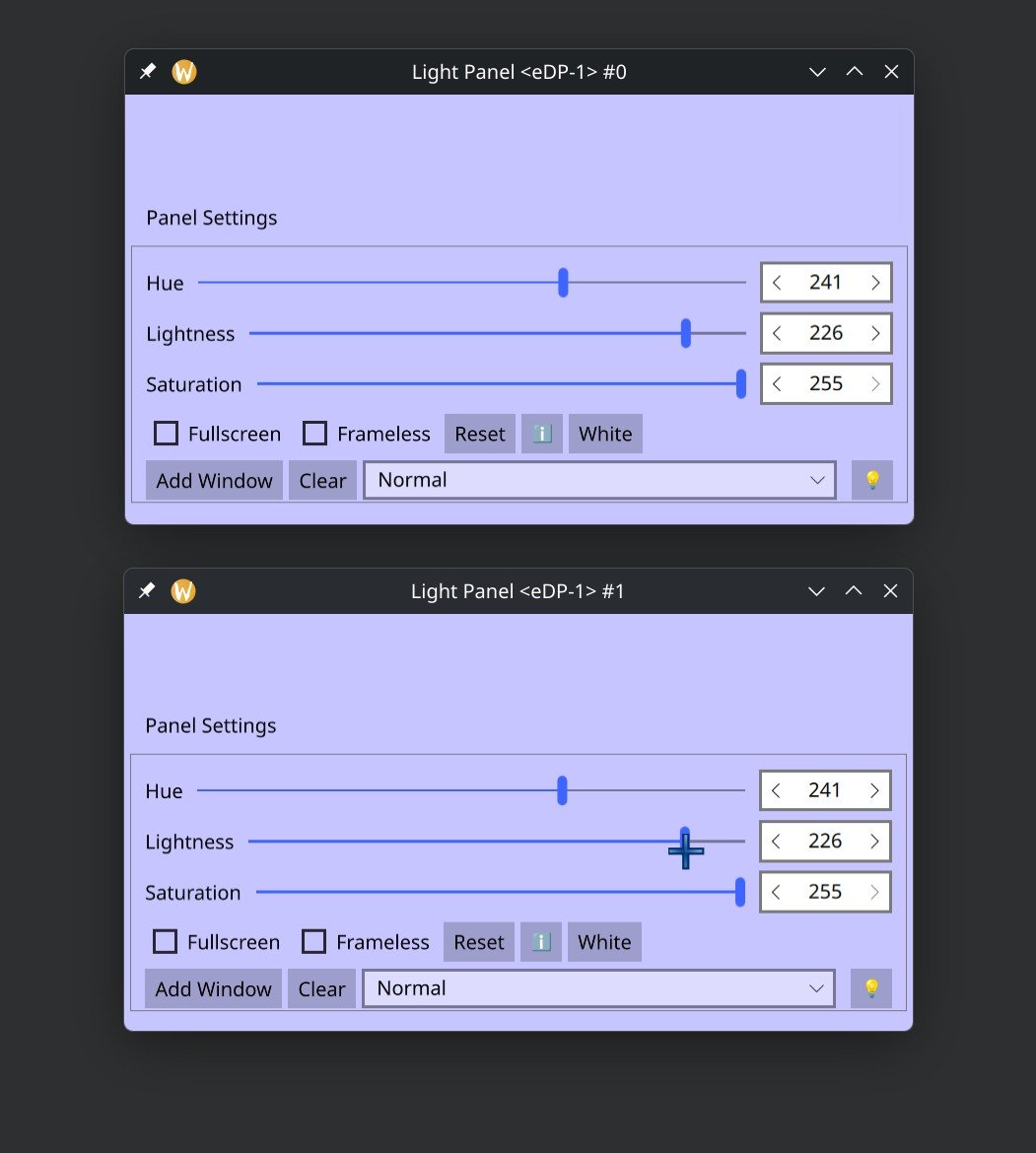
Properties bound across multiple instances of a window
The App: Display to Light Panels
The software I wrote this for is a small app that allows you to have many windows open, all synchronized to display a single color on a per-monitor basis. The idea behind this is for users to adjust the light that comes off their monitors and use it to illuminate their faces when recording a video or taking pictures. By having individual windows be synchronized, users can continue to interact with the computer through their displays (rather inconveniently), while simultaneously using them to illuminate themselves.
This is, by no means, a replacement for a proper recording setup. Some of you will know that a light source placed in front of the subject can serve as either a nice "fill light" or a "scary spotlight", depending on the height and size of the source. Therefore, this should be complemented with other sources of light; ideally ambient light and a top light, to achieve a nice look. If the app seems useful to you, there's a link to it at the end of this article. That's enough gaffer speak for today. Let's talk about the code.
The Code
When writing code, one of my main concerns is always long-term maintainability. For that reason, I prefer to connect different parts of code in explicit, and easy to follow ways. One of such ways is passing values through a hierarchy of components; that is generally easy to track and produces well performing code. However, that approach can become unviable when connecting dynamically instantiated items to other dynamically instantiated items. A better solution in this instance is to use signals and slots to interconnect the items via a message broker class, done in C++. Each item would have a model or backend class in C++ and those classes would have the message broker in common. Lastly, the properties would be exposed to QML through Q_PROPERTY and updated via your control's signal handlers.
Message Broker Singleton
The message broker needs to be a singleton. That way there's only one instance of the broker in memory and all instantiated objects interface with the same broker. Our message broker only needs to provide the signals that will be used for routing properties. The actual connections that the routing involves are to be done from the outside. As such, a broker class would look like this:
// internalmessagebroker.hpp
// Singleton broker class contains signals that serve as pipes
// for different parts of a program to communicate with each other.

#pragma once

#include <QObject>

class InternalMessageBroker : public QObject
{
    Q_OBJECT

// Hide regular constructor
private:
    InternalMessageBroker() = default;

public:
    // Disable copy constructor
    InternalMessageBroker(const InternalMessageBroker& obj) = delete;
    InternalMessageBroker& operator=(InternalMessageBroker const&) = delete;
    static std::shared_ptr<InternalMessageBroker> instance()
    {
        static std::shared_ptr<InternalMessageBroker> sharedPtr{new InternalMessageBroker};
        return sharedPtr;
    }

// This is where all the signals would go
signals:
    void broadcastAPropertyChange(int value, bool broadcast);
};
Connecting Properties
Then we have the class or classes that would connect the properties together. On my Display Panels app, all controls and visual features come from QML, meaning I only have to concern myself with interconnecting the properties. To that end, I've created a class based on QObject and instantiated it within the delegate of a QML Instantiator. This class is only for managing property data, so I refer to it as a model class, called PropertiesModel:
// Main.qml
// Here are 3 windows, each with a PropertiesModel,
// that allows them all to share a binding to aProperty
// across all window instantiatons.

import QtQuick
import QtQuick.Window
import QtQuick.Layouts
import QtQuick.Controls

import com.kdab.example

Item {
    Instantiator {
        model: 3
        delegate: Window {
            PropertiesModel {
                id: propertiesModel
                aProperty: 1
            }
            ColumnLayout {
                anchors.fill: parent
                Text {
                    text: propertiesModel.aProperty
                }
                Slider {
                    id: hueSlider
                    value: propertiesModel.aProperty
                    Layout.fillWidth: true
                    onMoved: {
                        propertiesModel.aProperty = value;
                    }
                }
            }
        }
    }
}
Each property of our class is to be declared using a Q_PROPERTY macro with a getter, a setter, and a notifier. The getter and the notifier have nothing out of the ordinary...
// An ordinary getter
int PropertiesModel::aProperty()
{
    return m_aProperty;
}
// An ordinary notifier, form propertiesmodel.h
signals:
    void aPropertyChanged();
However, the setter must be able to distinguish between when its call is the product of a user interaction and when it comes from the message broker. We accomplish this by having the setter accept a boolean argument (broadcast) that will be used to determine whether the value being set should be sent through the message broker or notified back to QML for the UI to be updated. When a setter is first called, the value being set should be broadcasted and only on its way back should the UI be updated.
There are a few ways we could make sure that the value is always broadcasted first. We could set broadcast to true by default, or have two setter functions: a private one taking in both the value and broadcast arguments and a public one that only takes-in the value and calls the private function with broadcast set to true. Another option is to have broadcast be an enum with only two possible values. That would produce more readable code, however, I didn't worry about that in my code because broadcast is only to be used on calls to the private setter.
Upon the private setter being called by the public setter, it will emit the broker's broadcast signal and that signal will in turn call the calling private setter for a second time (as well as the private setters of all other instances of PropertiesModel; those being called for the first time). When the private setter calls the broker that calls back to the private setter, it also passes broadcast set to false. All other instances will then evaluate the value of broadcast to be false determining that the UIs should be updated and preventing an infinite loop.
// Private setter implementation for a property that's being broadcasted
void PropertiesModel::setAProperty(const int value, const bool broadcast)
{
    if (broadcast)
        emit m_broker.get()->broadcastAPropertyChange(value, false);
    else if (m_currentScreen == screenName) {
        m_aProperty = value;
        emit screenSaturationChanged();
    }
}

// Publicly exposed setter prevents the broadcast argument from being
// specified by other callers
void PropertiesModel::setAProperty(const int value)
{
    // Always broadcast properties not being set by the message broker
    setAProperty(value, true);
}
To complete this loop as described, we need to connect the signal from the broker to the private setter of the PropertiesModel class whenever a new copy is instantiated. The best place to accomplish that is from the class' constructor, like so:
// The constructor is used to connect signals from the broker to setter properties
PropertiesModel::PropertiesModel(QObject* parent)
    : QObject { parent }
{
    m_mb = InternalMessageBroker::instance();
    // Connections take place after the class has been instantiated
    // and its QML properties parsed.
    QTimer::singleShot(0, this, [this] () {
        connect(m_mb.get(), &InternalMessageBroker::aPropertyChange,
        this, &ScreenModel::setAProperty);
    });
}
QTimer to Delay Initialization
If you've been reading the blocks of code that accompany this article, you may be wondering "Why is there a singleShotQTimer there?" When the PropertiesModel class is instantiated via QML, any connected properties that have values assigned from QML code will trigger the Q_PROPERTY's setter function. This will happen once per instantiation. If the broker were connected, it would broadcast the value set to all currently instantiated instances every single time that a new instance is added. To prevent that, we must not make the connection to the broker until after a class has been fully initialized. A single shot timer can be used to accomplish that; setting its delay to 0 will ensure that it is run immediately after all properties have been evaluated.
In the end, this is what the PropertyModel header would look like:
// propertiesmodel.h
#pragma once

#include "internalmessagebroker.hpp"

#include <QQmlEngine>

class PropertiesModel : public QObject {
    Q_OBJECT
    QML_ELEMENT

    Q_PROPERTY(int aProperty READ aProperty WRITE setAProperty NOTIFY aPropertyChanged FINAL)
public:
    explicit PropertiesModel(QObject* parent = nullptr);

    int aProperty();
    void setAProperty(const int value);

signals:
    void aPropertyChanged();

private:
    void setAProperty(const int value, const bool broadcast);

    std::shared_ptr<InternalMessageBroker> m_mb;
    int m_aProperty;
};
Conditional propagation
If a condition must be met for the propagated value to result in an update, then, in addition to value and broadcast, you should also broadcast any other values that are required to for such condition to be met. Pass those as arguments to the setter's and the broker's signal. Condition validation would then take place within the base case of the private setter. Here's a commented snippet of what that looks like on the Display to Light Panels app that this article was based on:
// In the original code what here I named broadcast used to be named spread.
void ScreenModel::setScreenHue(const int hue, const bool spread=true, const QString &screenName="s")
{
    if (spread)
        emit m_mb.get()->spreadHueChange(hue, false, m_currentScreen);
    // The incoming value is only accepted if screenName matches the screen
    // that the window is at and discarded otherwise.
    else if (m_currentScreen == screenName) {
        m_screens[m_currentScreen].hue = hue;
        emit screenHueChanged();
    }
}
An amazing journey of 8 weeks full of code, new experiences, and interactions.
I had an amazing time at the Season of KDE 2026. All the guidance from my mentors, Benson Muite and Srisharan VS, really helped me work on Mankala and also helped me learn new skills.
So, lets summarize things a bit, what I was able to achieve during the span of these two months at KDE.
Complete GUI redesign
I have made major changes in the MankalaNextGen GUI, introducing Kirigami to have different light and dark themes. Improved the design for different pages, MainMenu, Rules, About, Profile, and much more, where I worked to introduced better colors and geometry to the shapes, like buttons or display boxes.
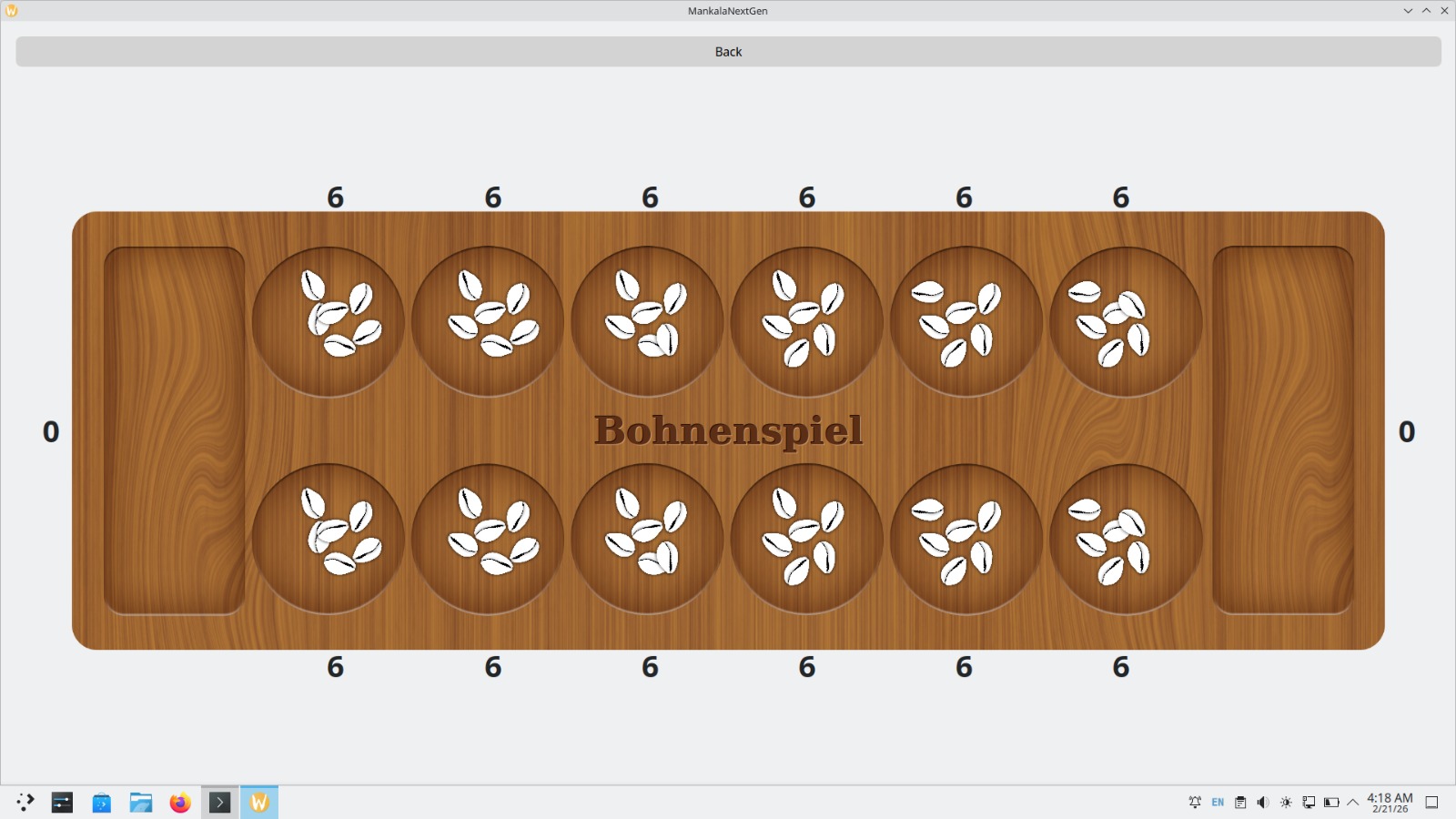
For the main Game interface, we made new boards and shells. I worked on integrating the logic for displaying the shells and fixing the Board based on the exact numbers shown from Mankala.
I tried generating a board using Perlin noise, which can be later integrated into MankalaNextGen to design the boards more efficiently based on variants. Added new code to generate a calm background music and a wooden click sound to make it look more authentic.
Translations and Localization
I started learning about Lokalize, KDE’s own translation software. I had successfully made translations for Mankala Engine and MankalaNextGen in Tamil and Hindi using Lokalize.
Artworks and KDE review
I have started working on the KDE review tasks and started with the fix to correct GitLab CI Build pipelines.
In the last few weeks, I started learning about Krita and made cover images for the three variants Bohnenspiel, Oware, and Pallanguzhi using their cultural Mankala boards and traditional motifs.
The journey doesn’t end here. Season of KDE has been a much-needed experience to improve my commitment towards projects and open-source. I plan to work with Mankala Engine and the KDE Community much more and make many other contributions.
Thanks to my mentors, my fellow contributors, and to the entire community for helping me so far. 🚀
KDE Gears 26.04 hit beta phase just a few days ago, so it is time to give an update on the new features in KJournald.
For 26.04, the main release goal was to have a natural integration of systemd user services and system services in the log view workflow. This means:
When opening a journald database on a system, from now on per default both the system and user service log records are opened and both will be displayed in a joint view. — If you do not like this, got to “Current Journal” -> “Limit Accessed Logs” and choose your preference. That configuration then is also stored persistently over several boots.
Revisiting the overall UI with this feature in mind, we need few more changes to really make it fly:
User units often are templated systemd services. This means, there is a single service definition but multiple instances of the service template with different parameters can be created. Using the traditional way to list every unique service in the filter criteria view (left side view) makes the filtering hard to use due to the number of services. So, as a new (opt-out; enabled per default) feature, templated services are grouped. So, for example, all my “app-org.kde.dolphin@[…].service” services can be enabled/disabled at once in the filter view. In the service name hover-info in the log view however, they still are displayed as full service names.
Typically, due to user units being user workflow specific, there are a lot of systemd services that are not started in every boot, because a user can control their startup individually. For this reason, services and executables are now being pre-filter according to the selected boot. Log priorities are not (yet) taken into account for this pre-filtering, but at least only useful filter entries are shown, which should be a major usability gain on its own.
If you interested in the features, try out the KDE Gears beta release or just install the latest nightly build of org.kde.kjournaldbrowser from the KDE Flatpak nightly CI.

 anditosan

 @hunter.one:matrix.org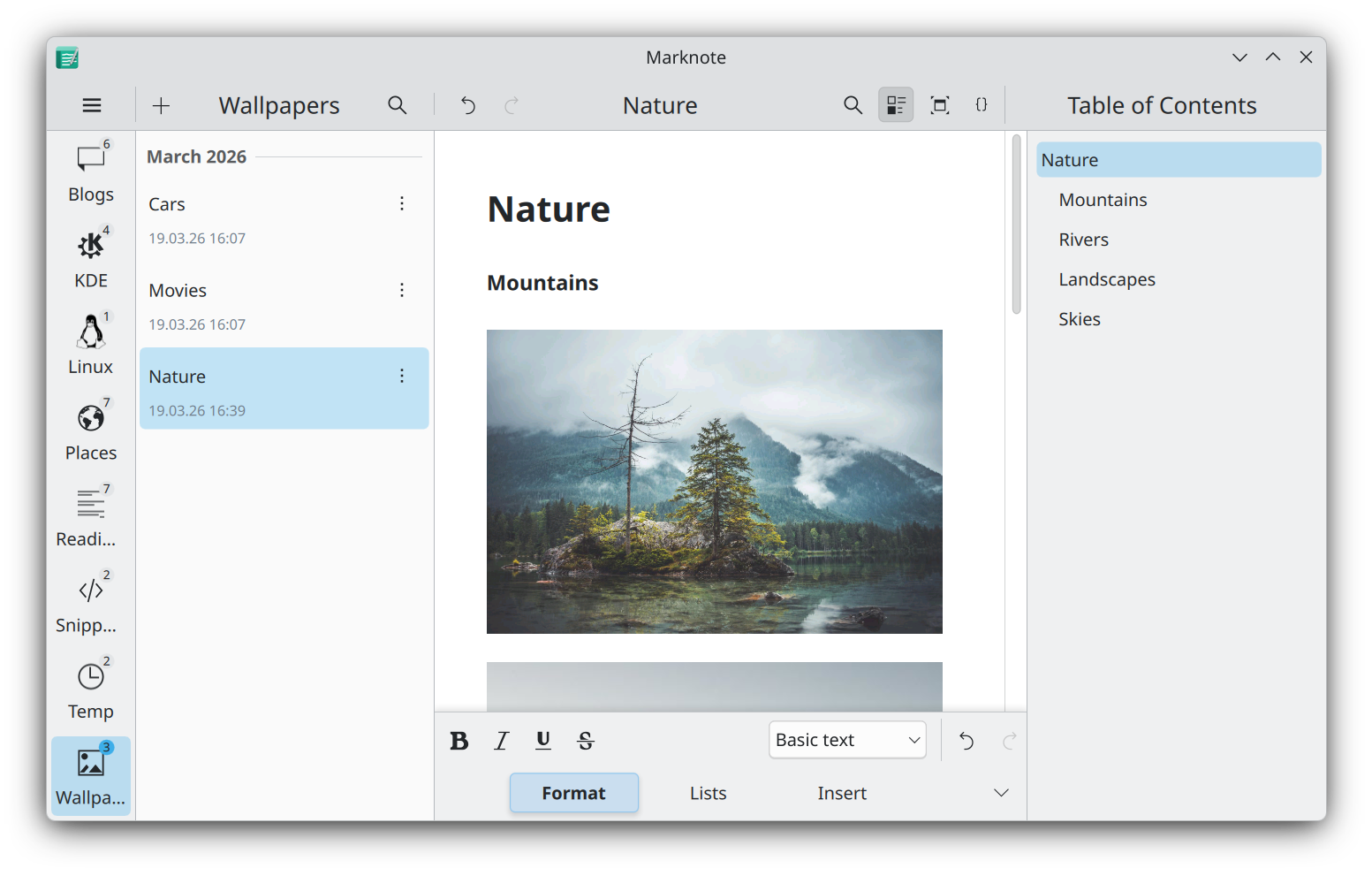




 GSoC
GSoC