Saturday, 5 April 2025

 @nidhish07:matrix.org
Work done so far
Move tracker for PvC game
Implemented the code for tracking the move played by player and computer in bohnenspiel TUI game.
It is achieved using getLastMove method initialized and defined in mankalaengine.h and mankalaengine.cpp. This method returns a pair containing the last moved as int played and the player as Player who made it.
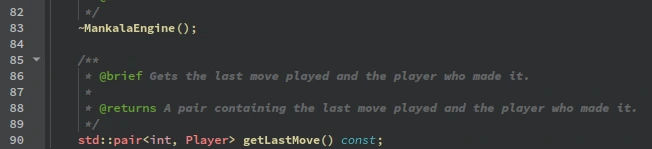

During each iteration of the game loop, the above method is called for both player and computer to retrieve their respective last moves.

The above code in TUI file of bohnenspiel game variant is used to display the move played in the terminal.
The player move is tracked using user.getLastMove() and the computer move is tracked using opponent.getLastMove(). The game loop alternates between the player and the computer, updating the board and tracking moves after each turn. The last moves are printed after each turn. The computer’s move are adjusted by adding 6 to align it’s side of board(move 6-11).
How it works?
- Player’s Turn:
- The player select the hole to play.
- The move is played, and the board is updated.
- The move is tracked using
user.getLastMove().
- Computer’s Turn:
- The computer select the hole to play.
- The move is played, and the board is updated.
- The move is tracked using
opponent.getLastMove().
After each turn the last moves played are displayed.
What’s next
The next goal moving forward is to create a PvP game mode for two different users.
Thursday, 3 April 2025

Model/View Drag and Drop in Qt - Part 3
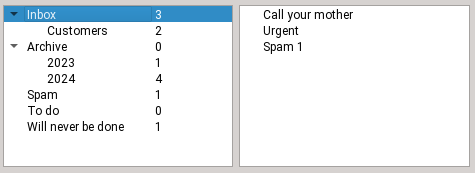
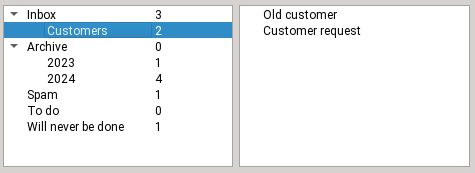
In this third blog post of the Model/View Drag and Drop series (part 1 and part 2), the idea is to implement dropping onto items, rather than in between items. QListWidget and QTableWidget have out of the box support for replacing the value of existing items when doing that, but there aren't many use cases for that. What is much more common is to associate a custom semantic to such a drop. For instance, the examples detailed below show email folders and their contents, and dropping an email onto another folder will move (or copy) the email into that folder.
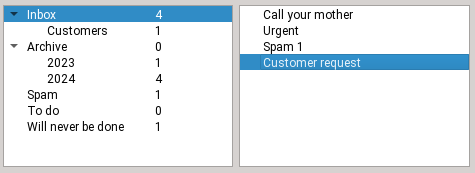
Step 1
Initial state, the email is in the inbox
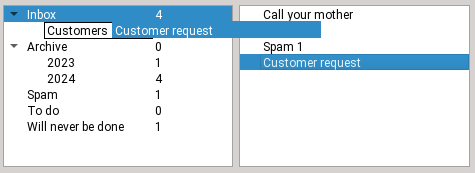
Step 2
Dragging the email onto the Customers folder
Step 3
Dropping the email
Step 4
The email is now in the customers folder
With Model/View separation
Example code can be found here for flat models and here for tree models.
Setting up the view on the drag side
☑ Call view->setDragDropMode(QAbstractItemView::DragOnly)
unless of course the same view should also support drops. In our example, only emails can be dragged, and only folders allow drops, so the drag and drop sides are distinct.
☑ Call view->setDragDropOverwriteMode(...)true if moving should clear cells, false if moving should remove rows.
Note that the default is true for QTableView and false for QListView and QTreeView. In our example, we want to remove emails that have been moved elsewhere, so false is correct.
☑ Call view->setDefaultDropAction(Qt::MoveAction) so that the drag defaults to a move and not a copy, adjust as needed
Setting up the model on the drag side
To implement dragging items out of a model, you need to implement the following -- this is very similar to the section of the same name in the previous blog post, obviously:
class EmailsModel : public QAbstractTableModel
{
    ~~~
    Qt::ItemFlags flags(const QModelIndex &index) const override
    {
        if (!index.isValid())
            return {};
        return Qt::ItemIsEnabled | Qt::ItemIsSelectable | Qt::ItemIsDragEnabled;
    }

    // the default is "copy only", change it
    Qt::DropActions supportedDragActions() const override { return Qt::MoveAction | Qt::CopyAction; }

    QMimeData *mimeData(const QModelIndexList &indexes) const override;

    bool removeRows(int position, int rows, const QModelIndex &parent) override;
☑ Reimplement flags() to add Qt::ItemIsDragEnabled in the case of a valid index
☑ Reimplement supportedDragActions() to return Qt::MoveAction | Qt::CopyAction or whichever you want to support (the default is CopyAction only).
☑ Reimplement mimeData() to serialize the complete data for the dragged items. If the views are always in the same process, you can get away with serializing only node pointers (if you have that) and application PID (to refuse dropping onto another process). See the previous part of this blog series for more details.
☑ Reimplement removeRows(), it will be called after a successful drop with MoveAction. An example implementation looks like this:
bool EmailsModel::removeRows(int position, int rows, const QModelIndex &parent)
{
    beginRemoveRows(parent, position, position + rows - 1);
    for (int row = 0; row < rows; ++row) {
        m_emailFolder->emails.removeAt(position);
    }
    endRemoveRows();
    return true;
}
Setting up the view on the drop side
☑ Call view->setDragDropMode(QAbstractItemView::DropOnly) unless of course it supports dragging too. In our example, we can drop onto email folders but we cannot reorganize the folders, so DropOnly is correct.
Setting up the model on the drop side
To implement dropping items into a model's existing items, you need to do the following:
class FoldersModel : public QAbstractTableModel
{
    ~~~
    Qt::ItemFlags flags(const QModelIndex &index) const override
    {
        CHECK_flags(index);
        if (!index.isValid())
            return {}; // do not allow dropping between items
        if (index.column() > 0)
            return Qt::ItemIsEnabled | Qt::ItemIsSelectable; // don't drop on other columns
        return Qt::ItemIsEnabled | Qt::ItemIsSelectable | Qt::ItemIsDropEnabled;
    }

    // the default is "copy only", change it
    Qt::DropActions supportedDropActions() const override { return Qt::MoveAction | Qt::CopyAction; }

    QStringList mimeTypes() const override { return {QString::fromLatin1(s_emailsMimeType)}; }

    bool dropMimeData(const QMimeData *mimeData, Qt::DropAction action, int row, int column, const QModelIndex &parent) override;
};
☑ Reimplement flags()
For a valid index (and only in that case), add Qt::ItemIsDropEnabled. As you can see, you can also restrict drops to column 0, which can be more sensible when using QTreeView (the user should drop onto the folder name, not onto the folder size).
☑ Reimplement supportedDropActions() to return Qt::MoveAction | Qt::CopyAction or whichever you want to support (the default is CopyAction only).
☑ Reimplement mimeTypes() - the list should include the MIME type used by the drag model.
☑ Reimplement dropMimeData()
to deserialize the data and handle the drop.
This could mean calling setData() to replace item contents, or anything else that should happen on a drop: in the email example, this is where we copy or move the email into the destination folder. Once you're done, return true, so that the drag side then deletes the dragged rows by calling removeRows() on its model.
bool FoldersModel::dropMimeData(const QMimeData *mimeData, Qt::DropAction action, int row, int column, const QModelIndex &parent)
{
    ~~~  // safety checks, see full example code

    EmailFolder *destFolder = folderForIndex(parent);

    const QByteArray encodedData = mimeData->data(s_emailsMimeType);
    QDataStream stream(encodedData);
    ~~~ // code to detect and reject dropping onto the folder currently holding those emails

    while (!stream.atEnd()) {
        QString email;
        stream >> email;
        destFolder->emails.append(email);
    }
    emit dataChanged(parent, parent); // update count

    return true; // let the view handle deletion on the source side by calling removeRows there
}
Using item widgets
Example code:
On the "drag" side
☑ Call widget->setDragDropMode(QAbstractItemView::DragOnly) or DragDrop if it should support both
☑ Call widget->setDefaultDropAction(Qt::MoveAction) so that the drag defaults to a move and not a copy, adjust as needed
☑ Reimplement Widget::mimeData() to serialize the complete data for the dragged items. If the views are always in the same process, you can get away with serializing only item pointers and application PID (to refuse dropping onto another process). In our email folders example we also serialize the pointer to the source folder (where the emails come from) so that we can detect dropping onto the same folder (which should do nothing).
To serialize pointers in QDataStream, cast them to quintptr, see the example code for details.
On the "drop" side
☑ Call widget->setDragDropMode(QAbstractItemView::DropOnly) or DragDrop if it should support both
☑ Call widget->setDragDropOverwriteMode(true) for a minor improvement: no forbidden cursor when moving the drag between folders. Instead Qt only computes drop positions which are onto items, as we want here.
☑ Reimplement Widget::mimeTypes() and return the same name as the one used on the drag side's mimeData
☑ Reimplement Widget::dropMimeData() (note that the signature is different between QListWidget, QTableWidget and QTreeWidget) This is where you deserialize the data and handle the drop. In the email example, this is where we copy or move the email into the destination folder.
Make sure to do all of the following:
- any necessary behind the scenes work (in our case, moving the actual email)
- updating the UI (creating or deleting items as needed)
This is a case where proper model/view separation is actually much simpler.
Improvements to Qt
While writing and testing these code examples, I improved the following things in Qt, in addition to those listed in the previous blog posts:
- QTBUG-2553 QTreeView with setAutoExpandDelay() collapses items while dragging over it, fixed in Qt 6.8.1
Conclusion
I hope you enjoyed this blog post series and learned a few things.
The post Model/View Drag and Drop in Qt - Part 3 appeared first on KDAB.
Wednesday, 2 April 2025
In Konsole Layout Automation (part 1), I wrote about how to automate opening Konsole with different tabs that ran different commands. In this post, I'll talk about doing this for layouts.
Inspiration
In the past, I needed to open two connections to the same host over ssh , and change to two different directories. I opened Konsole with a layout that had two panes. Then, Quick Commands allowed me to run a command in each pane to ssh and change to the right directory. This post will outline how to achieve that and more!
Goal: Launch a Konsole window with one tab that has multiple panes which run commands
💡 Note For more detailed instructions on using Konsole, please see the output of
konsole --helpand take a look at the Command-line Options section of the Konsole Handbook
A layout can save and load a set of panes. Unfortuately, it can't do anything else. We can, however, use profiles and the Quick Commands plugin to make the panes more useful.
Use case: See the output of different commands in the same window. For instance, you could be running htop in one pane and open your favorite editor in another.
Here's an overview of the steps:
- Set up a layout
- Use QuickCommands to run things in the panes
Set up a layout
Unfortunately, the online documentation for Konsole command line options doesn't say much about how to create a layout, or the format of its JSON file. It only mentions the command line flag --layout. Also make a note of -e which allows you to execute a command.
Fortunately, creating the layout is pretty easy. Note that a layout is limited to one tab. It will only save the window splits, nothing else. No profiles, directories, etc.
- Set up a tab in Konsole with the splits you want it to have
- Use
View -> Save Tab Layoutto save it to a .json file. (I personally recommend keeping these in a specific directory so they're easy to find later, and for scripting. I use~/konsole-layouts). - You can then use
konsole --layout ~/layout-name.jsonto load konsole with a tab that has the splits you saved.
Use Quick Commands to do useful things in your layout
As mentioned above, you can only save splits. you can't associate a profile, or run a command directly like you can with the tilix or kitty terminals. This has been requested. In the meantime, an easy thing you can do is load a layout and then load a profile manually in each pane. This is where Quick Commands come in. These are under Plugins - Quick Commands. (If you don't see this, contact your distro / the place you installed Konsole from).
You can use Quick Commands to run a command in each pane. You can also launch a profile (with different colors etc) that runs a command (part 1 showed how these might be used). Note, however, that running konsole itself from here will launch a new Konsole window.
End each command with || return so that you get to a prompt if the command fails.
Examples
htop || return
So, after you've launched Konsole with your layout as described above, you can do this:
Go to Plugins -> Show Quick Commands
Add commands you'd like to run in this session.
Now, focus the pane and run a command.
Using these steps, I can run htop in one pane and nvtop in the other.
After you've gotten familiar with tabs and layouts, you can make a decently powerful Konsole session. Combine these with a shell function, and you can invoke that session very easily.
This is still too manual!
You're right. This post is about automating Konsole and having to click on things is not exactly that. You can use dbus commands in a script to load your tab layout and then run commands in each pane without using Quick Commands.
As we saw in the last post, you can use profiles to customize color schemes and launch commands. We can call those from a script in a layout. The demo scripts used below use dbus, take a look at the docs on scripting Konsole for details.
I'm using the layout file ~/konsole_layouts/monitoring.json for this example.
This layout file represents two panes with one vertical split (horizontal orientation describes the panes being horizontally placed):
{
 "Orientation": "Horizontal",
 "Widgets": [
 {
 "SessionRestoreId": 0
 },
 {
 "SessionRestoreId": 0
 }
 ]
}
Here's an example of a simple script using that layout, which will launch fastfetch in one pane and btm in the other:
#!/usr/bin/env bash

# Define the commands to run
cmd1="fastfetch"
cmd2="btm"

# Opens a konsole tab with a saved layout
# Change the path to point to the layout file on your system
# KPID is used for renaming tabs

konsole --hold --layout $HOME/konsole_layouts/monitoring.json & KPID=$!

# Short sleep to let the tab creation complete
sleep 0.5

# Runs commands in Konsole panes
service="$(qdbus | grep -B1 konsole | grep -v -- -- | sort -t"." -k2 -n | tail -n 1)"

qdbus $service /Sessions/1 org.kde.konsole.Session.runCommand "${cmd1}"
qdbus $service /Sessions/2 org.kde.konsole.Session.runCommand "${cmd2}"

# Renames the tabs - optional
qdbus org.kde.konsole-$KPID /Sessions/1 setTitle 1 'System Info'
qdbus org.kde.konsole-$KPID /Sessions/2 setTitle 1 'System Monitor'
What it does:
- Loads a layout with 2 panes, horizontally arranged
- Runs
clearand thenfastfetchin the left pane; runsbtmin the right pane
Wrap-up
That's how you can accomplish opening a number of panes in konsole which run different commands. Using this kind of shortcut at the start of every work / programming session saved a little time every day which adds up over time. The marketing peeps would call it "maximizing efficiencies" or something. I hope some folks find this useful, and come up with many creative ways of making konsole work harder for them.
Known issues and tips
- Running
konsolefrom a Quick Command will open a new window, even if you want to just open a new tab. - You may see this warning when using runCommand in your scripts. You can ignore it. I wasn't able to find documentation on what the concern is, exactly.
The D-Bus methods sendText/runCommand were just used. There are security concerns about allowing these methods to be public. If desired, these methods can be changed to internal use only by re-compiling Konsole. This warning will only show once for this Konsole instance.
Credits to inspirational sources
- Thanks to the Cool-Konsole-setup repo, where I found an example script for using commands in a layout via
qdbus. Note: The scripts in that repo did not work as-is. - This answer on Ask Ubuntu for improvements on the example scripts.
Tuesday, 1 April 2025

 KNRO
KNROKStars v3.7.6 is released on 2025.04.01 for Windows, MacOS & Linux. It's a bi-monthly bug-fix release with a couple of exciting features.
Scheduler Plans Visualized
Hy Murveit added a graph to the Scheduler page that displays visually the scheduler's plans--the same plans described in the log at the bottom of that page, and partially described in the scheduler's table. You can see altitude graphs for all the scheduler jobs, which are highlighted in green when that job is planned to be active. The next two nights of the plan can be accessed using buttons to the right (and left) of the graph. The graph can be enlarged or hidden by sliding the "splitter" handle above it up or down.


PHD2 & Internal Guider RMS
Many users reported differences between the RMS value reported by Ekos internal guider vs PHD2. This is not a new issue as there was a difference in RMS calculations ever since Ekos Guider module was developed over a decade ago. In this release, we updated the internal Guider RMS calculations to use the same algorithm used by PHD2. This way, there is now a more consistent metric to judge the performance of the two guider systems.
Weather Scheduler Integration
Weather station integration with the scheduler was improved. The weather enforcement is now global and not per job. If weather enforcement is enabled, you can adjust the Grace Period (default 10 minutes) in cases where the scheduler cannot be started due to a weather Alert or Warning.

When a weather warning is received, existing jobs can continue to execute but new jobs will not be executed until the weather situation improves. Upon detecting a weather hazard, the scheduler execute a Soft shutdown mode where it can park the mount and dome, but still retains connection with INDI drivers to continue monitoring the weather situation. If the weather does not improve by the Grace Period, it then commences a full shutdown of the observatory. Otherwise, it should resume the job from where it was left.
Contrast Based Focusing
John Evans added an option to allow focusing on non-star fields by using various contrast based algorithms. This is suitable for Lunar, Solar and planetary imaging.
Autofocus Optimization
John Evans added an option has been added to Focus that allows an Autofocus run to re-use a previous successful Autofocus result if the previous AF run occurred within a user-defined time period, say <10mins ago. This can speed up certain situations when using the Scheduler where multiple Autofocus requests can happen within a short period of time.
Imaging Planner Improvements
Hy Murveit pushed a new Imaging Planner catalog release along with improvements to the KStars Imaging Planner.
- It should now start up much more quickly on first use, or first use after a catalog upgrade.
- There were stability improvements.
- The catalog was extended to include 770 objects.
Quick Go & Rotate

Added support to Go and Rotate in Framing Assistant. This would command fast go to target and then followed by rotation to match position angle indicated. Simply adjust the Position Angle to your desired angle then command Ekos to solve and rotate in one go.
Scheduler Coordinates Flexibility

Wolfgang Reissenberger introduced enhancements for handling target coordinates in the scheduler module:
- Add an option to switch the target coordinates between J2000 and JNow. This is interesting for those cases where the user wants to enter the coordinates manually, but has the coordinates only in JNow - for example when taking them over from the align module.
- Add a "use the current target" button. Currently, there is only an option to take over the current skymap center.
Furthermore, during the time where the moon is visible, it should be possible to schedule only those jobs that are not disturbed by moonlight (e.g. H-alpha captures). To enable this, a new optional constraint is introduced where the maximal moon altitude could be set.
Use PHD2-scheme graph

Toni Schriber modified the internal guider chart to use PHD2-scheme (RA/DEC) for graph of guide mount drift. This should help comparisons between PHD2 and internal guider more consistent.
Hey everyone!!
Welcome to my blog post. I am Roopa Dharshini, a mentee in Season of KDE 2025 for the KEcoLab project. In this blog, I will explain my work in the SoK mentorship program.
Getting Started With SoK
For my proposal I crafted a detailed timeline for each week. With this detailed plan and with the help of my wonderful fellow contributors and mentors, I was able to complete all the work before the end of the mentorship program.
I started by first week working to understanding the project's codebase, studying KECoLab's handbook and existing documentation, setting up a GitLab wiki in the forked repository, and discussing the GitLab wiki's Merge Request (MR) feature. I explored and discussed various technical documentation tools with the mentors. Initially, we had planned to continue with GitLab, but later due to the flexibility of KDE's community wiki, we proceeded with that as our preferred documentation tool.
I got to work creating an outline for the entire technical documentation. Usage scenarios scripts are essential for executing the automation pipeline in KEcolab. So, my fellow mentees and I started our documentation process with usage scenario scripting: we drafted a short page describing it's importance, provided some scripts, and detailed their structure. This documentation is structured in a way that even non-technical contributors are able to follow the guidelines and create their own scripts.
After this, I wrote various texts for the technical documentation (CI/CD pipeline, Home Page) of the KEcoLab project. There was a change in the audience for our documentation: initially we focused on the users of KEcoLab, but later we decided to write documentation for both the people who wish to contribute and provide new changes to KEcoLab as well as those who use KEcoLab for their software measurements. This change had us writing in-depth technical documentation for developers who wish to change the code for better efficiency. The CI/CD pipeline is essential for the energy measurement automation in KEcoLab. Writing detailed CI/CD pipeline documentation that explains its use, structure, and job execution was challenging, yet rewarding.
Final Documentation Links
- User Guide documentation for KEcoLab Users
- Usage Scenario Script documentation
- Accessing result documentation for users
- CI/CD pipeline documentation for contributors
- Contribution guidelines
How did I apply to Season of KDE?
Season of KDE is a mentorship program that happens every year between January and March. It is a three-month mentorship where mentees will be guided through a project they propose. You start by writing a proposal and timeline to work on from the projects listed on the KDE Ideas page. You tag the mentors in the issue, and they will review your proposal and check whether you are suitable or not. You can checkout my proposal for the KEcoLab project. After review, mentors will hopefully mark your proposal as accepted. And that’s how I got into it!
Challenges I faced
Applying to SoK was not easy for me. I ran into my first challenge when I tried to create a new KDE Invent account. I thought there were some technical issues with the website, so I tried every day to create an account (you are limited to one account creation chance per 24-hour period). After a long wait, I reached out to SoK admin Johnny for help, and he assisted me in creating an account. I was really scared to submit my proposal because there was only one week before the submission deadline, but I trusted my skills and submitted it. So, keep in mind that “it is never too late to apply."
The second challenge was team collaboration. Similar to me, there were 2 other contributors selected for this project. I was brand new to KDE. At first it was hard to communicate with my other contributors, but later on we started to work really well together. Those are the main challenges I faced during my contributions to SoK. Challenges are never an end point; they are a stepping stone to move further.
Thank You Note!
Challenges make the journey worthwhile. Without any challenges, I wouldn’t have known the perks of contributing to KDE in SoK. I take a moment here to thank my wonderful mentors Kieryn, Aakarsh, Karanjot, and Joseph for guiding me throughout this journey. Also, I want to thank my fellow contributors to the project Shubhanshu and Utkarsh for collaborating with me to achieve what we proposed successfully. Finally, I am thankful to the KDE e.V. and the KDE community for supporting us new contributors to the amazing KDE project.
KEcoLab is hosted on Invent. Are you interested in contributing? You can join the Matrix channels Measurement Lab Development and KDE Eco and introduce yourself.
Thank you!
Monday, 31 March 2025
Introduction -
Over the last 10 weeks, I had the opportunity to contribute to MankalaEngine by exploring and integrating new algorithms for gameplay, as well as working on adding the Pallanguli variant to the engine. My journey involved researching about various algorithms like Monte Carlo Tree Search (MCTS), implementing Q-learning, an ML-based approach, and evaluating their performance against the existing algorithms of MankalaEngine. Also assisted in reviewing the implementation of the Pallanguli variant.
Implementing and Testing MCTS
I first explored Monte Carlo Tree Search (MCTS) and implemented it in MankalaEngine. To assess its effectiveness, I tested it against the existing algorithms, such as Minimax and MTDF, which operate at depth 7 before each move.
MCTS Performance Results -
| Player 1 | Player 2 | MCTS Win Rate |
|---|---|---|
| Random | MCTS | 80% |
| MCTS | Random | 60% |
| Minimax | MCTS | 0% |
| MCTS | Minimax | 0% |
| MTDF | MCTS | 0% |
| MCTS | MTDF | 0% |
The results was not good enough. This was expected because existing Minimax and MTDF algorithms are strong and operate at depth 7 before each move.
Moving to Machine Learning: Implementing Q-Learning.
Given MCTS's poor performance against strong agents, I explored Machine Learning (ML) techniques, specifically Q-Learning, a reinforcement learning algorithm. After learning its mechanics, I implemented and trained a Q-learning agent in MankalaEngine, testing it against existing algorithms.
Q-Learning Performance Results -
| Player 1 | Player 2 | Q-Learning Win Rate |
|---|---|---|
| Random | Q-Learning | 100% |
| Q-Learning | Random | 98% |
| Minimax | Q-Learning | 100% |
| Q-Learning | Minimax | 0% |
| MTDF | Q-Learning | 100% |
| Q-Learning | MTDF | 10% |
Q-learning showed significant improvement, defeating existing algorithms in most cases. However, it still had weaknesses.
Techniques Explored to Improve Q-Learning Results:
To improve performance, I experimented with the following techniques:
Using Epsilon decay to balance exploration (random moves) and exploitation (using learned strategies).
Increased rewards for wins to reinforce successful strategies.
Training Q-learning against Minimax and MTDF rather than only against itself.
Despite these improvements, Q-learning still could not consistently outperform all existing algorithms.
After these experiments and research, I believe more advanced algorithms like DQN or Double DQN are needed to outperform all existing algorithms. This would also an exciting project for this summer.
Work related to Integration of Pallanguli Variant
Apart from exploring ML algorithms, I also worked on integrating the Pallanguli variant of the Mancala game into MankalaEngine. My contributions included:
Reviewing Srisharan’s code, suggesting fixes and discussions.
Creating Merge Request (MR) that allows users to input custom initial counters for Pallanguli.
Conclusion -
This journey has been an incredible learning experience, and I am grateful for the guidance of my mentors, Benson Muite and João Gouveia, who were always there to help.
I look forward to continuing my contributions to the KDE Community, as I truly love the work being done here.
Thank you to the KDE Community for this amazing opportunity!
Many people are, understandably, confused about brightness levels in content creation and consumption - both for SDR and for HDR content. Even people that do content creation as their job sometimes get it really wrong.
Why is there so much bad information about it out there?
Before jumping into the actual topic, I want to emphasize that most people that have gaps in their knowledge about HDR and SDR are not to blame for it. The standards that define colorspaces are usually confusingly written, many don’t paint the full picture, finding the one you actually need can be difficult, some you need to pay for to even read, and generally there is not a lot of well organized and free information about this out there.
When you have basically no information, you just go with what you do know - you see how Microsoft Windows does HDR for example, maybe you take a look at a draft for the sRGB specification or simply the Wikipedia pages, and do the best with what you have. The result is often less than ideal.
Having worked on this stuff for a while now, and having read lots about it from people that actually know what they’re doing, I think I know the topic well enough to clear up some misconceptions, but do keep in mind that my knowledge is limited too, and I may still make mistakes. If you’re sure I got anything wrong, tell me about it!
If you want an entry point for way more information than this blog post provides, check out color-and-hdr.
How brightness works with sRGB
sRGB is the colorspace most content uses today. Despite that, very annoyingly, its specification is not openly available… but there’s a draft version that you can download freely here, which is good enough for this topic.
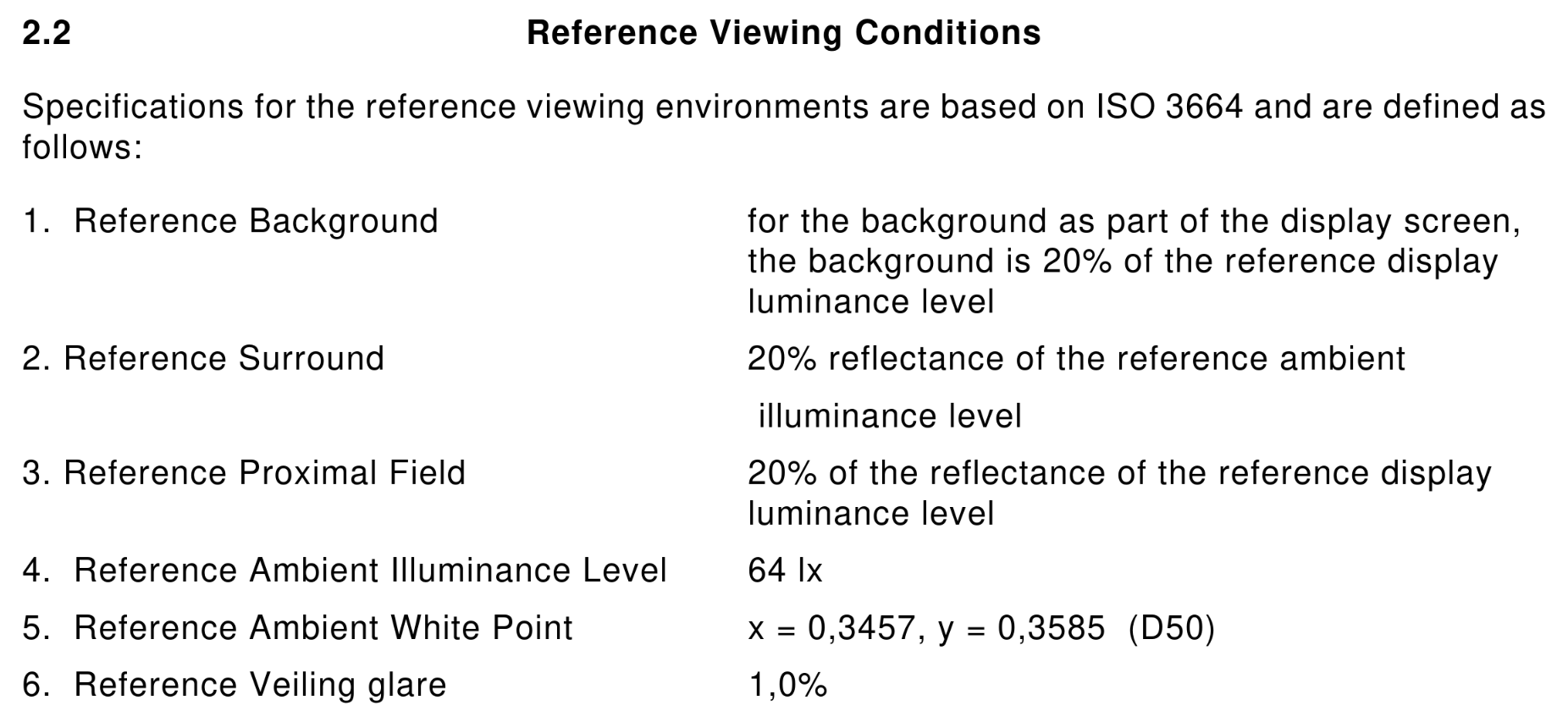
The (draft) specification defines two things that are important when it comes to brightness:
- a set of reference display conditions
- a set of reference viewing conditions (I’ll call that “viewing environment” from here on)
The reference display conditions are seemingly quite straight forward. The display luminance is 80cd/m², we have a whitepoint of D65, and a transfer function. Transfer functions describe how to calculate the output luminance from the encoded values of an image, and with sRGB that’s
Y = X ^ 2.2
where Y is the relative luminance on the display, and X is the relative luminance on the input.
The viewing environment has a few more parameters, but it’s conceptually not difficult to understand: It describes how bright your environment is, what color temperature the lights in your room have, and how much your display reflects the environment at you.
How to create sRGB content “correctly”?
The assumption that many people take from the specification is that you should calibrate your display to 80cd/m². On its own, that information is completely wrong!
It’s obvious when you think about how end users actually view content: They set the brightness level of the display to what they’re comfortable with in the current environment. You make the display really bright when you’re outside, less bright when in a normally lit room, and even darker than that when the lights are off.
The part that’s missing with just calibrating the display to some luminance level is that you must take the viewing environment into account. Either you set up the sRGB reference viewing environment (with measurements!)… or you just don’t. When you create content, in most cases you should do exactly the same thing as the person that will consume the content does: Just set the brightness to what’s comfortable in the environment you’re in. It still helps to keep your viewing environment mostly fixed of course, lots of brightness changes mean you’re constantly readjusting and that’s not good.
There’s another big thing to take into account for sRGB, which is its confusing transfer function.
The sRGB transfer function
The sRGB specification doesn’t just define a transfer function for the display, but it also defines a second transfer function. This sRGB piece-wise transfer function is
if X < 0.04045: Y = X / 12.92
else: Y = ((X + 0.055) / 1.055)^2.4
and it’s slightly different from gamma 2.2 in that it has that linear bit for the very dark area.
The purpose of this transfer function is to optimize encoding of dark parts of the image - with 8 bits per color, gamma 2.2 becomes really small in the lowest few values. 1/255 for example results in roughly 0.0000051 with gamma 2.2, and 0.0003035 with the sRGB piece-wise transfer function.
This difference might sound insignificant, but it is noticeable. The most well known place of where the wrong transfer function is used is Microsoft Windows: When you enable HDR in Windows, it uses the piece-wise transfer function for sRGB content, instead of the gamma 2.2 transfer function that which your display uses in SDR mode. The result is that dark areas of SDR games and videos are brighter than they should be, and look “washed out”.
So when should you use the sRGB piece-wise transfer function? So far, I don’t know of any case where you should, outside of working around that Windows problem in your application… I’m also only concerned with displaying images though, and not editing or creating them, so take that with a grain of salt.
How brightness works with HDR
Most HDR content uses the SMPTE ST 2084 transfer function. The specification for this is freely available here.
SMPTE ST 2084 is a bit different from the sRGB spec, in that it only defines a transfer function but no complete colorspace or viewing environment. That transfer function is the Perceptual Quantizer (PQ): It tries to compress luminance levels in a way that matches how sensitive human eyes are in specific luminance ranges, and it’s defined in absolute luminance - a PQ value of 0.0 means <= 0.005cd/m², and 1.0 maps to 10000 cd/m².
The missing parts are defined by different specifications, rec.2100 and BT.2408. More specifically, rec.2100 uses the BT.2020 primaries with the PQ transfer function (or the HLG transfer function, but we’ll ignore that here) and a recommended viewing environment for such HDR content:
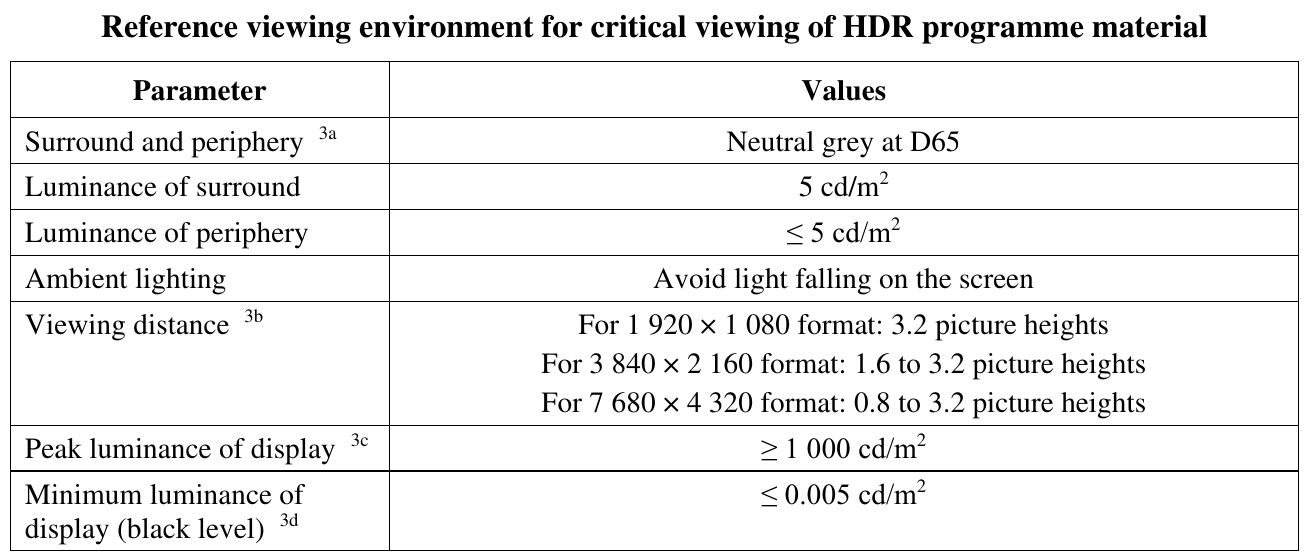
BT.2408 expands on that with an HDR reference white and graphics white, at 203cd/m². This is mostly meant for the context of broadcasts, referring with “graphics” to logos or subtitles in the video stream.
Despite the transfer function being “absolute”, just like with sRGB, the luminance numbers don’t mean anything in isolation. When displaying HDR content, just like with SDR, we need to take the viewing environment into account, and adjust luminance levels accordingly.
How is this handled in Wayland?
Every transfer function in the color management protocol has reference display conditions and a viewing environment attached to it, defined by a few parameters. Most relevant for this topic are
- a reference luminance, also known as HDR reference white, graphics white or SDR white
- minimum and maximum mastering luminances, basically how dark and bright the display the content was made for can go
When content is displayed on the screen, the compositor translates between the viewing environment of the content, and the viewing environment of the user. While we don’t usually have full knowledge of what exactly that viewing environment is like, the brightness slider in KDE Plasma provides a very good approximation by configuring the reference luminance to be used for content on the display. The calculation for this brightness adjustment is rather simple, in linear space you just do
output = input * output_reference / input_reference
You can configure the maximum reference luminance (brightness slider at 100%) with the “Maximum SDR Brightness” in the display settings of Plasma 6.3. The minimum and maximum luminance your display can achieve can only be configured with the kscreen-doctor command line tool right now, but an easy to use calibration utility for this is nearly finished (and the default values are usually fine too).
In general, this system is working really well… with one rather big exception.
HDR in Windows games
As mentioned before, Windows in HDR mode does sRGB wrong, but the story with HDR content is kind of worse.
When you use Windows 11 on a desktop monitor and enable HDR, you get an “SDR content brightness” slider in the settings - treating HDR content as something completely separate that’s somehow independent of the viewing environment, and that you cannot adjust the brightness of. With laptop displays however, you get a normal brightness slider, which applies to both SDR and HDR content.
The vast majority of Windows games expect the desktop monitor case: Static, never changing luminance levels, which are displayed on the screen without any adjustments whatsoever. Windows also didn’t have a built-in HDR calibration tool until Windows 11, so nearly every Windows game ships with its own HDR calibration settings and completely ignores system settings. This doesn’t just cause issues for Windows 11 laptops of course, but also for playing these same games with HDR on Linux.
Until Plasma 6.2, we worked around that, also mostly not doing brightness adjustments, and the result was that those HDR calibration settings in games worked basically like on Windows. However, these workarounds broke Linux native applications that want to mix HDR and SDR in their own windows, made tone mapping worse, and blocked features like HDR on “SDR” laptop displays, so in Plasma 6.3 we had to drop them.
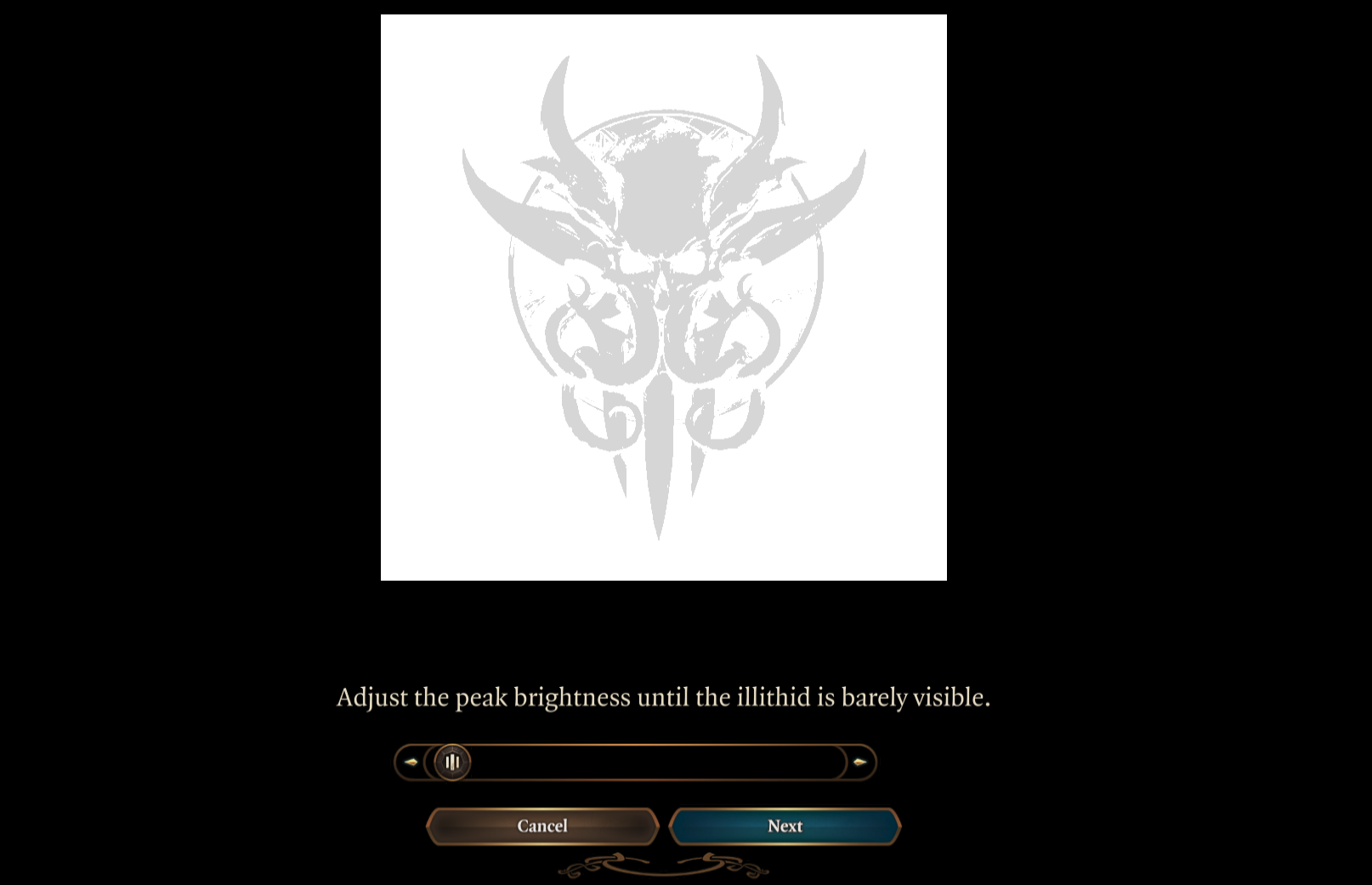
This doesn’t mean you can’t play Windows games with HDR in 6.3 anymore, you just have to adjust their configuration to match the changed brightness levels. In most cases, this means you set the HDR paper white in games to 203cd/m², and then set the maximum luminance with the game’s configuration screen, like this one from Baldur’s Gate 3:
How to implement good HDR
After ranting about how Windows games do it wrong, I should end this blog post by also explaining how to do it right. I will skip most of the implementation details, but on a high level if you’re implementing HDR in a Wayland native application or toolkit, you should
- use the Wayland color management protocol
- get the capabilities of the compositor and/or graphics driver, specifically the transfer functions they support
- get the preferred image description from the compositor, and the luminances you’re supposed to target from that. When using these luminance values, keep in mind that reference luminance adjustment the compositor will do!
- every time the preferred image description changes, get the new one and adjust your application to it
- now render for these parameters, and set the image description you actually ended up targeting on the surface, either through Vulkan or with the Wayland protocol (not both at the same time!)
- SDR things, like user interfaces in games, should use the reference luminance too
- if your application has some need to differentiate between “SDR” and “HDR” displays (to change the buffer format for example), you can do so by checking if the maximum mastering luminance is greater than the reference luminance
- now you can, and really should drop all HDR settings from your application. If HDR has a performance penalty in your application, a toggle to limit the app to SDR could still be useful, but everything else should be completely automatic and the user should not be bothered with calibration screens or similar annoyances
Saturday, 29 March 2025

Kaidan 0.12.2 fixes some bugs. Have a look at the changelog for more details.
Changelog
Bugfixes:
- Fix removing corrected message (melvo)
- Fix showing message bubble tail only for first message of sender (melvo)
Download
Or install Kaidan for your distribution:

Friday, 28 March 2025
Kaidan 0.12.1 fixes some bugs. Have a look at the changelog for more details.
Changelog
Bugfixes:
- Do not highlight unpinned chats when pinned chat is moved (melvo)
- Fix deleting/sending voice messages (melvo)
- Fix crash during login (melvo)
- Fix opening chat again after going back to chat list on narrow window (melvo)
- Increase tool bar height to fix avatar not being recognizable (melvo)
- Fix width of search bar above chat list to take available space while showing all buttons (melvo)
- Fix storing changed password (melvo)
- Fix setting custom host/port for account registration (melvo)
- Fix crash on chat removal (fazevedo)
- Move device switching options into account details to fix long credentials not being shown and login QR code being temporarily visible on opening dialog (melvo)
- Allow setting new password on error to fix not being able to log in after changing password via other device (melvo)
Download
Or install Kaidan for your distribution: