Este é um agregador de fontes que recolhe o que os colaboradores da comunidade do KDE estão a escrever nos seus 'blogs' respectivos, em diferentes línguas
Hoje o KDE lança uma actualização com correcções de erros para o Plasma do KDE 6, com a versão 6.7.2.
O Plasma 6.7 foi lançado a Junho de 2026 com diversas correcções de funcionalidades e novos módulos para ampliar a experiência do ambiente de trabalho.
This release adds a week’s worth of new translations and fixes from KDE’s contributors. As correcções de erros são tipicamente pequenas mas são importantes e incluem:
Hoje o KDE lança uma actualização com correcções de erros para o Plasma do KDE 6, com a versão 6.7.1.
O Plasma 6.7 foi lançado a Junho de 2026 com diversas correcções de funcionalidades e novos módulos para ampliar a experiência do ambiente de trabalho.
This release adds a week’s worth of new translations and fixes from KDE’s contributors. As correcções de erros são tipicamente pequenas mas são importantes e incluem:
Plasma 6.7 brings powerful new features to KDE’s classic desktop, and refines its user experience to new levels.
Enjoy thoughtfully-designed improvements that solve real problems, a sneak peek of future theming bliss, better performance, and more.
Read on to learn all about it!
A script element has been removed to ensure Planet works properly. Please find it in the original post.
Destaques
Per-screen virtual desktops
After 21 years, hopefully it will have been worth the wait… per-screen virtual desktops have finally arrived!
Test your microphone volume
No more being told your audio is too loud or quiet, or wondering if it’s your microphone or an app that’s misbehaving.
Press-and-hold for special characters
With Plasma’s virtual keyboard enabled, press and hold a key to type special characters related to it.
Elementos
Light/dark mode toggle
In Plasma 6.6, we introduced the ability to create your own Global Themes, and switch between them as part of the day-night cycle. Plasma 6.7 puts you even more in control with a quick toggle to switch between light and dark Global Themes immediately.
Vietnamese lunar calendar
Plasma 6.7 adds the Vietnamese lunar calendar to its available set of non-Gregorian calendars. Now you can keep up with dates and events using both calendar systems with more ease than ever!
“Background Apps” in the System Tray
The System Tray is already the place for monitoring apps running in the background using traditional methods. Plasma 6.7 extends this support by also showing apps using the newer “Background Apps” system, which is more common for apps using the Flatpak package format.
Printing
Plasma’s printing support continues to mature. Now the System Tray icon for printers shows the number of active jobs in a little badge.
On the enterprise side, Plasma 6.7 makes it substantially easier to connect to shared printers on Windows networks, and a new print queue management tool offers more power than ever before to those administering multiple frequently-used printers — while remaining simple and comprehensible enough for home use, too.
Usability
Plasma 6.7 puts a particular focus on refining the desktop experience to make common tasks faster than ever. Here’s just a small assortment:
Faster virtual desktop switching in the Overview
When you press Meta + W to open the Overview screen, Plasma 6.7 lets you switch virtual desktops simply by scrolling or pressing the Page Up or Page Down keys.
Drag and drop to add and remove favorites
It’s now easier than ever to add or remove favorite apps in the Application Launcher, Application Menu, and Application Dashboard widgets: just drag and drop!
More intuitive software management
The Discover software center now features a more obvious “Install” button and redesigned app cards with more information, plus a more intuitive sorting order.
In addition, installed software is now grouped by type, making it easier than ever to find what you’re looking for.
Easier to compare different time zones
How much earlier is it in Denver if you’re in Berlin? No longer will a question like this require mental gymnastics; Plasma 6.7 makes it easy to see how many hours earlier or later it is in each time zone shown in the Digital Clock widget compared to your local time zone.
“Type-ahead” on the desktop
For power users, the desktop layout now supports switching to “type-ahead” mode for quickly selecting files when typing on the desktop. You can change this back to activating KRunner if you prefer by Right-clicking on desktop and selecting Desktop and Wallpaper > Icons > Typing on the desktop from the pop-up menu.
Theming and styling: Something old, something new
Oxygen
In preparation for KDE’s 30th anniversary later this year, we’ve brought the Oxygen theme — used by default in KDE 4 — back up to par with the current Breeze theme.
Air, the Plasma Style providing a light version of Oxygen, has also returned, and we’ve reworked our Global Themes to feature light, dark, and twilight versions. Both Air and Oxygen benefit from a multitude of fixes, improvements, and restorations, including support for adaptive opacity, different panel positions, and more.
The classic KDE 4 Air and Horos wallpapers also make a return.
Brisa
The default Breeze theme also continues to evolve, now featuring rounded list and grid view highlights for many applications, and visible click effects for menu items.
Plasma’s Notifications have been given a fancier animation: they now slide in from the nearest screen edge. This makes them more visually prominent and less likely to be missed, while at the same time avoiding being too attention-grabbing.
Union
Though Plasma’s theming capabilities are second to none, for years creating those themes has been a difficult and fragmented experience.
Plasma’s all-new Union theming system intends to streamline theming by making it possible to style Plasma, QtQuick apps, and QtWidgets apps all with a single set of easy-to-write CSS — the world’s most popular and documented open standard for this purpose.
Plasma 6.7 marks the inaugural release of Union, here with a tech preview of the QtQuick style.
Union is under heavy development, and hence off by default. To test it out, make sure the union package is installed (name may differ depending on your OS), and select “Union” in System Settings > Colors & Themes > Application Style.
Applications must be restarted in order to use Union, and are expected to look nearly identical to Breeze.
You can find out more about the current state and future plans for Union on its developer’s blog.
Colors, graphics, and performance
Plasma has always offered a superb graphical experience, and 6.7 piles on further improvements.
No longer do you have to choose between color management using an ICC profile or enjoying HDR content; now both are possible at the same time!
In addition, you can now control whether the colors on the screen turn redder at extremely low brightness levels on many AMD laptops.
Finally, the team put a great deal of work into optimization, resulting in better performance and lower power usage for CPU-rendered apps, many full-screen windows, and integrated Intel GPUs.
But that’s not all…
Plasma 6.7 has even more to offer, including:
The ability to duplicate network connections, so you can quickly create several with only small differences between them — which can be useful in an enterprise or school setting
An option to sync mouse and stylus pointers
An option to set and change preferred calendar app
An option to assign keyboard shortcuts for toggling the global “push-to-talk” microphone mute mode and clearing the notification history, making these actions faster to trigger
An easy way of selecting mixed skin tone emojis in Emoji Selector app
A System Monitor app that respects your preference regarding storage units (e.g. “GiB” vs “GB”)
A Global Menu widget that shows menus for apps on other screens by default
A “Recent Locations” item in the Application Menu widget
Customizable sorting and grouping in the Window List widget
Support for many more Wayland protocols and portals
Hoje o KDE lança uma actualização com correcções de erros para o Plasma do KDE 6, com a versão 6.6.5.
O Plasma 6.6 foi lançado a Fevereiro de 2026 com diversas correcções de funcionalidades e novos módulos para ampliar a experiência do ambiente de trabalho.
This release adds a month’s worth of new translations and fixes from KDE’s contributors. As correcções de erros são tipicamente pequenas mas são importantes e incluem:
It contains bug fixes and improvements on many activities.
It is fully translated in the following languages:
Árabe
Búlgaro
Bretão
Catalão
Catalão (Valenciano)
Grego
Espanhol
Basco
Francês
Hebraico
Croata
Italiano
Lituano
Letão
Malayalam
Holandês
Polaco
Português do Brasil
Russo
Esloveno
Albanês
Sueco
Turco
Ucraniano
It is also partially translated in the following languages:
Azerbaijano (87%)
Bielorrusso (83%)
Checo (98%)
Alemão (93%)
Inglês Britânico (96%)
Esperanto (96%)
Estoniano (86%)
Finlandês (92%)
Galego (97%)
Húngaro (97%)
Indonésio (98%)
Georgian (88%)
Kannada (85%)
Macedónio (81%)
Norueguês (Nynorsk) (89%)
Português (85%)
Romeno (97%)
Sanskrit (97%)
Eslovaco (78%)
Swahili (88%)
Tamil (84%)
Chinês Tradicional (85%)
You can find packages of this new version for GNU/Linux, Windows, Android, and Raspberry Pi on the download page. Also this update will soon be available in the Android Play store, the F-Droid repository and the Windows store.
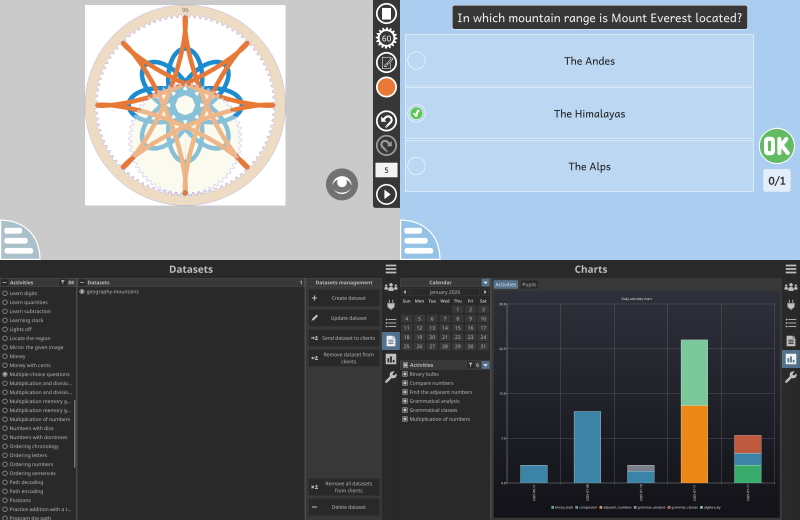
We are also releasing the first official version of our companion tool for teachers: GCompris-teachers! You can find more information about it on the schools page.
This new version contains 197 activities, including 2 new ones:
"Drawing wheels" is an activity for drawing using a gear rotating in a cogwheel.
"Multiple choice questions" is an MCQ activity. Note that this activity is hidden by default. It becomes visible after some datasets for it have been sent from GCompris-teachers.
It also contains bug fixes and improvements on multiple activities.
We ship translations for two more languages: Kannada and Tamil.
It is fully translated in the following languages:
Árabe
Búlgaro
Bretão
Catalão
Catalão (Valenciano)
Grego
Espanhol
Basco
Francês
Hebraico
Croata
Italiano
Lituano
Letão
Malayalam
Holandês
Polaco
Português do Brasil
Esloveno
Albanês
Sueco
Turco
Ucraniano
It is also partially translated in the following languages:
Azerbaijano (87%)
Bielorrusso (83%)
Checo (98%)
Alemão (92%)
Inglês Britânico (96%)
Esperanto (96%)
Estoniano (86%)
Finlandês (91%)
Galego (97%)
Húngaro (97%)
Indonésio (98%)
Georgian (88%)
Kannada (85%)
Macedónio (81%)
Norueguês (Nynorsk) (89%)
Português (85%)
Romeno (97%)
Russo (97%)
Sanskrit (97%)
Eslovaco (78%)
Swahili (88%)
Tamil (84%)
Chinês Tradicional (85%)
You can find packages of this new version for GNU/Linux, Windows, Android and Raspberry Pi on the download page. This update will also be available soon in the Android Play store, the F-Droid repository and the Windows store.
It contains bug fixes and graphics improvements on many activities.
It is fully translated in the following languages:
Árabe
Búlgaro
Bretão
Catalão
Catalão (Valenciano)
Grego
Espanhol
Basco
Francês
Galego
Croata
Húngaro
Indonésio
Italiano
Lituano
Letão
Malayalam
Holandês
Polaco
Português do Brasil
Romeno
Russo
Sanskrit
Esloveno
Albanês
Sueco
Turco
Ucraniano
It is also partially translated in the following languages:
Azerbaijano (90%)
Bielorrusso (86%)
Checo (98%)
Alemão (87%)
Inglês Britânico (99%)
Esperanto (99%)
Estoniano (88%)
Finlandês (93%)
Hebraico (97%)
Georgian (86%)
Macedónio (83%)
Norueguês (Nynorsk) (92%)
Português (87%)
Eslovaco (81%)
Swahili (91%)
Chinês Tradicional (87%)
You can find packages of this new version for GNU/Linux, Windows, Android, and Raspberry Pi on the download page. Also this update will soon be available in the Android Play store, the F-Droid repository and the Windows store.
We are also releasing GCompris version 4.3.1.
This is a maintenance version for 32bit systems which only contains a few backported bug fixes.
As you can see, we are now basing the major version number on the release year. This makes sense as we are doing one major version per year. It is also a good occasion to do it now to celebrate the 25 years of GCompris.
This version adds translation for one more language: Sanskrit.
This new version contains 195 activities, including 5 new ones:
"Sketch" is an activity for drawing freely with multiple tools to let children explore their creativity.
"Calculate with ten's complement" is the continuation of the existing ten's complement activities. This one helps the children to swap the numbers to easily compute a sum.
"Vertical addition" is an activity to write an addition and solve it.
"Vertical subtraction", is similar to the addition activity but for subtraction with the borrowing by regrouping method.
"Vertical subtraction (compensation)", is similar to the subtraction one with the borrowing by compensation method.
It contains bug fixes and graphics improvements on multiple activities.
With the help of teachers, we rewrote a big part of the activities description to be clearer.
When we switch language in the menu, the new language is now applied directly, without having to restart GCompris.
On the technical side, it is also the first release using Qt6.
We have also set the graphical renderer to direct3d11 by default on Windows.
It is fully translated in the following languages:
Árabe
Búlgaro
Bretão
Catalão
Catalão (Valenciano)
Grego
Espanhol
Basco
Francês
Galego
Croata
Húngaro
Italiano
Letão
Malayalam
Holandês
Polaco
Português do Brasil
Romeno
Sanskrit
Esloveno
Sueco
Turco
Ucraniano
It is also partially translated in the following languages:
Azerbaijano (90%)
Bielorrusso (86%)
Checo (98%)
Alemão (88%)
Inglês Britânico (99%)
Esperanto (99%)
Estoniano (88%)
Finlandês (91%)
Hebraico (96%)
Indonésio (93%)
Georgian (85%)
Lituano (92%)
Macedónio (83%)
Norueguês (Nynorsk) (94%)
Português (89%)
Russo (92%)
Eslovaco (82%)
Albanês (98%)
Swahili (92%)
Chinês Tradicional (88%)
You can find packages of this new version for GNU/Linux, Windows, Android and Raspberry Pi on the download page. This update will also be available soon in the Android Play store, the F-Droid repository and the Windows store.
It contains bug fixes and graphics improvements on multiple activities.
It is fully translated in the following languages:
Árabe
Búlgaro
Bretão
Catalão
Catalão (Valenciano)
Grego
Inglês Britânico
Esperanto
Espanhol
Basco
Francês
Galego
Croata
Húngaro
Indonésio
Italiano
Lituano
Letão
Malayalam
Holandês
Norueguês (Nynorsk)
Polaco
Português do Brasil
Romeno
Russo
Esloveno
Albanês
Sueco
Swahili
Turco
Ucraniano
It is also partially translated in the following languages:
Azerbaijano (97%)
Bielorrusso (87%)
Checo (97%)
Alemão (96%)
Estoniano (96%)
Finlandês (95%)
Hebraico (96%)
Macedónio (90%)
Português (96%)
Eslovaco (84%)
Chinês Tradicional (96%)
You can find packages of this new version for GNU/Linux, Windows, Android, Raspberry Pi and macOS on the download page. Also this update will soon be available in the Android Play store, the F-Droid repository and the Windows store.
It contains bug fixes and graphics improvements on multiple activities.
This version adds translation for Latvian.
It is fully translated in the following languages:
Árabe
Búlgaro
Bretão
Catalão
Catalão (Valenciano)
Grego
Inglês Britânico
Esperanto
Espanhol
Basco
Francês
Galego
Croata
Húngaro
Indonésio
Italiano
Lituano
Letão
Malayalam
Holandês
Norueguês (Nynorsk)
Polaco
Português do Brasil
Romeno
Russo
Esloveno
Albanês
Sueco
Swahili
Turco
Ucraniano
It is also partially translated in the following languages:
Azerbaijano (97%)
Bielorrusso (87%)
Checo (97%)
Alemão (96%)
Estoniano (96%)
Finlandês (95%)
Hebraico (96%)
Macedónio (90%)
Português (96%)
Eslovaco (84%)
Chinês Tradicional (96%)
You can find packages of this new version for GNU/Linux, Windows, Android, Raspberry Pi and macOS on the download page. This update will also be available soon in the Android Play store, the F-Droid repository and the Windows store.