Creating a wooden board with Perlin Noise in Mankala
During this Season of KDE, we made a lot of design changes to the Mankala Engine. We successfully redesigned most of the components including the entire home page, boards and game variants. Now I was in the middle of creating a new cover image to select game variants. I tried to create a natural wooden board for Bohnenspiel, and well, we got most of the things nicely done.
Designing a board
I had used perlin noise and a custom shader to give the wooden-like texture to the board. I used this function in our shader for the random generation of the particles.
glsl
float rand(vec2 n) {
    return fract(sin(dot(n, vec2(12.9898, 4.1414))) * 43758.5453);
}
To get a smooth, wooden-like surface, I used a function that interpolates between these random points. After experimenting with it a bit, I mixed and blended them with random values and was able to get a continuous noise surface.
glsl
float n = noise(v.yx * vec2(2.0, 12.0));
float rings = sin(v.x * 20.0 + n * 10.0);
Improvements in Wooden Texture
But to get the wood effect, this was still not enough, as if we were to render this directly, then we would have gotten a blurry, cloud-like texture. So, we stretched the noise heavily across one axis to give it a wave-like effect, having a more similar texture to a board. This made a color stretch of dark and light brown.
qml
ShaderEffect {
    anchors.fill: parent
    property real time: 0.0
    property variant color1: "#8B4513"
    property variant color2: "#D2691E"
Final look
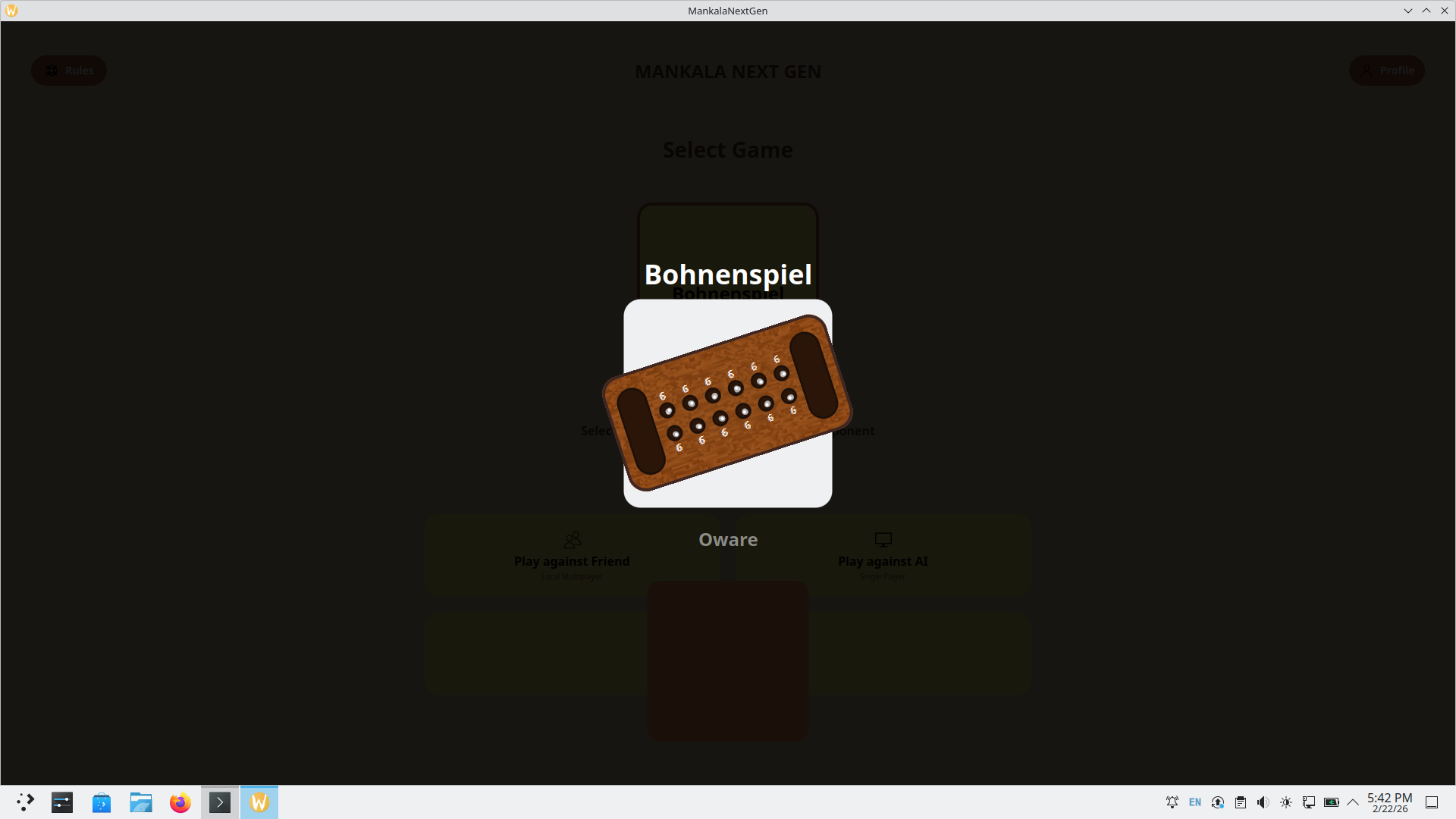
I used QML's ShaderEffect component to compile it and connect it to the MenuCard component in Mankala, which would act as a cover image while selecting Bohnenspiel. At last, I added some shadows and depth to make it more realistic, giving a feel of wood carving to the board.
Here is a sample qml wood generator to try:
You can run the below code in a qml project and see the noise generated in a few simple steps.
import QtQuick 2.15
import QtQuick.Window 2.15
Window {
    width: 640; height: 480; visible: true; title: "Procedural Wood Shader"
    ShaderEffect {
        anchors.fill: parent
        property variant color1: "#3b2310"
        property variant color2: "#7a4b24"

        fragmentShader: "
            varying highp vec2 qt_TexCoord0;
            uniform lowp vec4 color1;
            uniform lowp vec4 color2;

            float rand(vec2 n) {
                return fract(sin(dot(n, vec2(12.9898, 4.1414))) * 43758.5453);
            }
            float noise(vec2 n) {
                const vec2 d = vec2(0.0, 1.0);
                vec2 b = floor(n), f = smoothstep(vec2(0.0), vec2(1.0), fract(n));
                return mix(mix(rand(b), rand(b + d.yx), f.x), mix(rand(b + d.xy), rand(b + d.yy), f.x), f.y);
            }
            void main() {
                vec2 v = qt_TexCoord0;
                float n = noise(v.yx * vec2(2.0, 15.0));
                float rings = sin(v.x * 30.0 + n * 8.0);
                float woodGradiant = smoothstep(-0.8, 0.8, rings);
                gl_FragColor = mix(color1, color2, woodGradiant);
            }
        "
    }
}
While the small circular pits and the rectangulular spaces use the exact same logic but the rectangles look better due presence of a darker color and use of Drop Shadow which gives it a much more premium and wood like look.
References & useful resources
https://madaror.github.io/tiled-diffusion.github.io/ - Image tiling using diffusion
https://pbr-book.org/3ed-2018/Texture/Noise - Noise Generation
https://dev.to/hexshift/how-to-generate-realistic-random-terrain-in-python-using-perlin-noise-3ch5 - Generation of random terrain using Perlin noise
https://www.sci.utah.edu/~leenak/IndStudy_reportfall/Perlin%20Noise%20on%20GPU.html - Implementation of Perlin Noise on GPU
Thanks for reading :)