Translations in KDE are a lot easier than you think!!
In my 5th week of Season of KDE, I have translated the Mankala Engine into Tamil. Things are a lot easier with KDE’s very own translation software called Lokalize.
Installing Lokalize
Here is a guide to get you started with translation in KDE. I had installed KDE Lokalize in my Plasma desktop using:
$ sudo apt install localize
My project '''Mankala Engine''' already had translation files under the po folder; I had taken them as a reference for the strings that were to be translated. If the project being translated doesn’t have any prior translation, one can install the language template and start the translation from scratch.
svn co svn://anonsvn.kde.org/home/kde/branches/stable/l10n-kf5/{your-language}
svn co svn://anonsvn.kde.org/home/kde/branches/stable/l10n-kf5/templates
I copied the string from the previous translations of my project and changed the text to my intended language of Tamil. After this, we go to Lokalize and configure the settings.
- Enter your name and email.
- Find your language and also get their mailing list.
To setup your project, go to the project folder and select your po files and edit them in Lokalize.
Creating translation files
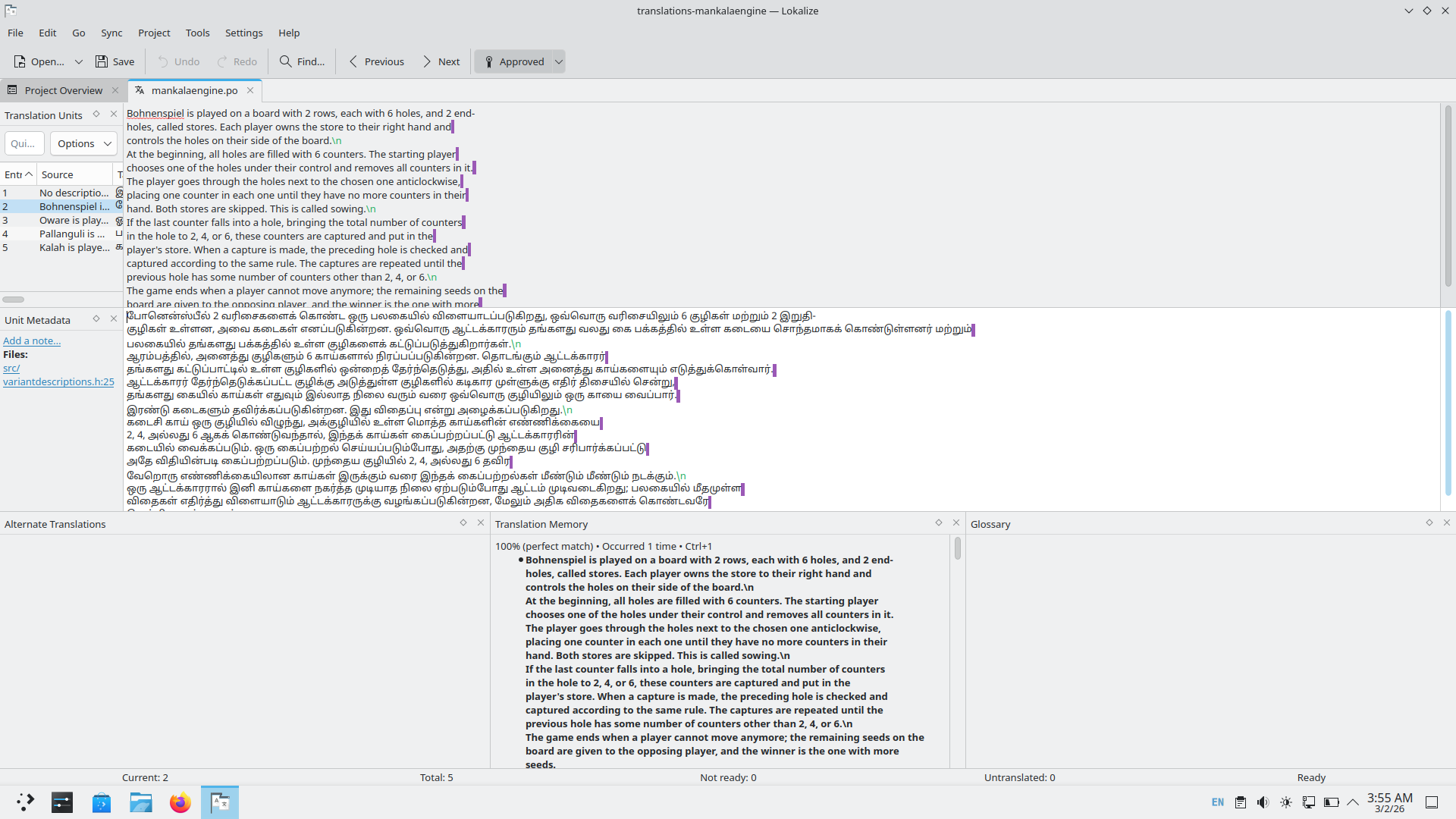
At the beginning of the files, we have some metadata giving the details about the files, their editor, the dates, and the version. After that, we have the lines for translation, followed by the English strings and then the translated language.
English
#: src/variantdescriptions.h:25
#, kde-format
msgid ""
"Bohnenspiel is played on a board with 2 rows, each with 6 holes, and 2 end-"
"holes, called stores. Each player owns the store to their right hand and "
"controls the holes on their side of the board.\n"
Tamil
msgstr ""
"போனென்ஸ்பீல், 2 வரிசைகளைக் கொண்ட பலகையில் விளையாடப்படுகிறது. ஒவ்வொரு வரிசையிலும் 6 குழிகள் "
"மற்றும் 2 இறுதிக்குழிகள் இருக்கும். ஒவ்வொரு ஆட்டக்காரரும் தமது வலதுபுறமுள்ள இறுதிக்குழியைச் சொந்தமாகக் "
"கொண்டுள்ளனர். பலகையில் தமது பக்கத்திலுள்ள குழிகளை அவர்கள் கட்டுப்படுத்துவார்கள்.\n"
After all the files are created, we should send them to the language moderators or else contact the mailing list of that language and ask for guidance on how these translations can be uploaded. To get involved and be updated with the team, one can join KDE Translation’s matrix channel:
#kde-i18n:kde.org
References & useful resources
- https://l10n.kde.org/docs/translation-howto/ - KDE Official Translation Guide
- https://raghukamath.com/how-to-translate-krita-to-your-own-language/ - How to translate Krita to your own language?
- https://kisaragi-hiu.com/2025-07-07-kde-translation-workflow-en/ - KDE translation workflow