Nezahrňovať/Zabrániť: compress touch events matched to shortcuts
Tretovanie 3+ prstových dotykov zrušenia ako koniec (Bug 510993)
Zabrániť blikaniu upozornenia na otáčanie okolo nuly
Povoliť combining zoom and rotation popup messages
Zakázať context menu on overview widget (Bug 514238)
Oprava/Zabezpečiť: touch scrolling not trigger menu (Bug 513413)
Opravy tlačidla a krivky Xiaomi stylusu (správanie pageup a pagedown)
Strmejšia krivka tabletu pre zariadenia Xiaomi
Nezahrňovať/Zabrániť: flicker window on Xiaomi devices
make xcodebuild an archival build to avoid unwanted debug entitlements.
Stiahnuť
Okná
Ak používate prenosné zip súbory, just open the zip file in Explorer and drag the folder somewhere convenient, then double-click on the Krita icon in the folder. This will not impact an installed version of Krita, though it will share your settings and custom resources with your regular installed version of Krita. For reporting crashes, also get the debug symbols folder.
Poznámka: starting with 5.2.11, the minimum supported version of Ubuntu is 22.04.
⚠️ Starting with 5.2.11 has updated the AppImage runtime, which is known to be incompatible with the old versions of AppImageLauncher. Developers of the AppImage runtime suggest to remove or update AppImageLauncher. See this report: <a href="https://github.com/AppImage/type2-runtime/issues/121">Issue 121</a> More AppImage troubleshooting info is available here: <a href="https://github.com/AppImage/AppImageKit/wiki/FUSE">FUSE</a>
Kritu na ChromeOS považujeme za pripravenú pre produkčné použitie. Krita na Androide je stále beta. Krita nie je dostupná pre telefóny Android, iba pre tablety, pretože používateľské rozhranie vyžaduje veľkú obrazovku.
Krita je zadarmo používateľná a upraviteľná, ale môže existovať len s príspevkami komunity. Malý sponzorovaný tím a veľa dobrovoľníkov pracuje na tomto softvéri.
Ak má tento softvér pre vás hodnotu, zvážte darovanie do Fondu vývoja Krity. Alebo čas, schopnosti alebo znalosti.
Nočné buildy
Tieto predbežné verzie Krity sú zostavované každý deň.
Vitajte v správe o vývoji a komunite za November 2025.
Správa o vývoji
5.2.14 vydaná
Posledné opravné vydanie v rade 5.2, 5.2.14 je vonku. Táto verzia opäť obsahuje veľa opráv pre Android a dotykový vstup, ale to nie je všetko! Náhľad Vzorko vača farieb má nový okrúhlý predvolený vzhľad a používatelia macOS môžu teraz opäť zobrazovať miniatúry .kra v Finderi.
Priebeh prepracovania textu
Vývoj 5.3.0 je teraz v zamraze ní funkcií, čo znamená, že žiaden nové funkcie nebudú pridané pred vydaním. To sa týka aj Nástroja textu, čo označuje koniec dlhej fázy vývoja pre Wolthera, recenzenta kódu Dmitry a všetkých ostatných, ktorí prispeli.
Texty môžu byť teraz vytvorené tak, aby sa zmestili do tvaru alebo pozdĺž cesty, len kliknutím na vektor Nástrojom textu.
Animated image of creating text that fits itself within a speech balloon shape. cc-by D.Revoy
Vlastnosti textu boli rozdelené do kar iet Odsek a Znak, čo objasňuje, na akej úrovni vlastnosti účinkujú.
Carsten tiež zabezpečil, aby Nástroj textu správne fungoval s dotykový m vstupom.
Ale toto cestovanie sa neskončilo; ak používate predbežné buildy 5.3, nezabudnite hlásiť chýby a zanechať spätnú väzbu vo vlákne Nástroja textu!
Nový nástroj na úpravu komiksových panelov
V nástrojovom paneli je nový nástroj: Nástroj úpravy komiksových panelov. Agata ho navrhla na vytváranie prie chod ov medzi komiksovými panelmi rezáním medzier vo vektorových tvaroch.
Môže byť nastavený na rez anie rôznych šírok medzier podľa toho, či rez je horizontálny, vertikálny alebo diagonálny. Druhý režim v Možnostiach nástroja odstráni medzery pre jednoduché preupravenie.
Zrýchlenie transformácie Liquify
Režim Liquify Nástroja transformácie bol optimaliz ovaný Agatou. Je to zvlášť rýchle jší na veľkých plátnach, pretože teraz sa vyhýba vý počtom mimo postihnutej oblasti.
Pred:
Video of using Liquify to make adjustments on a 3520x1978px canvas on Krita 5.2.9. It's not very responsive. cc-by D.Revoy
Po:
Video of using Liquify to make adjustments on the same canvas on Krita 5.3.0-pre-alpha. It's smooth and easy to use. cc-by D.Revoy
Python aktualizovaný na 3.13
Nest abilné buildy Krity boli aktualizované z Python 3.10 na Python 3.13. To môže spôsobiť problémy s pluginmi a skriptami, takže používatelia Krita Next by mali hlásiť takéto problémy.
Vývojári Krity vydali výzvu pre banner a ikonové dielo na propagovanie nadchádzajúceho vydania 5.3. Toto dielo musí spĺňať určité veľkosti a byť vhodné licencované.
Pre tému tohto mesiaca víťaz @Elixiah vybral/a Chiaroscuro, the strong contrast of light and dark, with runner-up @edgarej adding the optional challenge of a Christmas/holiday theme. Check out the topic for more details, and make some art that stands out like holiday lights on a dark night!
Odporúčané dielo
Best of Krita-Artists - October/November 2025
Nominačné vlákno Best of Krita-Artists tohto mesiaca dostalo 17 nominácií of forum members' artwork. When the poll closed, these five wonderful works made their way onto the Krita-Artists featured artwork banner:
Krita is Free and Open Source Software developed by an international team of sponsored developers and volunteer contributors. That means anyone can help make Krita better!
Podporte Kritu finančne jednorázovým alebo mesačným pen ažným darom. Alebo darujte svôj čas a Zapojte sa do testovania, vývoja, prekladu, dokumentácie a ďalšieho. V neposlednom rade môžete šíriť slovo a zdieľať vaše diela!
Pozoruhodné zmeny
Other notable changes in Krita's development builds from November 11, 2025 - December 14, 2025.
Stabilná vetva (5.2.14):
Plátno Input: Add a One Finger Hold gesture and set it by default to Sample Foreground Color From Merged Image. (Change, by Carsten Hartenfels)
Vzorkovač farieb: The Color Sampler preview now defaults to a circle to be more visible when using touch input. The size of the circle can be adjusted under Settings->General->Cursor, or changed back to rectangles. (bug report) (Change, by Carsten Hartenfels)
Docker vrstiev: Dragging-and-dropping a layer onto its own canvas now pastes a copy only if Ctrl is held, to prevent duplicating it by accident. Dropping a layer onto a different canvas still copy-pastes it as before, without holding Ctrl. (bug reportChange, by Carsten Hartenfels)
Filtrovacé vrstvy: Fix empty histogram when adding a new Levels, Threshold, Color Adjustment, or Cross-channel Filter Layer. (bug report) (Change, by Stuffins)
Skriptovanie: Fix Node.setChildNodes function to remove existing child nodes. (Change, by Stuffins)
Android: Zníženie šance na uloženie poškodených súborov použitím dočasného súboru.
Android: Oprava modifier keys getting stuck when inputting new custom shortcuts with a hardware keyboard. (bug reportChange, by Carsten Hartenfels)
macOS: Pridať podporu miniatúr QuickLook a Preview pre .kra, .krz a .ora files on macOS Sequoia and later. (bug report (Change, by Ivan Yossi)
macOS: Aktualizácia ikony aplikácie na podporu nastavení vzhľ adu macOS Tahoe.
Nestabilná vetva (5.3.0-prealpha):
Export: Nezobrazovať chybu pri rušení exportu.
Nočné buildy
Predbežné verzie Krity sú zostavované každý deň na testovanie nových zmien.
Dnes vydávame Krita 5.2.14. This is going to be the last bug fix release for 5.2. This release in particular contains many bug and usability fixes for Android.
Dotknúť sa a podržať Color Picker
Výb er farby bol vylepšený, aby vyzeral, pôsobil a fungoval lepšie. Najdôležitejšia zmena je pre dotykové obrazovky: môžete teraz stlačiť obrazovku jedným prstom a podržať ho na tom istom mieste na vzorkovanie farby.
Nový náhľad výberu farieb
Okrem toho bol náhľad zmen ený z obdľžníkov vedla seba na kruh okolo kurzora. To dáva lepšiu viditeľnosť farieb, ktoré vyb erate.
Zoznam zmien:
Okrem toho máme tonú menších opráv používateľského rozhrania pre dotyk, novú ikonu na MacOS a oveľa viac.
Osobitná vd'aka Freya Lupen, Stuffins, Joshua Goins okrem sponzorovaných vývojárov.
Oprava: brush preview outlines being aligned based on incorrect bounding box. (Bug 477164)
Nezahrňovať/Zabrániť: require restart for touch painting change and Automatically detect touch painting
[Android] Oprava main window not showing document (Bug 488606)
Oprava: off-by-1 in BrushHud Deform Modes combobox (Bug 509741)
Ak používate prenosné zip súbory, just open the zip file in Explorer and drag the folder somewhere convenient, then double-click on the Krita icon in the folder. This will not impact an installed version of Krita, though it will share your settings and custom resources with your regular installed version of Krita. For reporting crashes, also get the debug symbols folder.
Poznámka: starting with 5.2.11, the minimum supported version of Ubuntu is 22.04.
⚠️ Starting with 5.2.11 has updated the AppImage runtime, which is known to be incompatible with the old versions of AppImageLauncher. Developers of the AppImage runtime suggest to remove or update AppImageLauncher. See this report: <a href="https://github.com/AppImage/type2-runtime/issues/121">Issue 121</a> More AppImage troubleshooting info is available here: <a href="https://github.com/AppImage/AppImageKit/wiki/FUSE">FUSE</a>
Kritu na ChromeOS považujeme za pripravenú pre produkčné použitie. Krita na Androide je stále beta. Krita nie je dostupná pre telefóny Android, iba pre tablety, pretože používateľské rozhranie vyžaduje veľkú obrazovku.
Vitajte v správe o vývoji a komunite za October 2025.
Správa o vývoji
Priebeh prepracovania textu
Možnosti nástroja Nástroja textu boli prepracované. Teraz je tlačidlo pre prístup k dockeru Vlastnosti textu, spolu s možnosťou vytvoriť nové texty s aktuálnymi vlastnosťami alebo s predvoľbou štýlu.
ďalší prídavok je Režim nastaven ia typografie, ktorý zobrazuje rúčle transformácie pre veľkosť fontu a posunutie baseline.
V oblasti formátov súborov bola pridaná základná podpora pre textové vrstvy PSD, vektorové masky, vektorové ťahy, vektorové parametrické tvary a vodičle.
Carsten pokračoval v opravovaní problémov s dotykový m vstupom v stabilnej vetve.
Spracovanie dlhého stlačenia bolo ďalej vylepšené. Dlhé stlačenie slider-spinboxu už nezobrazuje rukoväte výberu textu, keď nie je v režime úpravy textu. Vzdialenost dlhého stlačenia je teraz správne vypočîtaná.
Kinetické posúv anie ľavý m kliknutím bolo zakázané na časovej osi animácie, aby neinter ferovalo s presúvaním snímok a inými operáciami.
Widgety vyskakujúce pri kurzore, ako je Menu akcií výberu, sa teraz objavujú na mieste dotyku namiesto miesta kurzora.
Nástroj Uprav tvary teraz správne funguje s dotykom namiesto toho, aby len vytváral výbe ry.
Podpora Wayland
Základná podpora HDR pre plátno na Waylande bola implementovaná Dmitrym. Pokyny na testovanie a diskusia o problémoch sú v vlákne fóra.
Plány pre nadchádzajúce vydanie 5.3.0
Krita 5.3.0 je naplánovaná na zamrazenie funkcií 21. novembra. To znamená, že žiadne nové funkcie nebudú prijaté pre ďalšiu verziu a zameranie vývojárov sa presunie na dokončenie funkcií už v priebeh u a opravovanie chýbb.
Po opravnom období niek oľkých mesiacov je prvé testovacé vydanie beta momentálne naplánované na február.
Nominačné vlákno Best of Krita-Artists tohto mesiaca dostalo 21 nominácií of forum members' artwork. When the poll closed, these five wonderful works made their way onto the Krita-Artists featured artwork banner:
Take a look at the nominations for next month, and suggest your favorite latest artworks to be featured. Don't forget to vote when the poll opens on November 11th!
Ako pomôcť Krite
Krita is Free and Open Source Software developed by an international team of sponsored developers and volunteer contributors. That means anyone can help make Krita better!
Podporte Kritu finančne jednorázovým alebo mesačným pen ažným darom. Alebo darujte svôj čas a Zapojte sa do testovania, vývoja, prekladu, dokumentácie a ďalšieho. V neposlednom rade môžete šíriť slovo a zdieľať vaše diela!
Pozoruhodné zmeny
Other notable changes in Krita's development builds from October 20, 2025 - November 11, 2025.
Stabilná vetva (5.2.14-prealpha):
Android: Na staviť aplikáciu na celú obrazovku predvolene.
Vstupné skratky plátna: Add Toggle Eraser Preset to canvas input shortcuts. (Change, by Carsten Hartenfels)
Nestabilná vetva (5.3.0-prealpha):
Režimy miešania: Add Marker blending mode. When used on a brush in Build up painting mode, it increases the layer's opacity only when the stroke's opacity is greater while mixing the colors. It's similar to Alpha Darken, but adheres to alpha lock/inherit alpha and interpolates between colors cleanly. (Change, by Carsten Hartenfels)
Skratky/Panely nástrojov: Add actions for each Transform Tool mode. (Change, by Stuffins)
Panely nástrojov: Toolbar actions' icons can now be custom-picked in Configure Toolbars, useful for actions that do not have icons by default. (Change, by Pavel shlop)
macOS: Podpisovanie a notarizácia nočných buildov, allowing them to be run without workarounds. (Change, by Ivan Yossi)
Nočné buildy
Predbežné verzie Krity sú zostavované každý deň na testovanie nových zmien.
It contains bug fixes and graphics improvements on many activities.
It is fully translated in the following languages:
Arabsky
Bulharsky
Bretónsky
Katalánsky
Katalánsky (Valencia)
Grécky
Španielsky
Baskicky
Francúzsky
Haličsky
Chorvátsky
Maďarsky
Indonézsky
Taliansky
Litovsky
Lotyšsky
Malabarsky
Holandsky
Poľsky
Portugalsky (Brazília)
Rumunsky
Rusky
Sanskrit
Slovinsky
Albánsky
Švédsky
Turecky
Ukrajinsky
It is also partially translated in the following languages:
Azerbajdžansky (90%)
Bielorusky (86%)
Česky (98%)
Nemecky (87%)
Anglicky (Británia) (99%)
Esperanto (99%)
Estónsky (88%)
Fínsky (93%)
Hebrejsky (97%)
Gruzínsky (86%)
Macedónsky (83%)
Nórsky (92%)
Portugalsky (87%)
Slovensky (81%)
Svahilčina (91%)
Čínsky (Tradičná) (87%)
You can find packages of this new version for GNU/Linux, Windows, Android, and Raspberry Pi on the download page. Also this update will soon be available in the Android Play store, the F-Droid repository and the Windows store.
We are also releasing GCompris version 4.3.1.
This is a maintenance version for 32bit systems which only contains a few backported bug fixes.
As you can see, we are now basing the major version number on the release year. This makes sense as we are doing one major version per year. It is also a good occasion to do it now to celebrate the 25 years of GCompris.
This version adds translation for one more language: Sanskrit.
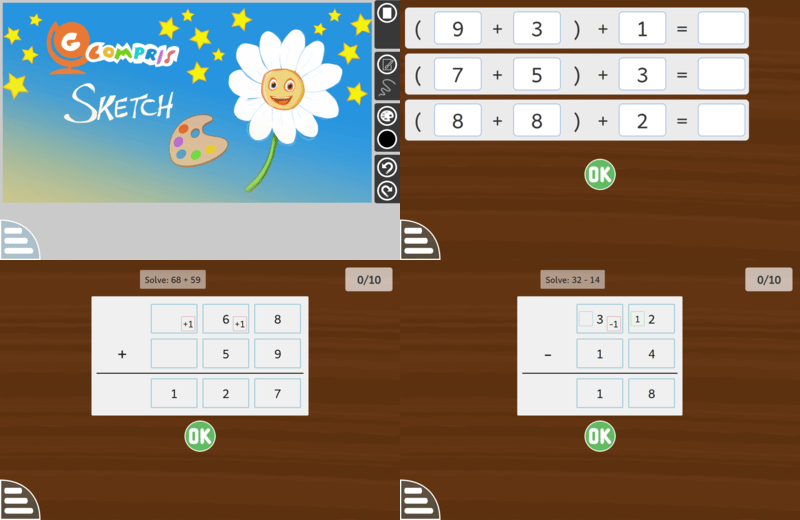
This new version contains 195 activities, including 5 new ones:
"Sketch" is an activity for drawing freely with multiple tools to let children explore their creativity.
"Calculate with ten's complement" is the continuation of the existing ten's complement activities. This one helps the children to swap the numbers to easily compute a sum.
"Vertical addition" is an activity to write an addition and solve it.
"Vertical subtraction", is similar to the addition activity but for subtraction with the borrowing by regrouping method.
"Vertical subtraction (compensation)", is similar to the subtraction one with the borrowing by compensation method.
It contains bug fixes and graphics improvements on multiple activities.
With the help of teachers, we rewrote a big part of the activities description to be clearer.
When we switch language in the menu, the new language is now applied directly, without having to restart GCompris.
On the technical side, it is also the first release using Qt6.
We have also set the graphical renderer to direct3d11 by default on Windows.
It is fully translated in the following languages:
Arabsky
Bulharsky
Bretónsky
Katalánsky
Katalánsky (Valencia)
Grécky
Španielsky
Baskicky
Francúzsky
Haličsky
Chorvátsky
Maďarsky
Taliansky
Lotyšsky
Malabarsky
Holandsky
Poľsky
Portugalsky (Brazília)
Rumunsky
Sanskrit
Slovinsky
Švédsky
Turecky
Ukrajinsky
It is also partially translated in the following languages:
Azerbajdžansky (90%)
Bielorusky (86%)
Česky (98%)
Nemecky (88%)
Anglicky (Británia) (99%)
Esperanto (99%)
Estónsky (88%)
Fínsky (91%)
Hebrejsky (96%)
Indonézsky (93%)
Gruzínsky (85%)
Litovsky (92%)
Macedónsky (83%)
Nórsky (94%)
Portugalsky (89%)
Rusky (92%)
Slovensky (82%)
Albánsky (98%)
Svahilčina (92%)
Čínsky (Tradičná) (88%)
You can find packages of this new version for GNU/Linux, Windows, Android and Raspberry Pi on the download page. This update will also be available soon in the Android Play store, the F-Droid repository and the Windows store.
It contains bug fixes and graphics improvements on multiple activities.
It is fully translated in the following languages:
Arabsky
Bulharsky
Bretónsky
Katalánsky
Katalánsky (Valencia)
Grécky
Anglicky (Británia)
Esperanto
Španielsky
Baskicky
Francúzsky
Haličsky
Chorvátsky
Maďarsky
Indonézsky
Taliansky
Litovsky
Lotyšsky
Malabarsky
Holandsky
Nórsky
Poľsky
Portugalsky (Brazília)
Rumunsky
Rusky
Slovinsky
Albánsky
Švédsky
Svahilčina
Turecky
Ukrajinsky
It is also partially translated in the following languages:
Azerbajdžansky (97%)
Bielorusky (87%)
Česky (97%)
Nemecky (96%)
Estónsky (96%)
Fínsky (95%)
Hebrejsky (96%)
Macedónsky (90%)
Portugalsky (96%)
Slovensky (84%)
Čínsky (Tradičná) (96%)
You can find packages of this new version for GNU/Linux, Windows, Android, Raspberry Pi and macOS on the download page. Also this update will soon be available in the Android Play store, the F-Droid repository and the Windows store.
It contains bug fixes and graphics improvements on multiple activities.
This version adds translation for Latvian.
It is fully translated in the following languages:
Arabsky
Bulharsky
Bretónsky
Katalánsky
Katalánsky (Valencia)
Grécky
Anglicky (Británia)
Esperanto
Španielsky
Baskicky
Francúzsky
Haličsky
Chorvátsky
Maďarsky
Indonézsky
Taliansky
Litovsky
Lotyšsky
Malabarsky
Holandsky
Nórsky
Poľsky
Portugalsky (Brazília)
Rumunsky
Rusky
Slovinsky
Albánsky
Švédsky
Svahilčina
Turecky
Ukrajinsky
It is also partially translated in the following languages:
Azerbajdžansky (97%)
Bielorusky (87%)
Česky (97%)
Nemecky (96%)
Estónsky (96%)
Fínsky (95%)
Hebrejsky (96%)
Macedónsky (90%)
Portugalsky (96%)
Slovensky (84%)
Čínsky (Tradičná) (96%)
You can find packages of this new version for GNU/Linux, Windows, Android, Raspberry Pi and macOS on the download page. This update will also be available soon in the Android Play store, the F-Droid repository and the Windows store.