Week 6: Building a Bookmark Manager for Lokalize
While wiring up the missing editor actions over the last two weeks, I left bookmark_edit for later. Just adding a simple menu trigger wasn't going to be enough.
The existing bookmark system in Lokalize was pretty limited, you could toggle them on or off, and jump between them. That’s fine for quick marks, but in a massive .po file with dozens of flagged lines, there was no way to actually see a list of what you had bookmarked to review or clean them up.
My goal for Week 6 was to build a dedicated ui where translators could manage all their bookmarks at a glance.
I looked at how other KDE apps handle this. KWrite, for example, just lists bookmarks in a right-click submenu. I decided against that for Lokalize. In a huge translation file, a dropdown menu would get ridiculously long. Plus, a submenu usually only gives you a "Clear All" option-if you wanted to remove just one specific bookmark, you'd have to jump to that exact line and manually untoggle it.
Instead, i took inspiration from Qt Assistant’s bookmark manager and built a standalone Qt dialog. It drops all the bookmarked entries into a list, complete with a quick text preview. I added a checkbox next to each one so translators can just uncheck the ones they want to remove and hit OK.
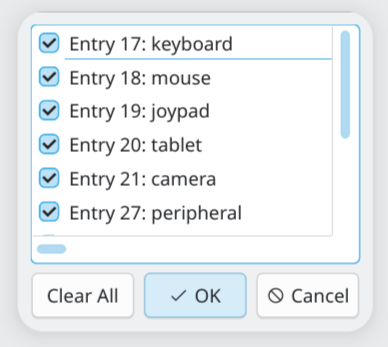
- Merge Request: editor: add edit bookmarks action and dialog
While testing this, I realized Lokalize completely forgets all bookmarks the second you close a file. Since other KDE apps persist bookmarks across sessions, I think i will fix this issue in the future so it persists them just like other KDE apps do.